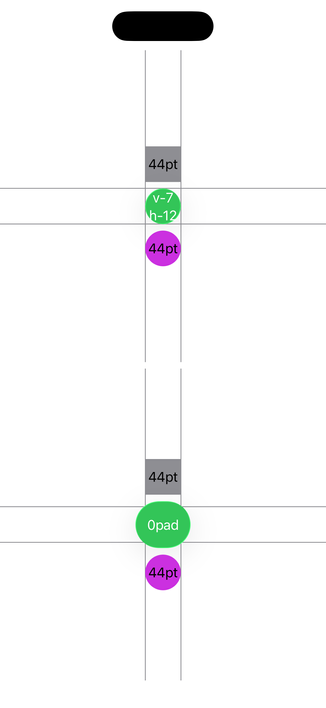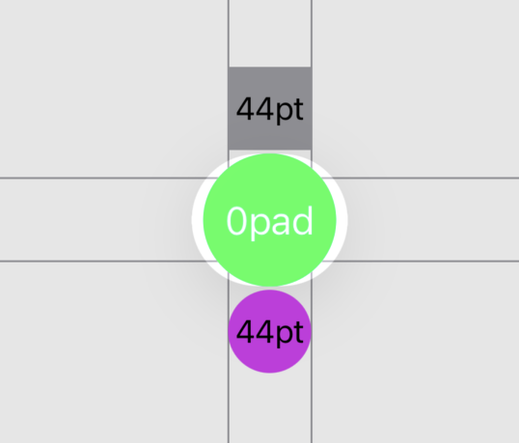
Liquid Glass doesn't seem to want circular buttons. The default `.glassProminent` button style adds an extra 5pt of horizontal padding compared to its vertical padding.

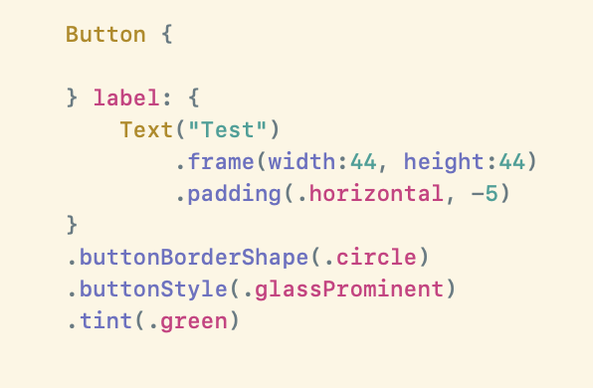
You can set the `buttonBorderShape` to be a `.circle` which will make it visually render as a circle, but when tapped get a oval shaped highlight.

Not really sure if this is a bug, working as designed or something in the middle. Best I've found for when I want a circular button is to apply `.padding(.horizontal, -5)`πŸ€·πŸ»β€β™‚οΈ

@_Davidsmith Not related but, What's your Xcode theme? It's beautiful.
GitHub - stackia/solarized-xcode: Solarized Light & Dark theme for Xcode.

Solarized Light & Dark theme for Xcode. Contribute to stackia/solarized-xcode development by creating an account on GitHub.

GitHub
@_Davidsmith same thing for a RoundedRectangle Button when using .glassEffect(.regular.interactice).
Since beta 1 it always shows a capsule instead of a RoundedRectangle.
@_Davidsmith It doesn’t help that neither the developer docs nor the HIG tells us anything useful about what ButtonBorderShape is meant to do.
@_Davidsmith I was told it was a bug and filed a FB.
@emcro Oh that very helpful to hear, thanks!
@_Davidsmith Seems to be fixed in beta 4, my roundedRectangles get now the correct shape when using .regular.interactive!
@jayfm It doesn't seem to be working for my .circle buttons yet πŸ€·πŸ»β€β™‚οΈ. But happy to hear things are improving.

@_Davidsmith you are right, .circle still makes it elliptical.
At least it is progress.

Blurring of the top navigationBar is still bad. Even in the fotos app.