 Heidi Li Feldman
Protesting at #NoKings tomorrow? Use this for your phone background.
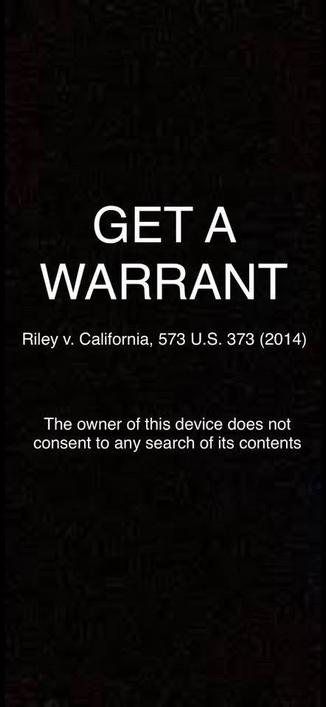
This works as well.
Hold the two buttons for 2 seconds.
@fogelnet @dashrb @heidilifeldman
What about still receiving SMS or notifications?
Aren’t notification services another way to track individuals that even phones touting privacy cannot prevent?
@Chancerubbage @dashrb @heidilifeldman
This isn’t about tracking as much as preventing someone from accessing your phone illegally.
If tracking is a concern leave your phone at home or get a burner.
@fogelnet @dashrb @heidilifeldman
It is just that I don’t realize how notifications are a chink in the privacy armor, just that it is.
And large groups could be tracked and digitally fingerprinted by those methods as well as any Bluetooth WiFi or privacy signal by someone determined enough.
But I understand the distinction of phones in physical reach as well.
@Chancerubbage @fogelnet @dashrb @heidilifeldman you can turn it off or use airplane mode if you’re concerned
Airplane mode is probably a good idea if you leave it on, so you don’t kill the battery. Being in a crowd, it has to fight with all the other phones to talk to the tower
@scm @Chancerubbage @fogelnet @heidilifeldman yes! There are many levels of security and they all have their own convenience trade offs.
Tech Note: airplane mode disables WiFi and cell traffic, but leaves your phone’s Bluetooth and NFC radios active. So you are still trackable, on a smaller scale (by line of sight / handheld trackers, as opposed to multi-mile-radius trackers.)
@heidilifeldman password even better or leave phone at home
Some OSes* have a duress password that can wipe your phone if you use it
 Swavy Silverhand✘
 -rb
-rb fogelnet
 Chancerubbage
 Dreaming of dad jazz.
 Steve
Steve Jernej Simončič �
 Orca 🌻 | 🎀 | 🪁 | 🏴🏳️⚧️
 i.grok
 tootbrute
 ILoveBlueSky