 mcc
mccSuper fucking frustrating thing in Android: In Do Not Disturb mode, there's a special setting for "receive calls from: - your contacts - anyone". However also it's possible to add "Phone" and "Phone Services" to allowed apps. This won't do anything unless you ALSO set the separate flag. I've been having problems for 2 years with important calls not going through in "Do Not Disturb" mode despite having "Phone" on allowed apps. Only found the REAL switch today.
The REALLY frustrating thing is that every time I tried to set this up, I asked my wife to call me to see if I got an audible notification. I did! I then assumed it was working and I didn't need to do anything else. No wrong my wife is a "contact" so it lets her through whereas my doctor, lawyer, etc would not be pre-existing contacts and those go to voice email.
Update: No!! No the above is wrong!!! Checking "your contacts - anyone" did nothing!! Nothing at all!! I got a critically important phone call from my doctor four minutes ago and the phone did not ring!! There is literally nothing I can do to make my phone ring when I get a phone call!! My smartphone can do anything at all EXCEPT receive phone calls!!!
Here is the tradeoff of modern life:
- USE IPHONE: The corporation "Apple Inc" will control your every thought and action, cradle to grave. But you will be able to get your phone to ring when you have a phone call
- USE ANDROID: Your phone will have a problem where it does not ring when you have a phone call, and you will spend years trying to fix this but you will never succeed
There is a third option, "use Android with a custom ROM". Now you can only buy phones from Google and literally nothing will work and you will not be able to run any apps except the ones on Android. But MAYBE your phone will ring when you have a phone call. MAYBE.
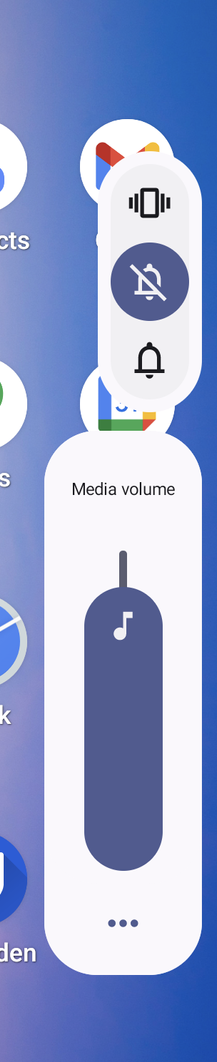
Oh for fuck's sake I think this is the problem. So there's four separate switches for whether phone calls make a sound, and you have to have all four in the correct place and never do anything like flip a switch to make Signal stop buzzing at 3 AM and then forgot you did it, and there's no way to just ask the OS "Hey. I have an important phone call coming today. Can you verify you'll make any sort of noise when it comes"? No, you need to know the four switches and check at least three every time
UPDATE: I am informed by multiple iPhone users that this post is too kind to Apple https://mastodon.social/@mcc/114383490713563106
 Jason Petersen (he)
 Karl Oscar Weber
 Dr. Blazing
@mcc I love esoteric computer systems I love it when the ancient tech god simply decides it shouldn't work right!!
 Kuba Orlik
@mcc what are the other two switches that you have to check?
@kuba I forget *bursts into tears*
@kuba So I think there are five switches, in Android
- Which of the three positions are the three cryptic icons above the volume fob set to?
- What is the ringer volume set to?
- Is Do not Disturb on?
- What is the "People" setting in Do Not Disturb set to?
- Are the "Phone" and "Phone Services" apps allowed in "Apps" under "Do Not Disturb"? (POSSIBLY DOES NOTHING)
 margot
@mcc the thing about moving fast and breaking things is that you don't go back and fix things or even make sure they don't already exist and you're just adding more complexity actually
 Erin
Erin@mcc these days, with a little showmanship and no conscience you could probably build a billion dollar company around 'never miss an important phone call ever again'
 M.S. Bellows, Jr.
@mcc Okay cool etc but what if I actually don't want my phone to ring, not ever, because phone calls are scary?