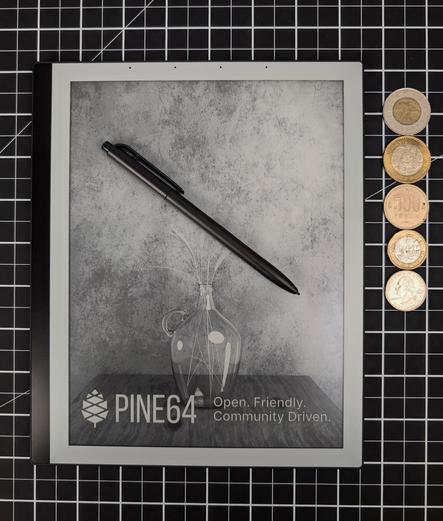
The PineNote is here! I'm planning on making a hands on video to share my experience. Let me know if you have any questions you want me to try and answer. I don't plan to do technical tests but open to collaborating on it.

First impression, feels like a quality and sturdy device. Feels good in the hand, the texture is a kinda soft grippy plastic. Pen felt good, the writing friction seems ok, I don't want to make any software qualifications until I update the device but still happy with the out-of-box experience. The wake from sleep time is essentially instant.

@PINE64 great work on the PineNote, I'm very impressed with the hardware!

Edit 2: there's renewed interest in this post, feel free to check out the first impressions video (~6 mins, which has a good bit of usage footage), in case that post isn't visible to you.

Edit: Link to blog post with thoughts after day one. Since I'm on a single user instance most people may not see the thread with info that hasn't been boosted, the post has all of it.

#Pine64 #PineNote #OpenHardware #OpenHardware #FOSS

Pine64 PineNote - first impressions

PeerTube

I have been really hoping the warm front light was decent. It is fantastic! That's about halfway up the brightness scale. The regular (white/blue) and warm front lights are separate sliders both in the quick access menu (white is totally off).

Garmin watch is still showing a bit more blue than white. I adjusted the color balance to correct for the camera and get it to a close as what I see in a pitch black room.

More updates later, send any questions you have. Quick (pine) note 🄁, the plastic back feels good but it's a fingerprint magnet but the folio cover is very nice.

#Pine64 #PineNote #OpenHardware #FOSS

PineNote Fedi Q&A

Thanks for the interest. There were some overlapping questions, I'm reviewing by category. I don't have answers for every question but I'll do my best and some of it will have to come later out of necessity. I'll be adding a link to a full blog post here soonā„¢: (PineNote - Day One).

Linux Experience

This is a first-class Linux device, full on Debian Trixie with a full Gnome desktop with Pine specific packages that are pinned so they're not overridden by generic packages. The on-screen keyboard has been the only source of frustration. The display runs at 200% and the keyboard isn't optimized for that.

Display Rendering Modes

There's a handy widget to change the current display rendering modes based on what you're doing.

  • Grayscale: 16 levels of gray for best quality, slowest refresh, good for graphics.
  • DU4: 4 levels of grey, great for reading (text is very crisp).
  • B&W + Dither: best for fast refresh needs, writing, terminal, etc. still easy to read but display will feel lower res.
    B&W and B&W invert: these exist but I haven't found them to be that useful for me yet.

Backlight

Wonderfully configurable from very dim to burn your retina. The white and the warm backlights can be controlled individually from the quick access, so you can create your own perfect color temperature. Genuinely delighted by this!

Applications

  • Terminal: Gnome Terminal, everything works great, touch typing hampered by on-screen keyboard but entirely good experience as a terminal with B&W + Dither mode.
  • Browser: Firefox, full install, works with plugins (only tried uBlock Origin).
  • Reader: KO Reader (more utilitarian) and Foliate (more UX polish) but both work great with epub and mobi, didn't try pdf much but it works. I will test annotation, marking, etc. later. It's a good eBook experience, I'm happy to say but as long you realize that it's not that small but definitely not heavy for its size and build quality.
  • Note-taking: Xournal++, works fine out of the box but can be improved with some community config. Haven't used the writing much, more on that in the future. Without config, totally usable but not a dream.
  • App Sources: Anything available in Debian Trixie and Flatpaks cab be enabled. I plan to test and use Flatpaks, will report back.
  • Sync: Syncthing built-in but I read people are also using NextCloud with it. Will test both in the future, might need a test NextCloud instance (if you want answers sooner).

Battery

Definitely not enough data to say. I've been poking and prodding the device most of the day and it has used about 30% of charge so that is very encouraging. Closing the folio case and opening it up again is almost instant response, which I love (was a big fear).
Speculation: The device must be doing some good battery management it seems since first launch of app after inactivity takes a bit to startup but is responsive after launch.

Peripherals

I have not connected Bluetooth devices yet, I plan to test it with Bluetooth mouse, keyboard, and headphones and report back in the utnext couple days.
Disclaimer based on very quick research: There's no USB-C dock functionality, the chip supports USB 3 PCIe,but the actual circuit out to USB-C connector is USB 2.0. There is no physical way for display mirroring (as in act as a external display) or multi-monitor support (as in extend/duplicate screen). But there are Gnome tools to achieve this, I'll play with them at some point.

Resources

Thanks for asking

@MrMozz, @chris, @tdback

@PINE64 I haven't tagged you on every single reply/post but I did want to make you aware in case I misrepresented anything, I'd be happy to correct any factual errors.

#Pine64 #PineNote #OpenHardware #FOSS

PineNote - Day One

I’ve been eye’ing the PineNote for years and recently decided to check up on it. The community has been hard at work it starting to look ready for prime now. I would LOVE an ebook reader and note taker but do not want to be tied into proprietary walled gardens (tempted most by the Remarkable 2 / Paper Pro). I didn’t find much review type information on the PineNote since it’s original developer edition release several years ago. So I decided to be the change I wanted to see and bought one. It’s Open-Hardware, Free Open Source Software (FOSS), and the main distro is purely community built, the purchase justifications just write themselves!

PineNote - Day One, my first 24 hours with the device and my thoughts so far (most of the posts above and a few others items).

Next week: note-taking and portable thin client workloads.

#Pine64 #PineNote

PineNote - Day One

I’ve been eye’ing the PineNote for years and recently decided to check up on it. The community has been hard at work it starting to look ready for prime now. I would LOVE an ebook reader and note taker but do not want to be tied into proprietary walled gardens (tempted most by the Remarkable 2 / Paper Pro). I didn’t find much review type information on the PineNote since it’s original developer edition release several years ago. So I decided to be the change I wanted to see and bought one. It’s Open-Hardware, Free Open Source Software (FOSS), and the main distro is purely community built, the purchase justifications just write themselves!

@shom this is super helpful, thanks! How good is the stand in the cover? I'm interested in this as a laptop replacement so the stand needs to be pretty sturdy to work on trains etc.
@jeromekelleher hey mate, sadly for me I don't have any train trips in the near future. But I think it's fairly stable. I took a quick video, hope this helps.
@shom thanks! I think I'll get one, could be a game changer for me.
@jeromekelleher yay! As long as you don't expect an perfect mass consumer device and are willing to smooth out your personal rough edges, it is a great device.
As someone who wants to use to type on an e-ink Linux tablet on a train, you'll be totally fine šŸ˜‚
Keep us posted!