 isabel
can you spot the UX issue here?
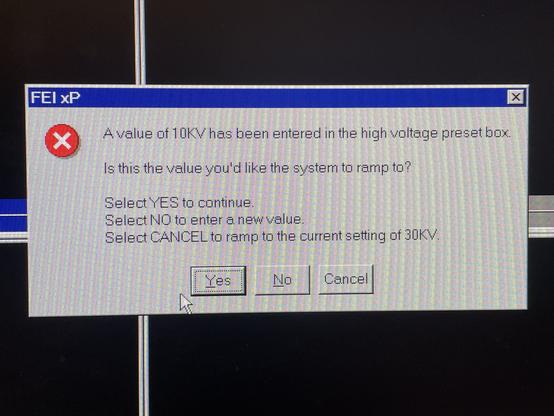

@isabel no keyboard option to select cancel unlike the Yes or No options?
Also, what does clicking the X do? Unknown behaviour... I do NOT want there to be a "YOLO" option on a system talking about kV.
@http_error_418 @isabel the keyboard option for Cancel is the Esc key.
But the absence of a keyboard option for Cancel would be a UX feature rather than an UI bug — if this dialog were in some parallel universe somehow required to have a Cancel option. Because it should absolutely not have a Cancel option, especially not the one here.
(This is IMHO the difference between UI and UX. Compare a large one-step "Launch atomic missiles" button. Great UI, works perfectly, horrible UX apocalypse!)
@isabel @http_error_418 the thing that really bothers me is that I can't tell if it's from a real system or from some UX teaching material made specifically to be bad…
Is this real? 😨
😱 😭 😱 😭 😱
@isabel This is because the Windows MessageBox() API only gives you a handful of different options for buttons [1] and they picked MB_YESNOCANCEL. It's the obvious lazy dev path forward.
The *correct* solution is to actually put the effort into designing a dedicated dialog with clearly labeled choices, but that's hundreds of lines of code not 1-2.
[1] https://learn.microsoft.com/en-us/windows/win32/api/winuser/nf-winuser-messagebox
@azonenberg @isabel Yes/No/Cancel shouldn’t even exist, since button labels should be *verbs*, so you have a chance to know what they do without reading the text, and so the text can be an explainer, not a bloody puzzle game.
Also button order and positions are wrong, since the default action should be in the right, Cancel directly to its left, and the dangerous action (“Don’t Save” or in this case “Fry Stuff With 30 kV”) on the left with plenty of space in between.
It's Windows
 Lady Doggo 🏳️⚧️
 Advanced Persistent Teapot
 equinox
 ≡_≡
≡_≡ EndlessMason
 Damien Ayers 🇦🇺 🧗
 George R. M. 🇩🇪🇺🇦
 Billy O'Neal
 Andrew Zonenberg
 Ölbaum
 mip
mip hazelnot
 hazel, that's me.
 seism0saurus