Is there any way to disable that PRIORITY dingus at the top of unread messages in Apple Mail on macOS?

It is never helpful and just gets in the way. I don't need animation in my INBOX.

I can't find any settings, so I'm assuming that Apple just knows what's best for me. And is wrong.

@chockenberry Should work:

https://www.iphonelife.com/content/remove-mailbox-priority-mail-app

Can’t verify due to not having the new mail app yet, though.

How to Get Rid of Mailbox Priority in Mail App on iPhone

iOS 18.2 introduced an Artificial Intelligence feature to the Mail app that is supposed to identify the most important emails and bring them to the top of your inbox. If you are worried about AI's ability to prioritize your emails or simply prefer your old inbox accurately, we'll teach you how to toggle off Show Priority.

www.iphonelife.com/
@j Thanks, but that “Show Priority" setting is nowhere to be found on macOS.
@chockenberry Oooh on macOS - sorry, I missed that part.
Turn off 'Priority' on Mac mail - Apple Community

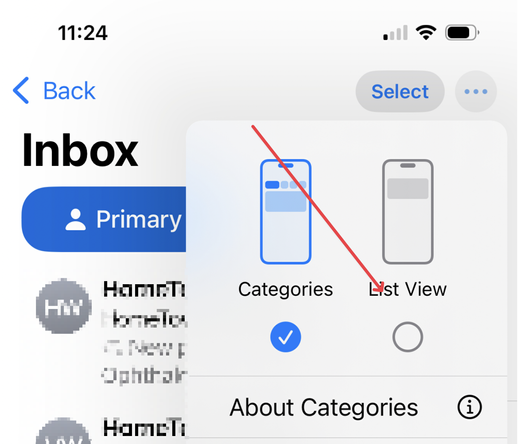
@chockenberry In the (…) next to “Select" in the nav bar, switch to "List View”
@agiletortoise Thanks, but that “Show Priority" setting is nowhere to be found on macOS.
@chockenberry Oh, gotcha. Misunderstood what you were asking. No help for you there.
@chockenberry Only way is the main Apple intelligence kill switch?
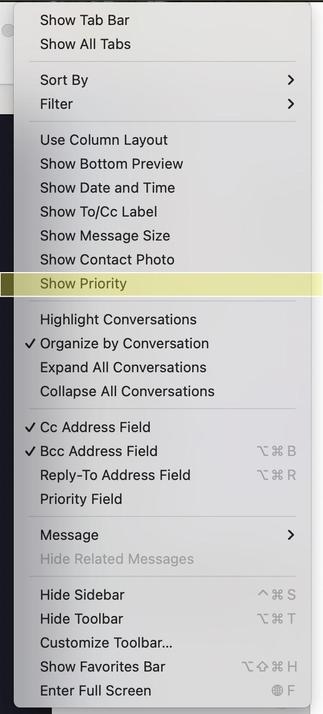
@chockenberry Isn't there a Show Priority menu item under the View menu in Mail on macOS? Can't you just un-select that?

@chockenberry Seems fine to me.

(This is spam)