blocking out the roof and back window
This is probably as far as I get tonight, unless I get an inexplicable second wind.
So far I think this technique is agreeable for me. I've been able to pick at it a bit on and off despite being sick and tired. This technique is a more fiddly than I want it to be, but that might in part be because I'm trying to make the model accurate to my references.
Unsurprisingly I have some ideas for how to improve this technique further.
I think what I actually want is to make the feature outlines with splines (eg, the windows, the different parts of the car body, the bumper, etc) and then use those to guide the placement of control points that can then be used to further adjust the shape of the local surface, as well as to paint materials. The spline outlines would then also serve as cropping features for the control points / surfels so materials can have hard edges etc.
As for what my game is to render exactly, I'm leaning towards representing stuff authored in Blender as cropped surfel clouds that can then be raytraced to produce more different surfels. Cropped surfels would be a set of pseudo discs that occasionally also have a cropping shape associated.
In that end, anything with a mesh representation can be efficiently prepared for my game via the distribute points of faces node.
The cropped surfels thing is nice because I wont have to commit to any particular artistic work flow in Blender, and should I need some kind of acceleration structure I think the surfels could be made hierarchical be generating sets of them at different frequencies and saving out which ones overlap with which.
I think the goal I should try to work on next is just putting together a simple scene like a road with a guard rail and some cones pretending to be trees and see if I can export that into something I can render, and then figure out whether or not rendering that can be made fast.
I just wanna get lost in the surfels, man 😌
I don't like how Blender does unit conversion.
If you set a unit system, and choose a non-meter base unit for distance, it converts everything to meters under the hood, with the unit scale being a scale factor on the conversion to meters.
Since the units presented in the UI are superficial, if you need to change the scale or the base unit everything in your scene changes along with it ;_;
Anyways I just realized that I was greatly mistaken as to how this all worked several hours ago when I tried to setup the base unit and scale to be able to represent a scene a mile in diameter and thought I got to pick the base unit 😩
I picked a mile diameter for the map cell arbitrarily, but this precision problem in Blender got me thinking about this more and...
huh, I guess the view distance to the horizon is about 3 miles if you're 6 feet tall, and is a few hundred meters less if you're 5 feet tall.
now I'm trying to decide if I want to vary the draw distance based on camera elevation or if I want to deform the relative world positions of things to simulate the curvature of the earth 🤔
again way over kill for a game about driving a shitty car in the rain but on the other hand when was the last time you played a game about driving a shitty car in the rain that even attempted to let you reach out and touch the infinite
I got a bit carried away reading about classical units and what ancient people found to be useful units of measurement, and anyways it turns out the distance you can walk in an hour is in the same ball park as the distance you can see up to the horizon (for some excessively uniform and able bodied definition of "you")
What an interesting coincidence that these just happen to work out to be relatively whole numbers in both time and space.
Wild speculation here, probably completely wrong, but it wouldn't surprise me if somewhere in the distant past folks used the time it took to walk as far as you can see as a colloquial time unit and that distance as a colloquial large distance unit and through an elaborate game of telephone that eventually became the hour and league of today's units we all love and know (except for all the people the French conquered)
A continuation of this idea that I want to explore later is applying the time spent walking to the horizon thing as a perceptual unit for distance in video games, because while realistic games often use real world units for modeling things these days, they only do so at a very immediate scale, and large spaces (for good reasons) are typically much smaller than they'd be irl, and so stuff like speed has to be fudged to make it all work.
It's a problem space I know well, but looking at it from another angle is interesting to me.
somethings that might be interesting to play with: the amount of time a player takes to walk an arbitrary distance in a straight line can be used to calculate a practical unit conversion for literal distances, and the amount of time it takes for the player to walk a route between to points on the map following a natural travel route can be used to determine how big the space actually feels
oh my god blender does not consistently apply the unit scale everywhere it does the internal conversion to meters >:O
well my precision problems seem to be primarily due to poor choices made in their choice of view matrix so that's easy enough to work around at least
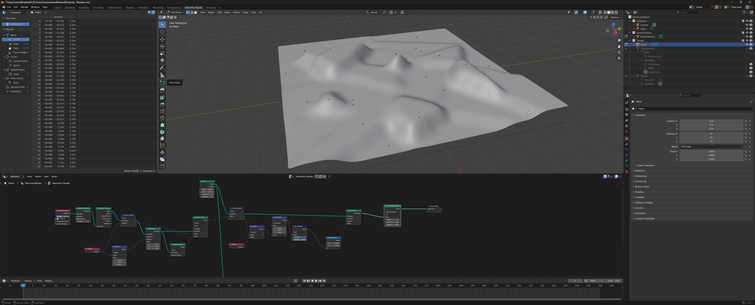
Anyways here's a mile diameter of terrain in Blender :P
Pretend this is a 2 lane rural highway that suspiciously lacks its shoulders, clear zones, and normal markings in an improbably arid mountainous region of Wisconsin and not a narrow path through cookies and cream land.
I think for map cells it'll work better if I try to keep the road connections at the crests of hills and going around bends and stuff like that, and the ideal size of a given cell is probably a function of how fast the player is expected to move through it, so when you're at the stage of the game where you're likely to travel in the 60 - 120 mph range a mile or three is probably a pretty reasonable cell diameter. the faster sections of the game will want larger map cells though
I had an idea for an interpolation strategy that doubles up as a noise function, and, well, here it is. I'm much happier with this version :3
I figure the exporter may as well build the acceleration structure for non-implicit models like landscape tiles for my game, so I'm experimenting with data structures for that now.
Here's a visualization of a hierarchical surfel graph for that landscape I posted a picture of the other day.
I'm experimenting with the graph construction parameters and visualization thereof and take my word for it that this image is actually very useful to me, but the main thing going on here is that it looks cool.
The visualizations are cool but this graph construction technique leaves something to be desired unfortunately.
My thinking was to poisson disc sample the terrain mesh at several intervals with the disc size decreasing each time. Each point becomes a surfel, and the nearest point in the previous generation is its parent.
The central light green patch shows that this technique can cause the coverage to meander quite a bit, and it gets worse the larger the root surfels are :(
the distribution looks fine if the root generation is dense enough though, so idk
It might be fine actually. In that particular case, the particularly prolific root surfel would have a bounding sphere about three times the diameter of the root surfel, but it only has 4 immediate branches which. So really it's a question of how tangled the branches are (and thus how fast it can prune them when processing ray queries), which is not something I can see easily from this visualization.
limiting the graph depth is also effective at preventing meandering
I think a better grouping strat will be having every surfel in the graph first label its ideal root, and then recursively pick the best ancestors that share a common root etc, but I don't feel like trying to implement that in geonodes tonight
This version of the surfel graph thingy looks like it might be more or less right.
ok that wasn't quite right but take my word for it this one is more along the lines of what I'm looking for
I learned how to use blender's greasy pencil tonight :D
Time to make like a tree and shed all my stop signs for the winter!
#greasepencil #geometrynodesI fixed the text on the signs, and tweaked a bunch of other things.
#GreasePencil #GeometryNodesIf you've been feeling down because you want to MAKE TERRAIN OUT OF SPLINES but you're not sure how and you really want to read a nice beginner friendly BLOG POST that walks through how to do that in #blender #geometrynodes with 23.4 MiB of FULL COLOR PICTURES and EXAMPLE SOURCE FILES well I have GREAT NEWS for you because I wrote one of those over the last three days and I'm really excited to share it!
Check it out: https://zone.dog/braindump/spline_fields/
@aeva this is great! In case you haven't seen it, reminds me a bit of the Kriging system we used on The Witness:
http://the-witness.net/news/2010/05/kriging-is-cool/ Kriging is cool. – The Witness
@ScatteredRay I think I have come across this. Someone pointed me to the wikipedia article about kriging in response to one of my prototypes, but it went over my head. tbh I'm not sure I really get how kriging works exactly.
@aeva I've tried implementing it in blender, and it's not great.... Additionally it's a global solution, so build times used to get slow to rebuild the whole thing. I think in a lot of ways what you've built is maybe more practical. I'd like to extend it beyond splines a bit maybe.
The true win for both of these is being able to move things around without resampling problems though!
@ScatteredRay the spline terrain technique generalizes pretty nicely to other control types, since all you really need is a bag of points with associated local surface normals. I think discs probably are the next most useful control type after splines but you could just as well use arbitrary triangle patches, or even mix and match. I've found this technique is a lot more useful if it's used to deform an existing mesh, otherwise you can end up in implicit surface meshing hell pretty fast.
@aeva Awesome! You inspired me to revisit an old blender terrain test I had a while ago
@ScatteredRay huh, neat. So this is essentially like the spline terrain technique but starting with points instead of having them as an intermediary, and the planar normal is implied to be (0, 0, 1)? It's interesting how you can see the voronoi cell boundaries in the elevation changes.
 aeva
aeva


 Indy Ray