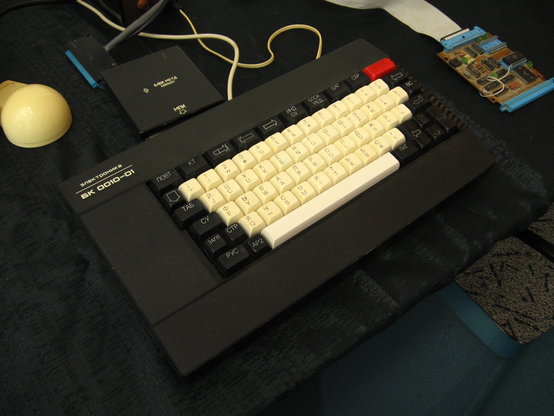

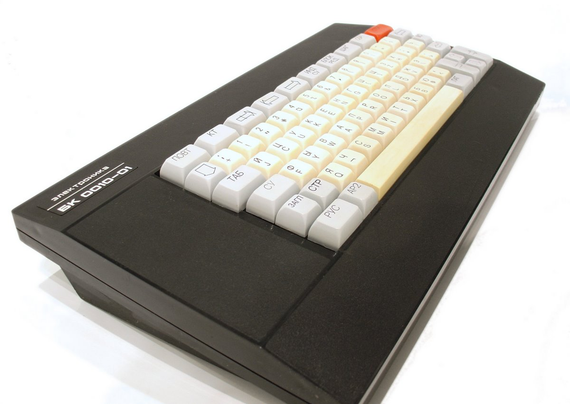
A while ago I posted a bit of info about a Russian desktop PDP-11-on-chip clone. Today I stumbled upon a couple of operating systems for a home computer BK-0010, and wanted to share a few screenshots from those. It's possible this is going to be quite unlike to what you've seen!

A few interesting things, before we begin:
* This computer series has a funny naming; for example, one of the models is called БК-0010.01Ш
* The keyboard layout is not QWERTY, and the default code page is not ASCII or PC-compatible CP866 but (almost) KOI-8
* The CPU is compatible with PDP-11, so the computer was used with RT-11 quite a bit. There is a modern UNIX V6 port for it, but, sadly, it was not a thing when the computer was still popular (only its older sibling DVK got a true UNIX back in the days)
* Designed in 1985, it was manufactured until 1993, and was still popular in the late 90s (but not as popular as ZX Spectrum)
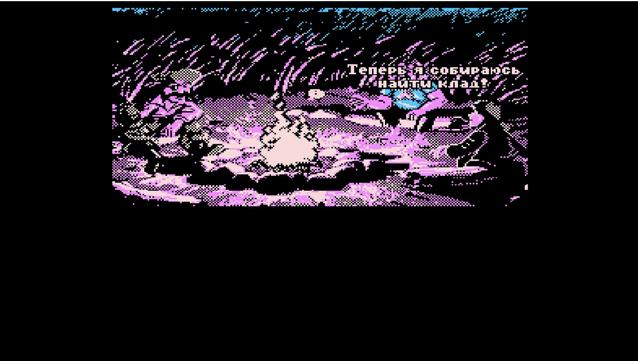
* It has an unauthorized port of Monkey Island 2 with music and an alternative ending from 1995!

🧵
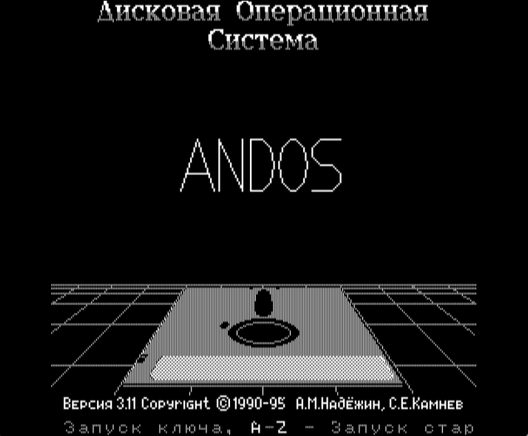
Our first stop is a popular-ish operating system for BK0010 called ANDOS. Like many other DOSes for this computer, it has a Norton Commander-style shell. Unlike other DOSes, it tries to be MS-DOS compatible rather than RT-11-compatible. It works with FAT12-floppies, and has a multitude of tools to work with IBM PC files, including TXT and PCX.

You'd be surprised to discover that you CAN'T just open a TXT file on this computer.

A curious detail about this OS and many programs for it is that they're very HACKER-like, demoscene-like, with in-group jokes, fancy animations, nice touches for fellow hackers. The OS'es boot screen has the text "ANDOS" flying around the screen in pseudo-3D, like this isn't a computer with 32KB RAM.

Another curious detail is that the video mode is "fake monochrome" - you'll see it in true colours later.

I tried to use the system and couldn't. The keyboard is obviously not PC-like, so I have no idea what "3" I need to press to call "3 View" and read the Readme files. Thankfully, there is a program called RUNME that explains that to read VXT files, I need to press "AP2" and "3" at the same time.

"Well, judging by the fact you're reading this text, this must be your first time using ANDOS, which is quite surprising."

I want to note that ANDOS was a commercial system, on sale for 50,000 RUB, or about $10 back in the days. It is freeware now. So it is not that unexpected to have a detailed manual coming with the system.

The system, and the computer itself, are unforgiving. If you press something wrong, it will try to execute something random, resulting in memory corruption. If you're lucky, the computer will not hang and instead will say "OWUBKA" - "ОШИБКА", "ERROR".

The OS manual goes as far as instructing how to wire a Reset button to the floppy disk drive, because the computer itself doesn't have a Reset button. "You will need it", they say.

And you will need it faster than you think. I started EDALT3, state-of-the-art text editor for the OS. First it greeted me with a feature list (6 cassette tape recording speeds! 72 characters per line!), and then it has shown me a prompt.

And it is not vim level of a prompt. You are allowed to press exactly two buttons, and then it will tell you "OWUBKA" again and again because it's mad at you. I had to reboot the computer because... I knew I had to read the manual for the editor first, but I felt lucky. C'mon, it's a program from 1995!

The reader app shipped with ANDOS is very sensible. The manual is sensible, too, explaining how the system is structured, and how to use it, as well as explaining what soft you can get for the OS (editors, compilers, games, etc).

The EDALT3 commands are "simple". SC means "screen editor", LO is "load" and "ST" is "Save text". Now I can type a text file!

Being a 16-bit computer with a 16-bit data bus, this machine can only address 64K of RAM. That means text editors try to compress the text on the fly. This is one of the reasons why text files aren't compatible with IBM PC. Another two reasons are KOI-8 instead of DOS CP866, and inability to handle large files (if it doesn't fit in free RAM, it doesn't work). Text editors for BK0010 are trying to work around those limitations somehow.

Well, EDALT3 is, thankfully, not the most advanced word processor for the system.

A nice touch of ANDOS is a system-wide "file open dialog". Not every graphical system had those, and for text-based UIs system-wide file pickers are rare.

Let's see what else do we have here...

Not surprisingly, many standard tools in the OS are aimed at file conversion or text editing/reading/printing.

Next programs on the floppy set I have are a bit boring. First a PAINT clone that doesn't seem to work without a mouse, and then an action game that includes killing soldiers - not a fan of those.

Far more interesting program for ANDOS running on this PDP-11 clone is TECHNO Art graphics system. It supports full-screen drawings and sprites, and, as far as I can tell, even has tools for importing PCXs.

The graphics editor is very advanced, very PaintDeluxe-like, and very, very responsive. I can see myself actually drawing in it, it's not a gimmick, it's a real tool. It comes with two sample images, and it has this demo-ey splash screen with flying birds and flying letters, very cool.

Let me show you how it would look like on a COLOUR CRT...

The computer actually has two TV outputs - colour and monochrome. You'd switch your TV between the two on the go because... well, I'll show you in a moment!

So, as you can guess, the "COLOUR" mode on BK0010 is absolutely unusable for high-resolution text. But it can give you some nice colours.

Or some not so nice colours. Anyhow, it seems this TECHNO Art graphics system can be actually very useful for colour images!

The black and white video mode is 512x256. The colour mode treats pair of bits in video RAM as 2bpp - black, red, green, blue. Other colours are generated by mixing the colours. There is no attribute clash, which is nice.

Another popular program for BK0010 was a word processor VorteX. The authors call it "Publishing system" and promise WYSIWYG capabilities. The interface has VERY nice system of menus, kind of like DOS Edit, but it can show page breaks, and supports some basic formatting and macro.
One of the most common type of programs for BK0010 is Tetris clones. This one is "colour columns". Too bad, I'm running it with a monochrome CRT emulation. :D

There were over 4000 programs for BK0010, and, understandably, many were games. There are multiple catalogues online, including https://hobot.pdp-11.ru/gamgal.html I'm using to share with you some of the cutest.

Klad-2 ("treasure") is a platformer not unlike Lode Runner.

Bolder Dash is a clone of a popular PC game Boulder Dash.

Desant aka Airborne Ranger has a stunning splash screen.

Planet Of Zoom is a vaporwave style flight simulator.

Of course, there are many other games, including Elite clone and abovementioned Monkey Island 2 port.

Oh, oh! Some games didn't just use 1-bit speaker, but supported Covox and AY!

Галерея игр для УК-НЦ, ДВК и БК.

Amstrad, CPC, Amiga, adventuron, DGMAG, DGMag, DownGrade журнал, DownGrade, Журнал, Parkan, Elite, XHomer, Пещера, LAND, WarCraft Adventure, Герои Меча и Магии, Герои, Heroes, HOMM, Сумрадель, Сталкер, Собчаг, Волочкова, Шпагат, Stalk, AlienRS, DiabloRL, DoomRL, Игры БК, Игры БК0010, Игры УК-НЦ, Игры УКНЦ, Игры ДВК, GAMES, klad, KLAD, клад, КЛАД, LODE RUNNER, lode runner, XONIX, xonix, 2.11BSD, 2.9BSD, 2BSD, BSD, DEC, DECnet, DEC PRO, DEC Professional, DOS/Batch, DOS/Batch-11, FILES-11, FODOS, HECnet, IAS, MASSBUS, Mentec, ODS-1, PDP, PDP GAMES, PDP-11, PDP11, QBUS, RAFOS, RAFOS-PLUS, RMS, RMS-11, RSTS, RSTS/E, RSX-11, RSX-11D, RSX-11M, RSX-11M-PLUS, RT-11, RT-11SJ, RT-11FB, RT-11XM, Salvagnini, TSX, TSX-11, TSX-Plus, ULTRIX, ULTRIX-11, UNIBUS, UNIX, VENIX, XINU, Macintosh, БК-0010, ДОС КП, БК-0011, ОСРВ, ОСРВМ, РАФОС, РАФОС-ПЛЮС, СМ-3, СМ-4, СМ-1420, СМ-2420, УК-НЦ, УКНЦ, ФОДОС, Электроника 60, Электроника 100/25, Электроника МС 0511

Let's get back to the useful/system software for BK0010.

Take a look at the exhibit called "TOPOR4" (Axe 4). It is not a demo, and it is not a game. The manual hints that it is a tool to convert files (floppies?) between multiple formats.

The tool starts with showing you lots of skulls and a bunch of vector axes flying at you.

Frankly, the text of the manual here is very arrogant, not even bothering to explain what this program is supposed to do in lay-person terms. They even snark that the "Help" button doesn't really do anything useful, and they added it for lulz.

I suppose it might be called "Axe" because you could cut long files into multiple parts with it?

A curious detail: the computer has buttons "KT" ("control"? kind of "cancel") and "STOP". Usually, KT is used to exit the programs gracefully. If you press STOP while running TOPOR, the program will show you another demo with flying vector lines, and a text line "Why are you hitting me? Are you stupid or what? Use KT!"

Phew! I'm finished with ANDOS for now. There are many other tools, but they are not very fun to screenshot. BASIC, debuggers, other convertor utilities....

Let's switch to another very popular OS for BK0010 series. This is MKDOS; it used its own file system but supported RT-11 and FAT12. The benefit of its own FS was file compression and whopping 14 characters for a file name.

It comes with yet another Norton Commander like shell and quick tools.

I think this is the last batch of the screenshots for today.

First, a Digital Press - a file archive utility. It has a windows-like interface. I am not sure if those are actually windows, and I don't have a mouse to check. It says it supports archives as large as 32MB with RLE and LZW, and can unpack ARJ files with the speeds of 2-3 kB/s. That's about 3.5 hours for the 32MB archive.

Finally, the RT-11 emulator. It doesn't emulate the OS (boo!), just adds the support for RT-11 floppies. But it is still a surprising piece of software, and here's why:

The emulator's help screen not just explains what the program can do, but literally says "If you have any questions, call 433-72-79 (Eugene)". Imagine buying a piece of software in 2024 and getting THIS level of support directly from the developer... Wowsers. I hope the author didn't regret leaving his phone number to the users.

/thread

Thank you all for following along!

@nina_kali_nina It's been fascinating. A trip back in time when there was so much creativity and diversity in computer hardware... Ah, all the clones we've seen in the past. That was fun.
@nina_kali_nina that logo looks like an old MS Windows logo. I wonder what the connection could be?
@smsm1 someone thought it was kewl and copied it. :)
@nina_kali_nina NC-style file managers seem to be really popular in East Europe – there was DOS Navigator from Ritlabs and FAR Manager for Windows is still in active development.
@jernej__s and Necromancer's Dos Navigator is still alive!

@nina_kali_nina this KT thing made me laugh.

Fascinating, thanks for sharing this !

@nina_kali_nina "Ненадо" is hilarious.
@nina_kali_nina КТ = end of text (конец текста)

@nina_kali_nina Planet of Zoom looks like a clone of the Sega arcade game, which was also ported to a bunch of home computers and consoles.

https://en.wikipedia.org/wiki/Buck_Rogers:_Planet_of_Zoom

Buck Rogers: Planet of Zoom - Wikipedia

@nina_kali_nina lemme guess, it's like the apple II monitors with the monochrome switch for higher resolution by killing the chroma filter and treating the incoming signal as monochrome (due to the lower horizontal color resolution of NTSC/PAL and additionally the lower vertical color resolution of SECAM)
oh yeah, and on the apple II the pixel clock being so intimately tied to the subcarrier frequency helps
also some monitors with monochrome switches for PC98 and the like did weird things with the input signals to determine luminance
@wyatt8740 yep yep! Kind of great, right?
@nina_kali_nina huh, that's perhaps not quite identical, if this computer is actually working in an RGB color space. You're bit banging colors to get monochrome instead of bit banging monochrome to get colors
although maybe for the IIgs it is? I can't afford to even look at a IIgs for more than a few moments
@wyatt8740 I suppose this is the ... uh... reverse side of the same coin?
@nina_kali_nina
Thanks for the wonderful tour, it has such an "alternate reality" feel to it... also, OWUBKA feels inherently funny and is going to pop into my head whenever I see a particularly nonsensical error message :)
@eichin this was my attempt to write ОШИБКА with English characters only. Kind of tangentially related, some Soviet calculators with 7-seg displays used to say "ЕГГОГ" (reads as "eggog") when they couldn't display the number or finish the calculation. Eggog-ology, thus, became a word for exploiting bugs in calculators to make funny things (games and animations)

@nina_kali_nina what machine is this exactly? i must have missed it

maybe unrelated but I'd LOVE to find a DVK-2

@wyatt8740 this is BK0010, a household strip-down version of DVK series

@nina_kali_nina ahh so it is related, nice :)

I've lusted after the DVK-2 for a long time but would love any PDP-11 microcomputer tbh

@wyatt8740 nod nod ^_^
@nina_kali_nina this is only kind of related, since it's about how far behind russia was in the 1990's in terms of consumer computers, but "The Curse of the Grey Elephant" is a good watch about famiclones primarily
https://www.youtube.com/watch?v=pDCW_hXrU1E
edit: if you haven't already seen it of course
The Grey Elephant's Curse. Russian VG Nerd - About Famicom Pirating Era

YouTube
@wyatt8740 ooo Dendyyyyy?
@nina_kali_nina yep! it's sort of this guy's testimony/reminiscing and explaining all the problems they had
for instance, you didn't get color unless your TV supported PAL or you had a really expensive converter, and this is on top of the really expensive game console that you basically only get whatever carts china decided to make. Sometimes triggering anti-piracy code in the process
@nina_kali_nina i almost got a dendy at one point, but then my contact in crimea became understandably busy about ten years ago :\

@wyatt8740 :< hope your contact is OK.

My family should have one somewhere, but I doubt it still works. IIRC those were using very custom very VLSI chips

@nina_kali_nina not all of them, apparently some early dendy classics use discrete UMC parts, which is what i am looking for so i can play around with swapping them for real chips from a famicom
@nina_kali_nina other dreams include the hong kong version famicom with the NTSC-to-PAL converter built in and a speed switch on the back.
@nina_kali_nina but yeah later ones did use very VLSI chips. Often also made by UMC.
@nina_kali_nina andos, what's that? android inside dos?
@esoteric_programmer please do check out the thread! This is an obscure operating system running on a household PDP-11 clone that was surprisingly popular in the ex-USSR in the 1990s
@nina_kali_nina ahh, I see it now, wouldn't know it was a thread if you didn't tell me. Seriously, there has to be a mastodon client one of these days, which tells me if the post I'm seeing right now is part of a thread. On mastodon and similar, the whole thread may not show, and that's OK for some definitions of OK, but with go to social those threads load properly
@esoteric_programmer yeah, could be super confusing, especially when you see it in your feed...
@nina_kali_nina yes, that's exactly what happened. Hmm, I'd make it so that the algorythm of mastodon would be cronological timelines as it always was, but except for threads, in which case posts are reordered so that the top of the thread appears first in the timeline
@nina_kali_nina I understood 50% of what you said, but I really, really want to know more about that Monkey Island 2 version.

@massimolauria
you can watch a play-through made by someone:
https://www.youtube.com/watch?v=qH2RBnRGiNw

I guess we should tag @grumpygamer and ask him if he knew about an unauthorized Monkey Island 2 port to a potato-level PDP-11 soviet clone :D

P.S. I'm frankly disappointed that the port has never mentioned the original authors in the credits.

Russian Monkey Island (Остров Обезьян) - Electronika BK-0011M - 1995

YouTube
@nina_kali_nina holy shit!!! Amazing computer!!! So weird!! Love it
@nina_kali_nina Thanks for this thread! I look forward to the bits you haven't written yet, especially on the use of colour. I became aware of this when an ex-pat Russian retro streamer featured it on one of her streams.
@cyningstan darn, I don't have enough screenshots of colour graphics, but I'll try...

@nina_kali_nina Thanks, I enjoyed the thread. I'd forgotten about the monochrome mode (the streamer who showcased the system was more interested in the colour and games as you'd expect).

What I've gathered from watching and reading is that the original system had this fixed black, red, green, blue palette, but that later revisions added a series of fixed palettes (like the CGA-a-like in the Monkey Island screenshot). I've not yet found info on what those other palettes were.

@nina_kali_nina I'm not about to start developing for this thing, but I am curious about the graphics. I tend to develop an obsession for any system with four-colour graphics 🙂

@nina_kali_nina It is a pretty system, probably because it appears to only support graphics. You mention that it only has 32KB of RAM, I reckon the other 32KB of memory is used for video display?

(Looks like a 640x525 display resolution based on some of your posted pictures, which would take up around 42KB, so I'm now starting to think that video is off in its own pocket of memory, kind of like how the C128's 80-column chip works.