 Jerry on Mastodon
Important reminder, if you own a domain name and don't use it for sending email.
There is nothing to stop scammers from sending email claiming to be coming from your domain. And the older it gets, the more valuable it is for spoofing. It could eventually damage your domain's reputation and maybe get it blacklisted, unless you take the steps to notify email servers that any email received claiming to come from your domain should be trashed.
Just add these two TXT records to the DNS for your domain:
TXT v=spf1 -all
TXT v=DMARC1; p=reject;
The first says there is not a single SMTP server on earth authorized to send email on behalf of your domain. The second says that any email that says otherwise should be trashed.
If you do use your domain for sending email, be sure to add 3 records:
SPF record to indicate which SMTP server(s) are allowed to send your email.
DKIM records to add a digital signature to emails, allowing the receiving server to verify the sender and ensure message integrity.
DMARC record that tells the receiving email server how to handle email that fails either check.
You cannot stop scammers from sending email claiming to be from your domain, any more than you can prevent people from using your home address as a return address on a mailed letter. But, you can protect both your domain and intended scam victims by adding appropriate DNS records.
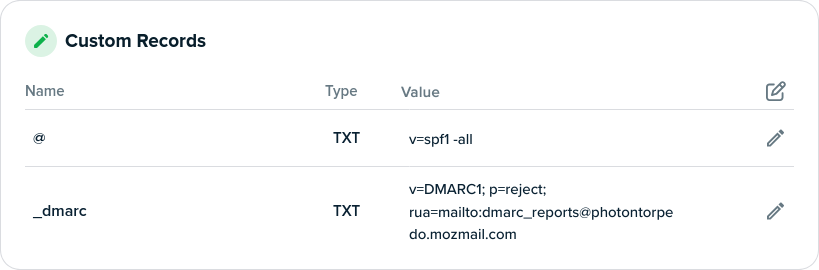
UPDATE: The spf and the dmarc records need to be appropriately named. The spf record should be named "@", and the dmarc record name should be "_dmarc".
Here's what I have for one domain.
One difference that I have is that I'm requesting that email providers email me a weekly aggregated report when they encounter a spoof. gmail and Microsoft send them, but most providers won't, but since most email goes to Gmail, it's enlightening when they come.
#cybersecurity #email #DomainSpoofing #EmailSecurity #phishing
 Royce Williams
 Dec [{(
 )}]
)}]