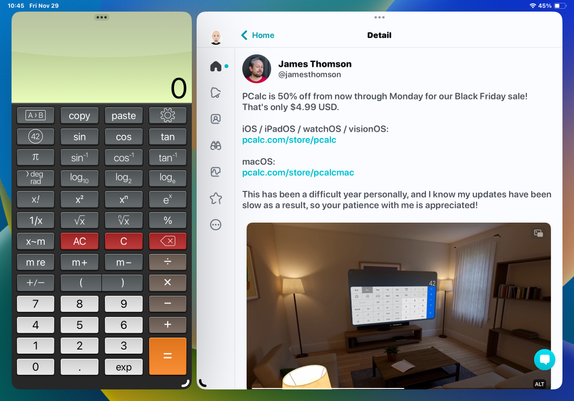
PCalc is 50% off from now through Monday for our Black Friday sale! That's only $4.99 USD.

iOS / iPadOS / watchOS / visionOS:
https://pcalc.com/store/pcalc

macOS:
https://pcalc.com/store/pcalcmac

This has been a difficult year personally, and I know my updates have been slow as a result, so your patience with me is appreciated!

PCalc App - App Store

Download PCalc by TLA Systems Ltd. on the App Store. See screenshots, ratings and reviews, user tips, and more games like PCalc.

App Store
@jamesthomson Unless someone invented some new numbers I don't know about, I think you can cut yourself some slack
@jamesthomson @tantramar Aww man, I *love* PCalc! It's on my task bar(?) so I always have easy access to it. I tried a few before I settled on yours.

@jamesthomson Done and done.

I have two bucket list items I’d like to fund and/or make for myself:

- something like PCalc that has versions going back to every macOS including Classic, probably needing Metrowerks Codewarrior and a PPC-x86 fat binary that works on 10.5, as a minimum

- something like PCalc that does basic arithmetic with transfinite numbers and the first few classes of googolism … but first I have to decide on notations … thankfully there are some incredible ā€œrank listsā€ out there (some are hours on YouTube) and Graham’s Number is fairly down the early end these days. I like how you can double or square these numbers and they don’t change … not enough to alter their notation haha

@whophd I think the tricky part is finding a maths library that goes back that far, but I guess writing your own is an option!
@jamesthomson yeah I’m just such a fan of Mactracker, and I think a calculator is the only other thing that has lasted as long without changing its UI

@jamesthomson I will call it ā€œBig Calcā€

Feature list is basically:

- simple arithmetic calculator + - x Ć·, and then
- ability to display numberlines beyond exponents
- decision tree for 0,1,2 and ā€œotherā€ (zero, infinity)
- probably include a size-comparison tool
- (this may require a dual display?)
- maybe include ^ exponent operand if it’s easy

But first — and most fun — is I have to craft a simple-ish way to display several forms of ā€œbigā€ numbers (tetration, etc). I am deciding whether to aim for ASCII 1-dimensional, Unicode 1-dimensional, or LaTeX etc levels. The reductive approach appeals to my geekery; the fancy symbols will appeal to users who have heard of Graham’s Number and TREE(3).

I’ll just call them downloaders. This is a toy I’m making. Maybe an educational toy, but a toy nonetheless.

I discovered most of what I’m using by forcing myself to craft a programming challenge question about tetration, many years ago. That’s when I discovered most (if not all) of the operations go into ā€œorbitā€ if you don’t use 0, 1 or 2.

@jamesthomson PCalc is one of the first things I install on any new Mac, iPad or iPhone, and it has been for years. Truly great bit of software.
PCalc is my go to calculator/converter on all the things. We often need to convert numbers on the MTJC podcast. It’s our official podcast calculator. Can’t tip enough! Go buy it now. I’ll wait. @jamesthomson
@jamesthomson What took me this long to PCalc my life? No clue.

@jamesthomson ā€œPCalc is 50% off from now through Monday for our Black Friday sale! That's only $4.99 USD.ā€

PCalc is great! Highly recommended. Thanks for making it.

@jamesthomson I’ve owned it for ages and it’s the best app sent you a tip and wishing and sending you the best vibes Take care
@jamesthomson I’ve used and loved this for years. Added a tip, hope it helps.
@jamesthomson All your PCalcs are belong to me (I did pay).
@dgoldsmith Thank you, though our legal department may have questions!
@jamesthomson The best calculator app in my view. I just tipped you enormous because it’s so worth it. Thanks for your efforts.
@jamesthomson Thankyou James, finally I have the *full* version! /me cackles! :)
@bazbt3 Thank _you_!
@jamesthomson My pleasure. :) Incidentally, I've always gone back to the 'Brawn' theme whichever layout I've used, thanks for that too.
@jamesthomson Did you know that Dice and PCalc each have tip jars in the settings screen and you can tip in both? I just tested it and it works. Tell your friends to try it out!
@robert_cassidy Oh no, I was trying to hide those!

@jamesthomson just bought on MacOS. iOS will follow later in the day.

Be well.

@jamesthomson I just found the ā€œJonyā€ setting for the digital display and it made me laugh (quietly, since I’m in public and I don’t want to be a complete weirdo). That was worth tipping.
@ac I am glad somebody got that šŸ™‚
@jamesthomson Your post reminded me what a trash fire the new macOS Calc app is. Imagine my joy when I confirmed that PCalc has an RPN mode! Easily worth the purchase, sale or no.
@jamesthomson Bought it many years ago and use it every day! Best and most complete calculator app out there. RPN FTW! Thanks for reminding me implicitly to tip, since I can’t buy it againšŸ™‚. ā€œEnormous Tipā€ sent in your direction. Hope things get better in your life and wish you all the best.
@relausen It is appreciated, thank you!
@jamesthomson Tip given and I purchased Dice. Everyone should practice patience and giving.
@jamesthomson I just realized that, while I've had it on the Mac for a long time, I never bought the iOS++ version. Well, I can now do all the PCalc-ing on my Vision Pro now—thanks for supporting it!