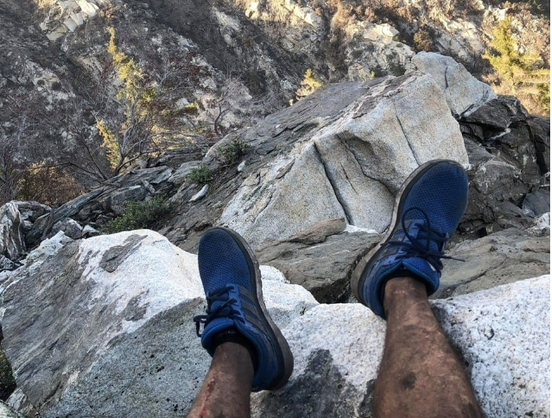
Reposting this for pinning purposes only. Yes, I am the guy who found that lost hiker using only the blurry photo of his legs. #geolocation https://web.archive.org/web/20210420135611/https://www.washingtonpost.com/lifestyle/2021/04/22/lost-hiker-satelite-rescue/
A hiker was lost and desperate. A stranger with an unusual hobby saved him.

“SOS. My phone is going to die. I’m lost,” the hiker texted a friend, along with two photos.

The Washington Post
@ai6yr https://archive.ph/oJXIU for those who are not subscribed.
archive.ph

@frooned @ai6yr
Bravo Ben 👏🙏🏻Thanks for your service - You saved his life.
@ai6yr
You're that guy! So cool!
@ai6yr Good on ya man. I remember reading this story and being blown away.

@ai6yr

I remember this well, but not enough. I can not remember if you geolocated because you had been there yourself or not. Or you had pics from others that had geotags.

Anyway, glad I found you here. Thanks for the updates on NC.

@SpaceLifeForm None of the above! I used satellite photos and Google Earth to geolocate this gentleman. It's a unique skill.

@ai6yr

Yep. To find that rock takes work.

I knew I forgot how you did it.

@SpaceLifeForm @ai6yr The exact expert I needed. I don’t include the horizon in photos I post to avoid being located in this way. But what about the tree line against the sky, or with the mountain behind obscured by clouds? What about a landscape with no sky? Can you still derive a location?
How we Geolocated a Photo of a Russian Missile Programming Team - bellingcat

Geolocating a photo of Russian missile programmers was one key part of our investigation into the people behind cruise missiles strikes on Ukraine.

bellingcat

@ai6yr @SpaceLifeForm that’s amazing. These stories are incredible. In this one they had a city and a couple possible locations to start with.

What if you had a landscape photo and only knew say the state or region, no other info. Although I am realizing you probably *would* have other information from social media or other sources 🙀

AI6YR (@[email protected])

Attached: 2 images Music video #geolocation of the day. Nicky Youre, dazy - Sunroof. 34.14014269,-118.10951535 #MusicVideo #OSINT

AI6YR's Mastodon
AI6YR (@[email protected])

Attached: 2 images Bingo, Morgan Wallen #MusicVideo #geolocation is filmed started at P&D Quick Stop, in McEwen, Tennessee 36.10766,-87.63416 #OSINT

AI6YR's Mastodon
AI6YR (@[email protected])

Attached: 2 images #MusicVideo #geolocation of the day. David Guetta & Bebe Rexha - I'm Good (Blue) [Official Music Video]. 38.969311, 1.555081

AI6YR's Mastodon

@ai6yr @nesmb

Can not find it currently, but one of the best Geolocates that Bellingcat did was using a ground-based pic of a road which showed a rock (size near something one may have as part of their landscaping, say 200 pounds), a tree, and a broken curb. They found it in Ukraine.

@ai6yr @nesmb @SpaceLifeForm
Only partly related q, when I follow links like these, mastodon is asking me to log in again. I know it is a bunch of connected servers, but is there any way of automating login?

@serehfas @ai6yr @nesmb

If you see the login message, you are not on your home instance. Assume you are in read-only mode at that point, you are just reading a different website.

If you are using browser on desktop, use Advanced Web Interface mode.

If you want to read a specific thread, use the three dot menu.

Pick expand. If open original appears in the menu, it was not posted to your home instance. You will be jumping to another website.

Same thing as clicking on the post age, you may be jumping to another website. If you use the three dot menu, you will be less likely to confuse yourself.

Another thing to avoid to minimize confusion, is make sure you pay attention to your tabs. If you have multiple tabs open to various Mastodon posts, there may be only one that you are logged into.

@SpaceLifeForm @ai6yr @nesmb Thanks.
I use a browser on my phone, not least because apparently I can't remember my password to log in anywhere else - and that is part of the issue here, can't log into other instances until I remember my password.
There seem to be a few 3 dot menus. Is it top right of a post you are reading?

@serehfas @ai6yr @nesmb

For me, FF in AWI mode, under the post itself, the buttons are from left to right:

Reply, Boost, Favorite, Bookmark, triple-dot menu (then post age).

I have tried phone browser, but it is not the same. Have not spent much effort on learning it yet.

@SpaceLifeForm @ai6yr @nesmb e.g., on your post, that lower rhs 3 dot menu gives me the following:

@serehfas @ai6yr @nesmb

Aha!

You are missing a piece of functionality that I have. For me, that menu has

Expand this post

at the very top. But this is desktop in AWI mode, and that functionality probably is not there on phone because of the limited screen space.

That is what I use. There may also be a difference in the instance software. On infosec.exchange it is not pure Mastodon but a patched version called Glitch-soc whereas med-mastodon.com is likely running the vanilla software.

So, your only option would be to use the

Open original page

and be aware that you are not going to be logged in to the infosec.exchange but are just reading. And when done reading, go Back. Another alternative is to

Copy link to post

and open a new tab, and paste it in, and keep track of your tabs. You also will not be logged in there either unless it on your home instance.

But, you can at least read the thread or what that instance has seen of it so far, then close new tab or Back out.

It is easy to get confused at first and I have not really tried to do much on the phone side except the basic stuff. Post, reply, boost, fav, and bookmark.

Whether desktop or phone, I always assume that I am missing posts.

@SpaceLifeForm @ai6yr @nesmb
Thank you!
I have seen other server pages (?) with nore menu options, etc. I lobbed in here as a beginner because I followed so many med ppl and needed someone to lead the way (and Aus servers were getting overloaded).

@serehfas @SpaceLifeForm @ai6yr

where I am right now: (yes I insist on using my iphone): went thru mastodon, mammoth, and metatext apps. Liked Metatext but it’s not supported any more according to rumor.
Paid the $3.99 for Toot! and it is the most functioning so far.

@ai6yr @nesmb @SpaceLifeForm Is this possible, or made much easier, because of the huge amount of images and metadata in the public domain?
@serehfas @nesmb @SpaceLifeForm Yes, geolocation wouldn't be possible without the Internet/maps/street view/crowdsourced photos/etc. that we have available today.
@ai6yr @nesmb @SpaceLifeForm I checked your twitter post and was impressed, given the texture of the Google earth pics that you were able to spot it.
@ai6yr that is great. I envy that ability. I just wonder why the hiker was able to send the picture but not his Location with WhatsApp eg
@stefan_grosse Very poor cell phone service, he managed to only get out a single, low resolution SMS, even though he had sent out several other messages.
@ai6yr 👏🏻
@markwyner Thanks!
@ai6yr really cool story. I suspect it felt quite delightful to know you solved a puzzle that literally saved someone’s life.
@markwyner Well, the geolocation was easy (I do it all the time for movies and music videos, etc.) The most amazing thing actually was the authorities actually acting on my info and checking out the area and conducting the rescue. (which I think is a much bigger challenge).
@ai6yr yeah. You had to make your case and evoke trust of your findings. Whatever you did, it worked. Did you ever have lunch and/or go on that hike with Rene?
@markwyner Ha! Not yet. He got in some legal hot water over that rescue... I should reach out to him to see if he's clear of that now. (he/we were getting to much fame/TV time, so the agencies involved were threatening to file charges against him etc.)
@ai6yr what?! I can’t even imagine what scenario would have someone in a legal battle over being stranded and rescued.
That's awesome! The article was paywalled though, you should link to one that isn't. I found this one: https://spectrumnews1.com/ca/la-west/human-interest/2021/04/16/man-helps-locate-missing-hiker-using-hobby-he-calls--satellite-surfing-
Man helps locate missing hiker using hobby he calls 'satellite surfing'

Ben Kuo used sites like Google Earth and EO Browser.

Spectrum News 1

@ai6yr

Wow, you were his angel.
Thank goodness for your knowledge about landscapes & more!

My husband has a GPS device for hiking & hunting, since he goes deep into wood a lot. It updates with latest coordinates, latitude/longitude & shares a map. He can send pre-programmed messages too.Makes me feel better.

Did you and Rene ever end up meeting? What a scary experience for him w/a GOOD ending!

@ai6yr Well done you
@3wombats Thanks!
@ai6yr You must know that place like the back of your hand to pull that off
@3wombats Nope, never been there. Figured it out using satellite imaging and looking at the terrain in 3D in Google Earth.
@ai6yr I’m even more impressed
@ai6yr a good story but I don't think google earth can zoom in that close. Or that you can find a place by photo's date and time on google earth. Tell me I'm wrong.
@gnomeoffender you're wrong ;-) Sentinel-2 satellite imagery plus geolocation skills go a long way. I generally can geolocate outdoor photos with any landscape.
@ai6yr C’mon, Ben . . . EVERYbody knows that place. Just kidding. That was an amazing piece is sleuthing you did. Do you remember in December when you identified the location of my vacation beach in Mexico?
@ai6yr Wow, I just read the article and am amazed of this fantastic story. Even after reading the explanation in the article I'm still totally bluffed about how you managed to pinpoint that location. Congratulations.

@ai6yr

I remember reading about this!
What a nice suprise to find you here :)

Do you play geoguessr by any chance? 🤔

@selea I don't play GeoGuessr, because that relies a lot more on rote memory than solving puzzles... the best GeoGuessrs are off finding stuff in seconds, because they've seen those locations before in the game.