 Konstantinos Kallas
 muesli
"Closing a Browser", 2024
White ASCII on transparent canvas.
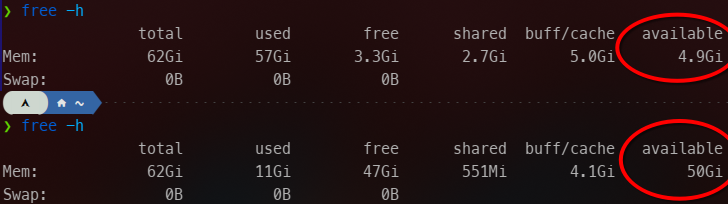
@fribbledom It's so fucking annoying. Why they can't just put a memory limit in those things like any user-respecting app, I cannot fathom.
I'm only ever looking at a handful of tabs at the same time, for heaven's sake!
Firefox is particularly bad (can't say for other browsers) because they don't garbage-collect closed tabs. Not even when you _tell it to optimize_ on about memory! 🤬 It just keeps growing and growing until system memory is full -- and not even _then_ does it give way! AAARG!
@OmegaPolice @fribbledom i'm old enough to remember "we should all get rid of netscape because firefox is better at memory management"
now my 32G machine swaps everytime i change task
@m0xee @fribbledom Is that different from "tab unloading"? 'Cause I already do that.
Simple observation: System memory 90% full. Close FF, open FF. Same tabs; fewer loaded, of course. Observable effect similar to OP. Then, over several days, usage grows.
I once found an issue comment stating that, indeed, they consider this a _feature_! Idle memory doesn't help anybody, after all, right? Better use it for good! Maybe I visit the same random page again this year! You never know! /s
@m0xee @fribbledom (That's me assuming they don't just have a straight-up memory leak.)
I _sort of_ follow the reasoning -- if they would ever release all that memory when it's needed. But nope. Restarting FF consistently brings back 10GB RAM (-ish) but, somehow, opening a second Miro board can freeze my entire machine.
Miro is a true memory sinner btw. Really, really awful. An empty board starts somewhere around 500GB, if I can trust FF to show meaningful numbers.
@m0xee The main different seems to be the sheer number of open (if unloaded) tabs I have. There are several dozen "resident" tabs at least, some of those huge-ass apps. 😅 I also create _many_ ephemeral tabs, probably hundreds each day.
For some reason, Firefox keeps data of unloaded and even _closed_ tabs in memory; at least that's the only explanation I can come up with for what I'm seeing.
I'll give that plugin a shot, thanks for the pointer!
I currently rely on the unloader addon of TabTree
Nah, that's Firefox. Why it shouldn't use all my memory? Because it means it's fighting with the kernel over caching and freeing my memory. Which I typically need for other things than Facebook, really.
Nah, to be honest it behaves just fine, and I have no issue with it using a sizeable amount of my memory. It's just that at some point it becomes a race between the kernel and Firefox thinking they both know better what to cache, and eventually that means you're constantly at the edge of OOM situations.
Okokok, my Web-VM then... 🙄
@fribbledom I so hate it.
I shouldn't have to worry and manage my tabs, and worse, the whole app lifecycle because it can't manage itself.
I feel like I'm coding in C, managing memory instead of actually coding the app.
This sucks.
 Felix 🇨🇦 🇩🇪 🇺🇦
 Raphael
 Damien (TIG BUSINESS)
 David Chisnall (*Now with 50% more sarcasm!*)
 m0xEE
m0xEE
 Alex
Alex Götz Hoffart
 Григорий Клюшников
 ElectroFetish
 Tanguy ⧓ Herrmann
 Nemethon
 Endless Stateless