 whjjackwhite
 Tris
TrisWHEN DID KATE GET SO GOOD!?
git integration, minimap, symbols, plugins, LSP!?!?
It's like a vscode had a baby with sublimetext - it's SO responsive, no electron here!
KDE/Plasma contributors, bravo! 🎉
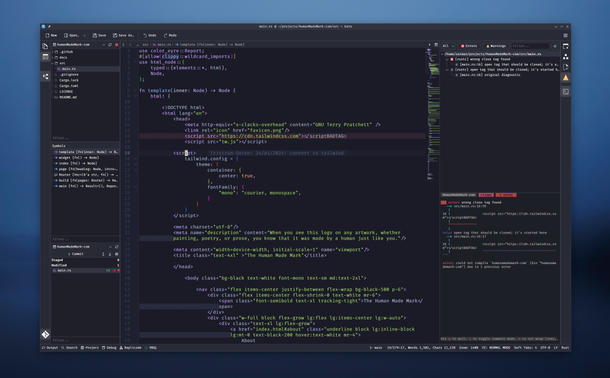
WHEN DID KATE GET SO GOOD!?
git integration, minimap, symbols, plugins, LSP!?!?
It's like a vscode had a baby with sublimetext - it's SO responsive, no electron here!
KDE/Plasma contributors, bravo! 🎉
@0atman it's not a good selling point for me neither https://zed.dev/docs/vim
Anyway I sacrificed vim key bindings for jetbrains powerful years ago. I want to recover the vim fast and light experience without waste many time with lua or vimscript configurations. LSP maturity is my bigger concern, because don't matter how fast and light is your editor if it should wait to a slow memory hungry LSP (I suffered that many times trying to escape from jetbrains claws).
Linux Install Kate or KWrite from your distribution. Install Kate on Linux Install KWrite on Linux These buttons only work with Discover and other AppStream application stores, such as GNOME Software. You can also use your distribution's package manager, such as Muon or Synaptic. Install Kate's Flatpak package from flathub.org. Install Kate's Snap package from Snapcraft. Download the nightly 64-bit AppImage for Kate. ** Windows Install Kate from the Microsoft Store. Download the nightly Kate 64-bit installer. ** Install Kate via Chocolatey. *** macOS Download the Kate nightly installer for ARM machines. ** Download the Kate nightly installer for Intel machines. ** Source Code The source code for Kate is available on KDE’s GitLab instance. For detailed instructions on how to build Kate from source, check the Build it page.
@pavi @0atman Kate has an org-mode too!
https://akselmo.dev/posts/kate-and-orgmode/
via @aks
* me looking up if kate supports remote development over ssh. *
 Marie
Marie Mark
Mark alexanderadam
 lasizoillo
 Vincent Batts
 pavi
pavi Joseph Nuthalapati
 lu 🍉
lu 🍉 Anupam 🇮🇳《ミ》λ≡
 Joshua Barretto
 Gabriel Adrian Samfira
 Julian Groß