 tsugu
tsuguCtrl + Shift + A
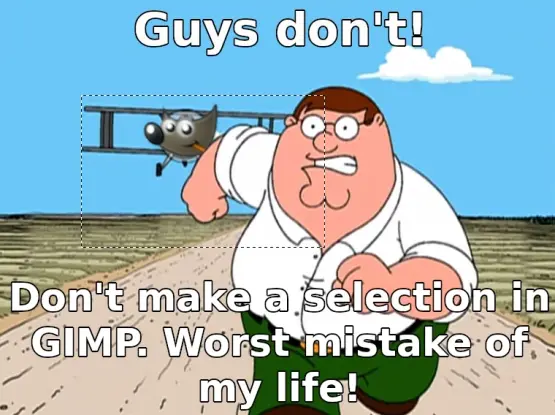
It takes a while to figure out how selections in Gimp work.
It whenever you select you have created a mask and when you combine it with layers it can get very confusing.
If you accidentally select a small bit you cannot edit anything else. I think that is what OP is referring to.
There is a tool that shows you what you have selected that can help.
IMO Gimp isn’t very well documented so you can get stuck for a while before you understand what is going on.
It’s a common scenario in software. We think some things like ui designs and workflows are “natural”, but they’re quire arbitrary, and people just got used to them. Then people who are used to it will feel lost with any different workflow, and people who first learned the different ones may feel at home.
A nice example is the windows ui, that a lot of people who grew up to it feel like the most straightforward way to use a computer, but people who grew up with smartphones usually struggle with it ad find something like the gnome ui more straightforward.
I have no idea how selection works anywhere else, since I only ever used gimp.
For me, I don’t understand this meme, selection seems to work very intuitively, it seems to do what I expect it to do.
work very intuitively I only ever used gimp
Lol, all these GIMP haters who don’t seem to understand the goal was being on par with Photoshop whennit was a desktop platform. It works exactly like Photoshop always did. And I agree, selection makes sense. There were many apps that worked the same… Paint Shop Pro as well.
I guess the kids have all grown up with some other tools and would rather call things they don’t understand stupid than try to grasp where the tool came from.
I’m not sure how Krita is different but then again I haven’t used it. I installed it, saw it looked like a fork of GIMP, and stuck with what I knew. Which is probably what anyone who hates GIMP should do.
It works exactly like Photoshop always did.
Unequivocally false (source: been a PS user since version 7)
Interesting. I remember trying a copy of newer Photoshop a few years and being genuinely confused by how layers worked as they’ve always been part of my flow.
The old versions of photoshop and paint shop pro were heavily layer based and selections were automatically a mask of the current layer as in GIMP so GIMP was easy for me to transfer too at the time.
I also find that intuitive is a relative term. Relative based on your own experience.
“Early 2000s”
I mean, even if that was what they said, that would make it and things that function like it more intuitive to them, wouldn’t it? And someone who’s used to a different workflow would find it unintuitive.
So yeah… Intuitive is relative
“Even if” 🤢
That is what they said. “Early 2000s”.
I can screenshot too
Note where you said “only ever used Gimp”, when they said they have, in fact, used Photoshop. Additionally, nowhere in that did they say they’ve not used anything else since then even, just not Photoshop.
But you think you’ve made some credible point here, and likely won’t back down no matter how wrong you are, so go ahead and respond telling me some twisted logic about why you’re right and I’m wrong and I can ignore it so you can walk away thinking you’ve won some useless internet points.
I also find that intuitive is a relative term. Relative based on your own experience.
That’s a very good point. As a counterpoint though, pretty much every other app (Affinity Photo, Photopea, whatever) emulates the PS workflow, which makes GIMP feel even more odd. Its paradigm was probably OK in the early 00s but the world has moved on.
Yeah that’s fair. I’d have to figure out how people are getting on without layers, probably take myself back to basics and pretend I know nothing and see how the ‘learn from scratch’ track teaches these skills today.
OTOH, I also getting to the old dog point, not because I can’t learn new tricks, but because I have so many responsibilities I have little time to do so, which is another reason ideological camps like this form. Which frankly is the wrong reason for them to exist.
I should go figure out how the new apps work, but when I do need to do graphics (since its not my main bread and butter but usually an additional skill I need to help develop something) I habitually pull out the familiar to save time.
The problem with that, though, is if they changed the workflow to be like Photoshop, it would leave those of us who know how to use Gimp but not Photoshop high and dry
Gimp is intuitive to me at this point because I have some idea of how it looks at raster image manipulation from using it off and on for years. I have no clue how to do things in Photoshop that I can do easily in Gimp. It may be the better user experience, I don’t know.
If they ever do that, I really hope they leave the option for it to work like classic Gimp in there, because people like me don’t actually do image editing that much overall and relearning would be painful for much longer than someone who can deep immerse themselves until they get it. I’d hate to do it but I think I’d have to stick with an old version if that happened without any way to keep doing things the same way
if they changed the workflow to be like Photoshop, it would leave those of us who know how to use Gimp but not Photoshop high and dry
That’s a VERY good point. I think a good example would be how Blender has evolved in the last decade or so.
It started out very “in-house” and unconventional, but it had very specific UX principles in mind rather than just aping “ThE iNdUsTrY”. Coming from learning 3D MAX to OG pre-3.5 Blender was really difficult. Right-click select?!
But like Blender, I feel like GIMP could benefit from having easily adjustable settings that could line up with what a particular user finds intuitive. Certain layer behavior seems to be the big one here. The settings are there, they’re just awkwardly small buttons or buried in menus.
Blender’s UI / UX overhaul caused a bit of screeching, but overall was instrumental in balancing accessibility with familiarity to existing users. It made those options very accessible and modular.
For instance, I always use left-click-select, but I use the “Blender way” for everything else. If someone’s coming from Maya? There’s the “industry standard keymap” for them.
Sorry for the ramble. LOL
They could make the “classic” vs “modern” UI toggle-able on first launch.
From the post you replied to:
They could make the “classic” vs “modern” UI toggle-able on first launch.
To add to this, it’s not like other apps have just blindly copied Photoshop. Affinity Photo has shape tools that are far less convoluted than Photoshop but they still feel instantly familiar.
Even when they couldn’t stick to common patterns (such as the eyedropper tool) they still manage to communicate how the feature works just by designing intelligently, no Googling required.
But every time I’ve used gimp, common tasks feels like a collection of workarounds for missing features. Someone elsewhere in this thread asked how to place an ellipse and got told that wasn’t something commonly needed but to make a selection and fill it using the paint bucket tool (and a modifier key).
That solution is jankier than MS Paint, which at least offers you an actual tool and a short period where you can make non-destructive modifications to the stroke, fill, size and position.
But since you’ve technically got the circle you asked for, it’s treated as “people who don’t like GIMP are just haters” rather than “people don’t want to use bad tools for their job”
Gimp sucks. That’s why people on Linux rather use krita to edit photos and it wasn’t even built to do that.
Gimp is a horrible mistake that should literally be killed off and it should be put into a failure museum to serve as a warning and a reminder how Foss can take a wrong turn and many free development hours are spent towards building the wrong things and continue to disappoint any user that tries it.
And it is intentionally horrible. It is how the developers want it.
Lack of a user friendly art suite is a major barrier to Linux adoption.
Change it, make it better. Market your version.
Or join conversations with developers so that it becomes better.
You are the development team as much as you want to be. It’s not Adobe.
You don’t get it.
If you’re not spending hours trying to figure out how to do the most basic shit then it’s not for you, pal. Ever heard the expression pressure turns coal into diamonds?
That’s right.
That’s because we’re not bitch ass pussies. Last night I spent five hours trying to merge some layers, and you know what? Worth it! I read the docu, had a back and forth with the developers and after they threatened to kill my family I got it. I’m now a proud member of th Gimp Club Tm (choker and gag ball not included).
Ya gotta give to get some, Shirley. Now move over, I need to block out the rest of the day so I can figure out how to export a PNG.
This comment was exactly for people like you. Criticism of Gimp and you went straight to:
You must like windows, huh? I bet you take that Steve Ballmer Bill Gates double d all day
Ya boiiiiii I’ll take the Ballmer Dick any day over having to endure opening that abhorrent nightmare of an interface from hell
so I can figure out how to export a PNG.
I spent five hours trying to merge some layers
Your examples suck. Got any real examples?

 alyth
alyth Wxnzxn
 SSTF
SSTF Azzu
Azzu Anamana
 Routhinator
 cygnus
 uis
uis Captain Aggravated
 TrickDacy