A bit of a frustrating day trying to get my ESP32 Atom Echo working with Home Assistant.

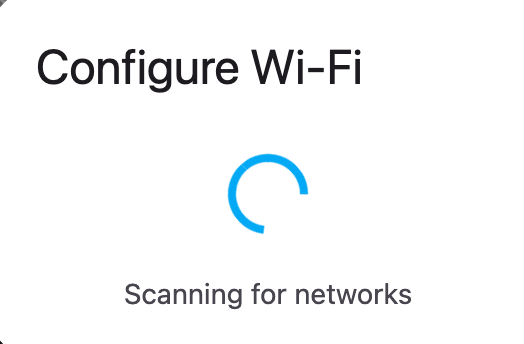
I used this page to flash it, it seems to work, but when it get to the wifi page it just spins looking for a network.

https://esphome.io/projects/index.html

Any ideas what I can do? I can add it via ESPHome, but I assume that I assume that has wipes the Voice Control firmware.

#HomeAssistant #ESP32AtomEcho #AtomEcho

@homeassistant
@[email protected]
@homeassistantinpills
@[email protected]
Ready-Made Projects

Install ready-made projects directly on your device.

ESPHome
@bazcurtis @homeassistant @[email protected] @homeassistantinpills @[email protected] I’ve just copied the yaml, added my WiFi network to the configuration then compiled and flashed it
@spitfire @homeassistant @[email protected] @homeassistantinpills @[email protected] Thanks for replying. I am not sure how to do that, but I think I will wait. This seems to be a known issue at the moment. An issue has been raised on GitHub.

@bazcurtis @homeassistant @[email protected] @homeassistantinpills @[email protected] I think it would be a valuable lesson if you’ve tried it. Once you do it the world of ESPHome supported stuff lies open to you ;)
@spitfire @homeassistant @[email protected] @homeassistantinpills @[email protected] I have an M5 Tough ready for my heat pump. It will be running ESPAltherma.
@bazcurtis @homeassistant @[email protected] @homeassistantinpills @[email protected] I’m running all of my esp devices on ESPHome - controlling my heat pump, recuperator and solar inverter suing modbus, using stuff like ld2410 in a few others.

@spitfire @homeassistant @[email protected] @homeassistantinpills @[email protected] I have been using Home Assistant for about a year and never used ESPHome before. I am not sure what I am missing out on. I can controller my batteries and inverter without it.

Saying that, always happy to have something else to play with 😀

@bazcurtis @homeassistant @[email protected] @homeassistantinpills @[email protected] I wasn’t so lucky - Foxess cloud (for my inverter) sucks, and the modbus interface is a little bit better, and works locally. Still limited to refresh once every 2 minutes:/
@bazcurtis @homeassistant @[email protected] @homeassistantinpills @[email protected] I highly recommend trying it. It opens a new world of possibilities. You can make both devices that are much cheaper than their counterparts available to buy, and ones that are not available at all (combine a few sensors/components in a mix that is not generally available). (1/2)
If you have worked with yaml (I presume you have - using HA) it is realtively easy to program (no C/C++ skills required) and you can easily ask ChatGPT to help you create configs for these. ESPHome translates yaml config into C++ code, compiles and uploads it to the device for you. Aside from the modbus stuff, I’m using it mostly for LD2410-based presence sensors with Bluetooth proxy (and sometimes more components) in one device. (2/2)
@spitfire @homeassistant @[email protected] @homeassistantinpills @[email protected] The bit that confuses me is, I can flash it fine, but it won’t appear in Home Assistant at that point. I can add it via ESPHome and I assume it join the wifi, but then how do I get voice on it.
@bazcurtis @homeassistant @[email protected] @homeassistantinpills @[email protected] You need to add the device (it should be auto discovered by HA and available in settings->devices->integrations), only after doing that it will be able to communicate with HA using its API. On the HA side you need to set up pipelines, it is described in the year of the voice blog post.
@bazcurtis there was a bug and the fix is being released as we speak

@balloob That is great news. I will try it again in the morning. I liked your wording, the releases is coming as we speak for the voice assistant issue 🤣

@spitfire

firmware/voice-assistant/m5stack-atom-echo.yaml at main · esphome/firmware

Holds firmware configuration files for projects that the ESPHome team provides. - esphome/firmware

GitHub

@crazifyngers @homeassistant @[email protected] @homeassistantinpills @[email protected] @spitfire

The projects page now seems to install correctly. I know a fix was released last night. The Atom Echo is discovered by Home Assistant, but I get this error.

Can't connect to ESP. Please make sure your YAML file contains an 'api:' line. My Home Assistant is using https. I added that to the GUI that came up and port 6053, but still has the issue.

@crazifyngers @homeassistant @[email protected] @homeassistantinpills @[email protected] @spitfire I reset it all again and I finally have it in Home Assistant and can see all the entities. Now to get back to so voice testing.