
🚀 My new iOS app, TrailPro, is now available! 🏃

https://trailpro.app

TrailPro is a fitness app for trail runners, and is totally free. I'd love for you to check it out and tell me what you think 😊

This started as my next "big thing", but has now morphed into a hobby project following my new role at Apple. So whilst I'm unlikely to be able to work on it once I start, I'm always happy to receive feedback. It will however remain entirely free for the foreseeable.
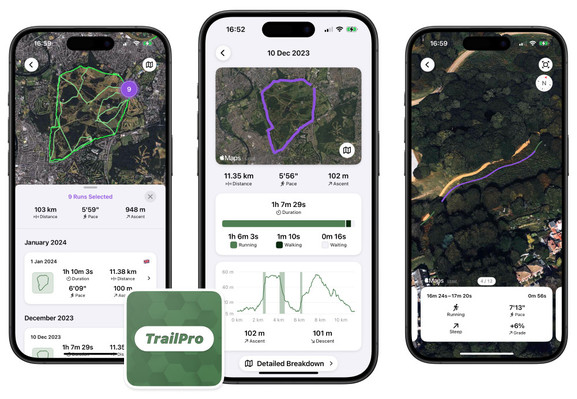

#iosdev #trailrunning

TrailPro | Jack Morris

Jack Morris

Jack Morris
@jackmorris Apple permits you to continue working on your personal hobby projects while working there? I remember this being not allowed.
@pasi Will have to see! Might not be the case.

@jackmorris nice! Can you share a little bit more about the tech behind the app please? Like is that SwiftUI?

I'm asking because I'm building an app that uses sheet above a Map (like Apple Maps) but I find it a little bit challenging to control the map offset. I would be happy to talk in MP if you want?! Thanks!

@alpennec Sure thing!

App UI is entirely SwiftUI _except_ the main map screen (with the overlay of all of your workouts). I couldn't get annotation clustering to work with SwiftUI MapKit support, so I dropped down to a UIKit for that. Saying that, all navigation is UIKit (navigation controllers etc) managed by coordinators (so each view is hosted in a UIHostingController).

@alpennec

Managing the sheet over the map was a little awkward since I wanted to display the sheet when the map screen was pushed on, then hide it when the map is popped. For sheet position, the UIHostingController containing the sheet is presented, and its UISheetPresentationController has a few detents specified to control its position (so this is just a standard UIKit sheet, not custom).

@alpennec Not sure if I've answered your question re. map offset but let me know if you'd like more details!

@jackmorris Thanks Jack for all these infos! Really helpful. I'm trying to avoid UIKit (not that I don't like it, but I don't want to learn that again right now) & do only in SwiftUI but I'm not sure I can obtain the result I want.

Regarding the offset, I was thinking about your third screenshot with the segment details. You moved the Apple legal stuff to put your horizontal scroll view at the bottom. I think I've managed to do it in SwiftUI but animations are not great as they reframe the map.

@alpennec ah, for that I just adjusted the safe area of the map by the height of the scroll view with .safeAreaPadding(.bottom, <height>) (on the MapView). The map respects this and shifts up controls & the legal links, however I don't think it handles being adjusted that well as you said (for my use case, it's constant).
@jackmorris yep I see. On my side, as soon as I have a dynamic safeAreaPadding height for the Map based on the detent height, the maps does not animate properly. I’m trying to reproduce the Apple Maps UX: when you resize the sheet while checking in for route directions. In my app, when I do that, I see a white background and the Map kind of jump 🫤.
@jackmorris see this post for the broken animation example: https://iosdev.space/@alpennec/112331976961123109
Axel Le Pennec (@[email protected])

Attached: 1 image Any #SwiftUI Map expert here? 👋🏻 I'm trying to have a nice animation when I update the safeAreaPadding of my Map. When the map needs to zoom in, it's working fine. But when the map needs to zoom out to show all the content, the animation is broken. See attached video. Any idea how to fix that? I filed #FB13754091 in case it's a bug that Apple can fix. #BuildInPublic #iOSDev

iOS Dev Space
@jackmorris I don’t see a link /banner for the app on the blog post..?
@aleck there's a link near the top of the post, copied here: https://apps.apple.com/gb/app/trailpro-trail-running/id6474039305
‎TrailPro: Trail Running

‎TrailPro is your ultimate trail running analysis app. With a greater focus on ascent, descent, and smart run segmentation to track your performance across both running and walking periods, TrailPro will let you break down and relive your runs like never before. == Features == → Pace-Aware Splits…

App Store
@jackmorris Can you trim the start and end of a run?
@WTL not currently, good idea though!
@jackmorris It's one of the few things I wish I could do in Apple Fitness; trim start/stop locations.

@inkeduprunner FYI

trailpro.app

@amerpie similar to Strava?
@inkeduprunner I saw it on Mastodon. just downloaded it. Will let you know.
@amerpie @inkeduprunner caught on to this chain and just downloaded it as well.. Doesn't seem like Strava but more like a dashboard but might be missing something.
@inkeduprunner It completely downloaded all of my wife's workouts from her phone
@jackmorris this looks great, congrats on shipping!