Electron.
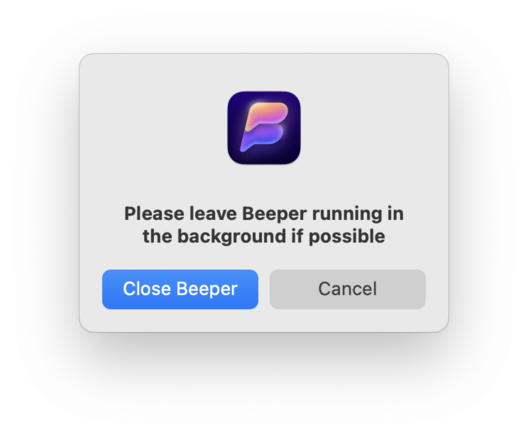
I have been using the Mac for a long time and I can't recall ever seeing a prompt like this when I ⌘Q an app:
@gruber Chrome does it’s “really quit” BS, but that’s next-level nonsense.
@agiletortoise @gruber I kinda like that because Cmd+Q really do be next to Cmd+W
@agiletortoise @gruber Yeah… but Command-Q is right next to Command-W and browsers have long restart times, so I have found the similar thing in Firefox to be useful.
@agiletortoise @gruber and under the File menu in Chrome you can toggle off the “really quit” question from popping up again.
@agiletortoise @gruber lol yes I only use chrome on occasion when I’m having an issue that seems potentially browser related. Every time chrome tells me to “hold to quit” I always feel like I’m going to close chrome and then the next app in the queue accidentally.

@mikenichols @agiletortoise @gruber You can just cmd Q twice instead, which I found to be more reliable or at least seemingly safer than holding it (Chromium has the same behavior)
@lm1 @agiletortoise @gruber that’s actually what I do, and even that worries me I’m going to accidentally kill the next app in the queue. My muscle memory _really_ doesn’t like that move.
@mikenichols @lm1 @agiletortoise Just turn off the option.
@gruber @lm1 @agiletortoise I use Chrome so infrequently I didn't look for the setting. Just found it and disabled it.
@mikenichols @lm1 @agiletortoise @gruber I'm so anxious about this kind of mistake that I always use the mouse, like a caveman, to select Quit from the menu bar for all apps.