I am begging developers of command line tools to simply write an example of the working command after the options.

reading a 1000 lines of documentation with a million -flags and -switches and then guessing how im supposed to use them is not fun. many many non coders want to use your program. Let us copy paste the working command and then edit to our needs

the yt-dlp github im trying to use has 2338 lines in the readme with hundreds of flags\options to use it with. This seems like it would be really helpful because wow so many options. but in reality it just causes paralysis because wow so many options. I literally just wanna change what folder it downloads to by default and I have to either read through these 2338 lines or hop between reddit posts with half answers that are all locked because their older than 6 months.
@nix totally agree!
you may already know this, but if you aren't aware, tldr is a great "simple help pages for command line tools" project. you run: tldr yt-dlp for example.
https://tldr.sh/
tldr pages

Simplified and community-driven man pages

@exquisitecorp @nix `tldr` is amazing! It can also do sub-commands, e.g. try `tldr git push`
@kfet @nix oh wow, i wasn't aware, that's great!
@nix https://cht.sh/ also chat models work very well. Asking devs is like yelling at clouds
cheat.sh/:firstpage

@nix
For that specific case, I personally just side stepped the options and wrote a wrapper script that just changes directories first. I do expect the controls are there somewhere, but I really didn't want to bother figuring them out.

(This script predates me using yt-dlp, originally for youtube-dl. Having a wrapper with the most common options I care about also lets me change tools easily.)

@nix Have you seen https://tldr.sh/ ? I find it indispensable.

Of course you are correct, this should be included in all command line tool documentation by the authors/maintainers, rather than relying on a third party tool to address the problem.

tldr pages

Simplified and community-driven man pages

@skyfaller @nix Even as a supposed professional it bothers me so much when I can't just find a few clear examples of common commands to start. I second the recommendation of tldr; I still like to have the manpages available but when I want a quick reference / refresher I go to tldr first
@skyfaller @nix Now I wonder why all the projects I maintain can be found on tldr.sh while at the same time I never even a single time received a issue report or pull request of the form "please provide examples" or "please simplify the man page". I wish the energy spent on maintaining tldr.sh would instead be spent to improve the actual documentation shipped by each project. These are FOSS projects and contributions are usually welcome.
@josch @skyfaller @nix maybe people tend to favor one app to do all. It seems reasonable that tldr gets more attention because its use is to simplify man pages, not a specific app.
Maybe Devs could contribute to tldr by submitting their own examples.
Not blaming anyone here, I understand FOSS has issues with support and I thank anyone that does it.
@skyfaller
This is wonderful, thanks! And there's an #emacs client I'm quickly going to install 😉
@nix @aksharvarma
@nix Do you mean in documentation, or in --help?

@nix yeah, the worst for me is when I download "weebl, a tool for doing X" and I have to read the whole documentation because they haven't just told me up front what the shortest working command for doing X is

(and obviously there are tools for which the idea of a "shortest working command" either isn't useful or doesn't make sense, but I think those are probably rarer than the reverse)

@nix If you’ve not tried it already, try installing “tldr”. Doing “tldr [commandname]” will give you a handful of usage examples for most commands.
@nix
documentation without contextual examples is incomplete software
@nix tldr is great for this
@nix yep. show, not tell
@nix how dare you suggest that a 4 line regular expression with conflicting flags is unreasonable!?
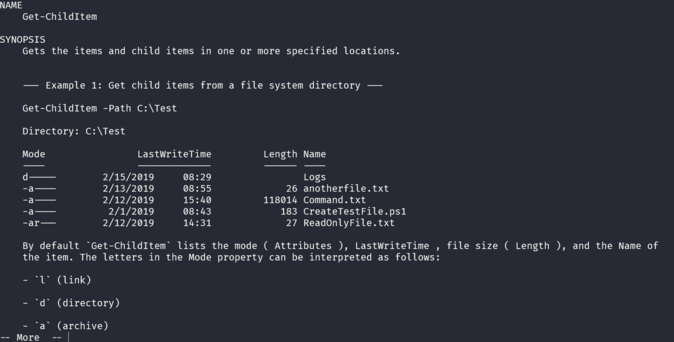
@nix One thing PowerShell got right is that there's a standard Examples section in the help pages for commands and you can just do e.g. 'man ls -examples' to bring them up.
@pervognsen @nix powershell’s get-help functionality is amazing and something you can add to literally any script with ease.

@nix the recommended order of sections in Perl's POD documentation had a "SYNOPSIS" section at the top (https://perldoc.perl.org/perlmodstyle#POD):

"Your SYNOPSIS section should contain a minimal example of use"

SYNOPSIS should be after NAME and before DESCRIPTION. Because most people reading your docs already know what the utility does and just want to know how to invoke it. I haven't wielded Perl in anger for quite some time, but it got a few things right when it came to communicating ideas, and I miss that.

perlmodstyle - Perl module style guide - Perldoc Browser

@trurl @nix I think the issue is many (including me) took "should contain a minimal example of use" and stuck my-tool [options] [arguments] there, or worse my tool -acvheZLVHVEhvD --flag --other-flag -omgmakeitstop...

IMO, the spec would be better if it removed SYNOPSIS and said to put EXAMPLES up after NAME instead.

That said, I'll be making better SYNOPSISes from now on.

@nix "reading a 1000 lines of documentation with a million -flags and -switches and then guessing how im supposed to use them" Wait a second, you're saying the problem is that people *do read* the documentation but it doesn't answer the their questions clearly and they are forced to guess? I thought the problem was that people, very reasonably, want to read as little as possible, so they *don't read* a 1000 lines of documentation, instead they look for the examples which are often lacking. I agree with you that adding examples would be good, but I think there is a chance you've misdiagnosed the problem.

@oantolin @nix

Possibly the reason people don't read thousands of lines of documentation is that they've learned that it still won't answer their question even if they put the effort in.

@nix Pages upon pages of pedantic, self important blah-blah that never actually answers the question you have? There's a reason why they're called "man" pages ...
@nix There is a cli tool called tealdeer that does just that, for many cli programs.
@nix this, but also for f**king spreadsheets.

@nix Unix documentation started with "Here is the Man utility, it prints out a manual for a program, you should be able to reverse engineer the program from the manual".

Then came GNU who decided to replace Man with Info. It had more features, and used Hypertext. So it was harder to read, and important information got hidden in nested hypertext links.

And then came people who said "Just read the website. It has the source code".

And now there's apps who's documentation is a Discord server.

@nix

Honestly sounds like a decent use-case for LLM AI. Give the README to the AI as context and ask it to craft the command-line that you desire, and then just double check it

@nix quick fix: before the options, not after.

@nix

ah yeah, my favorite man pages are the ones I know I can rocket down towards the end to find some examples

@nix I think shell ergonomics could be improved with self-documenting CLI tools, that's why I started https://github.com/shellcomp
shellcomp

shell completion protocol. shellcomp has one repository available. Follow their code on GitHub.

GitHub

@nix

YES!

Also, a couple of sensible examples with a brief description of what it'll do would be nice.

https://merveilles.town/@nix/112249064962199218

༺NIX༻ (@[email protected])

I am begging developers of command line tools to simply write an example of the working command after the options. reading a 1000 lines of documentation with a million -flags and -switches and then guessing how im supposed to use them is not fun. many many non coders want to use your program. Let us copy paste the working command and then edit to our needs

Merveilles
yeah, man pages suck for this - I always end up finding some related guide, copying their command and then editing to suit my needs.

@nix I'm looking at you "ip". I've had just some networking issues and tried to guess what I'm supposed to do just with the manpage.

Yes, there are examples in «man ip-address», but still, it always feels unintuitiv to me. And I'm called Mr. Manpage at work, as I'm usually produce long commands without the need to look them up.

And I don't mourn after ifconfig, I know "ip" has to support IPv6 and other features. A swiss army knife has many features too, but it's easy to just open the blade.

@nix THIS!!!

Every time I look at a man page, I scroll to the bottom to look for examples first.

Even if I intend to read the whole man page, examples go a LONG way to understanding the overall vibe of the tool and to give context for the documentation.

@nix A tip if you're having trouble finding the option you want: redirect the help into a file and then use your favorite editor to search for your option. It doesn't solve "how do I use the option?", but it helps with narrowing down the "thousand options".
@nix after a while you learn to google for examples after reading the manual
@nix If I need examples - edge cases aside - it's just a bad interface. I should be able to do the basic job without hundreds of switches. They should be for advanced needs. And in those advanced situations, it's imho very much okay to ask the user to thoroughly read the documentation. Life isn't tiktok. Examples are basically a lousy workaround for a bad interface design. As I said: edge cases aside.

@nix ... I've never missed an example section for ls, rm, grep, ...

And they all quite have some (optional) arguments.

@nix This is the reason why I have https://www.mankier.com/ bookmarked as a search provider. I look up most documentation there, because they *lead* with the examples.

It is so much better because 90% of the time I want to do something super-lame that's probably contained in the first 3 examples.

Man Pages | ManKier

The most complete and up-to-date collection of online man pages.