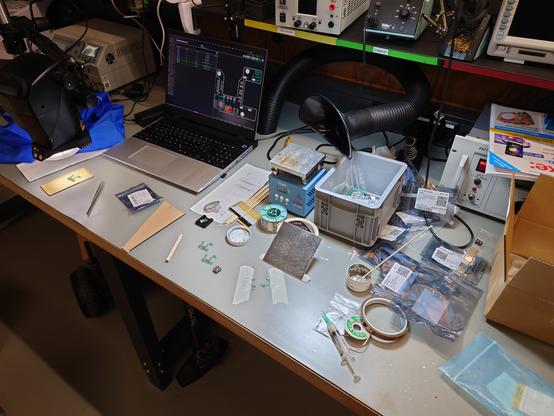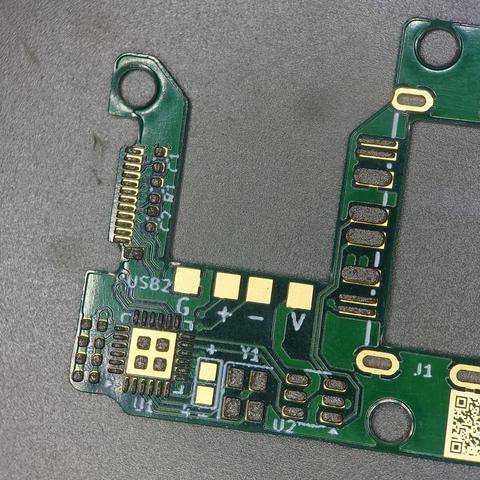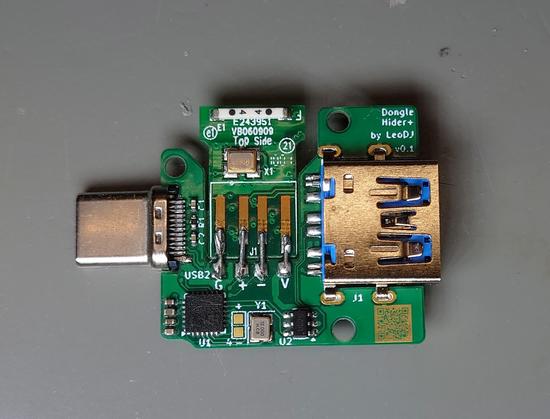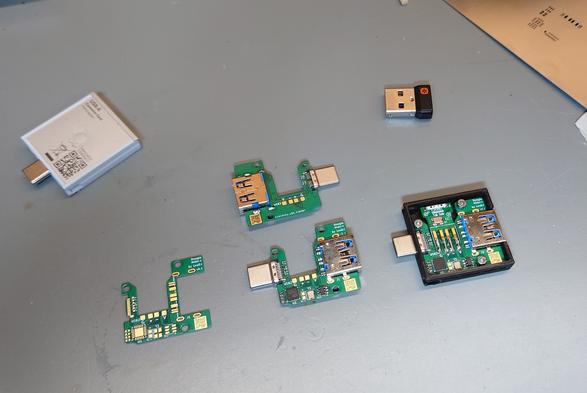
I'm currently in the process of designing an #ExpansionCard for my new #FrameworkLaptop.

I need the #Unifying #dongle (lower latency), but don't want it sticking out and losing a whole slot.

So I'm going to throw a USB hub and the peeled dongle on a PCB and hope it all works out :D

As a further experiment, I routed the USB A SS lines past the hub (USB 2 D+/D- connected to port 1 of the hub).
Not sure if this will play nice with USB drivers, but it's worth a try.

#USB #DongleHiderPlus

Finally, all parts arrived today!

Time for assembly.

*insert standard run-of-the-mill PCB assembly steps here*
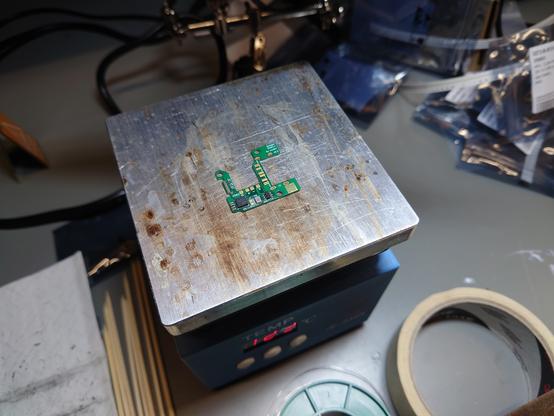
Paste, place, reflow. Paste, place, reflow. Solder the rest of the components manually.

It went pretty normal, although the assembly order of the straddle-mount USB-C connector needed a bit of thought ^^
I ended up with this procedure:
- Reflow the top side without the connector
- Place it after the paste of the bottom side and put flux on the top side contacts
- Reflow bottom side with hot air

#DongleHiderPlus

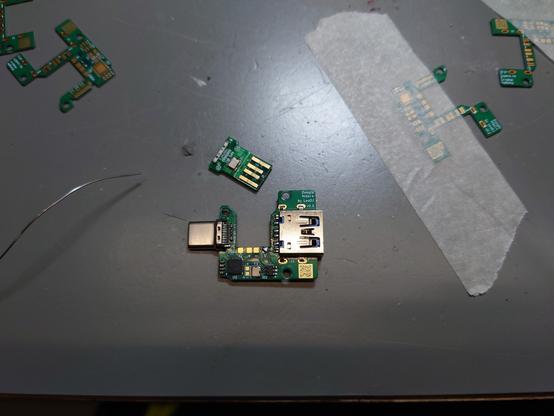
And with that, the #DongleHiderPlus is done!

It features room for 2-3 skinned dongles while still providing an external USB A 3 port.

I tested it and it works like a charm* !
The receiver and different USB 2 and even USB 3 devices worked on the first attempt.

Massive props to @frameworkcomputer for making the whole development process very easy, with all needed information already public and even supplying a base 3D-printing-ready #ExpansionCard model.

#Framework16 #FrameworkLaptop

* The only issue I've found is when the card is plugged into one of the USB4 ports of an AMD Framework (13+16) and you connect a USB 3 device. Then the internal USB 2 dongle stops working.
This doesn't happen on the other, non-USB4 expansion card slots or with USB 2 devices.

So best to avoid the top two slots or USB 3 devices if you don't. ^^

GitHub repo: https://github.com/LeoDJ/FW-EC-DongleHiderPlus (I'll add some more documentation soon™)

I also assembled two more PCBs, as I had everything set up already.

GitHub - LeoDJ/FW-EC-DongleHiderPlus: Framework Expansion Card that includes a USB hub to hide a bare dongle inside and still have a USB-A port externally

Framework Expansion Card that includes a USB hub to hide a bare dongle inside and still have a USB-A port externally - LeoDJ/FW-EC-DongleHiderPlus

GitHub

@LeoDJ
I'm a bit confused where the extra pads are for soldering/attaching additional dongles? I was wondering if there might be room for one of the kingston style micro sd readers, and where the pads would need to attach.

Also, I'm new to the PCB game and am not sure my youtube based know-how would enable me to assemble this. Before I attempt to order from JLCPCB, I was wondering if you had gotten enough interest for this to do a larger order?

@LeoDJ Currently looking into ordering a bunch on JLCPCB together with @koen but since I have no prior experience there, I will wait for some help from a friend.
Main issue I ran into is that it seems to put the USB-C connector in the wrong place and they don't have the USB3-A in stock.

Something we'll look into, hopefully later this week.

@wheeze_NL @LeoDJ a bunch could mean 10 but it could also mean 100
@koen @LeoDJ let's see if I can ask @bas for some help.
@LeoDJ @frameworkcomputer very nice! It'd be sweet if it could also be used with a yubikey, like somehow mount one with a bit of metal sticking out
@foone @LeoDJ @frameworkcomputer yes please! I think Solokeys are open source, but might be a bit big.

@foone @LeoDJ @frameworkcomputer

Had the same idea, should work with the small USB A Yubikey.

I might try that.

@LeoDJ Once i get my framework, I need this dock
@LeoDJ @frameworkcomputer How are the other two dongles connected to the PCB and placed in the case?

@matj1
There is enough room and solder pads for more dongles vertically and under the PCB.
You can fit two dongles stacked on top of each other where I placed the single one and the third probably somewhere under the PCB.

I didn't try to actually fit three dongles in at the same time, because I only need the one.
I simply checked the feasibility by laying the dongle PCB into the assembled expansion card at various positions and concluded that it would fit.

@LeoDJ
That paste print 🥺
@karotte
ty ^^"
Had feared that it wouldn't turn out that nice, as my solder paste had already dried out quite much.
But I simply mixed in some fresh flux until the consistency improved.
Other than that it was just a single card squeegee pass ^^

@LeoDJ drivers shouldn't care, as USB 2 and 3 are completely separate busses :3

also, might be handy here somewhere, do you know you are allowed to switch polarity of the SS pairs to simplify routing? E.g. SSTX+ to SSTX- and vice-versa :)

@littlefox @LeoDJ yea the usb 2 lanes in a usb 3 receptacle/plug are for fallback/backwards-compat only, theoretically you could leave them disconnected entirely but then you wouldn't be able to connect usb 2 devices and if the usb 3 link fails then it won't have anything to fall back to
@chfour @LeoDJ irregular reminder that you can connect USB 3+ devices to two different computers at once with this :>
@littlefox @chfour @LeoDJ connecting a USB 2 and a USB 3 device to the same port is something I've heard of before, but this way round, that's cursed :D

@littlefox
I think it should work out too.

I only know that I crashed an HP BIOS with something like this at my old work, because of the USB 2 and 3 parts of the device not being at the same place topologically. (Because of a cursed USB fiber extension)
Apparently the BIOS was confused when the device upgraded to USB 3 but was now at e.g. 1-1.1 instead of 1-1.2.1 and froze :D
Then again, a VL671 was involved too, soo idk ^^

Regarding swapping +/-: Ohh, I didn't know that, that's neat, thx!

@littlefox
But "specific PC not booting anymore when specific USB device is connected via specific (active) extension cable" was a new failure mode to me too xD
@LeoDJ oh what sometimes does trigger this behavior is something being on the bus (lines not floating) but not responding to SETUP requests - Linux reports those with a question "bad cable?" but tries perpetually

@LeoDJ but .. USB devices don't upgrade to 3.0, they try to connect on the 3+ bus and if they can't find a host, they try the 2- bus instead o.o

Maybe the controller was confused about something connected on both 3+ and 2- on what was the same port for it?

@littlefox
It's been a few years already, so my memory is a bit hazy.

I think in this instance the device's USB 3 stack initialized some time after the USB 2 stack, leading to the device only being reachable via USB 2 at first.
(And "upgrading" to 3 a few hundred ms or so later)

But I'm unsure of the exact details rn ^^"

Maybe some non-floating USB 3 lines could've been involved too, but I think it was mainly because of the topology thingy.

@LeoDJ i love this, i take 10. This is one of the things that hold me back from buying a FW laptop, together with that their usb C modules only have one usb C. Instead of two.
@LeoDJ USB 3.0 bus signals are creating interference on the same general frequency band/region that 2.4GHz wireless stuff works on, so it's possible that you'll get quite choppy results when a SuperSpeed device is plugged to the outer port! Just as a FYI if any weird reception issues randomly crop up

@LeoDJ @fluepke This is a brilliant solution to the frustrating situation of limited form factors for Unifying adapters. Bravo.

(I don't own a Framework myself, but I deal with enough Apple Silicon devices, and otherwise understand the problem space in which you're working.)