 Phillip Ingham
 Craig Hockenberry
Do you hate how hard it is to get to System Information now? (System Settings… > General > About > System Report…)
Just hold down the Option key in the Apple menu…
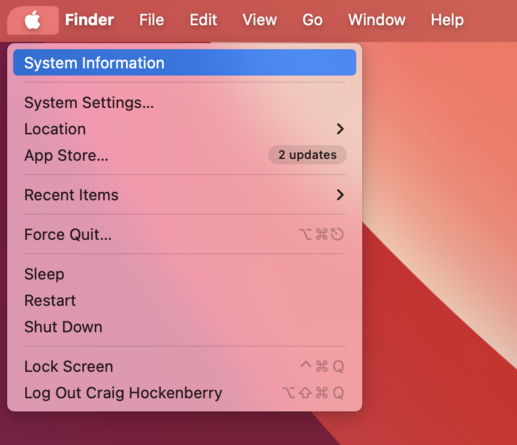
Do you hate how hard it is to get to System Information now? (System Settings… > General > About > System Report…)
Just hold down the Option key in the Apple menu…
@chockenberry I swear that this is due to the new Apple Department of Breaking Things That Were Once Perfectly Fine. They also screwed up the beep-the-iPhone feature on the Apple Watch that was once found by scrolling down and instead moving it to the side click. Imagine spending your life working at Apple making decisions that screw things up. And don't get me going on the new FaceTime gesture feature in Sonoma that happens to mess up anyone using OBS, Ecamm, Vmix, Streamyard, etc. That's from the other Apple group, the Department of Bumbling Incompetence.
And there is absolutely no one at Apple who listens to this stuff.
@chockenberry @davidham So obvious. 🙄
It used to be the case that options and features were primed for discoverability. Not once did I ever feel the need to refer to a manual or instructions.
For a short while though, the OS has gotten quite messy. Beautiful? Yes. Experience? Sub-par (compared to once-held-high Apple standards.)
@chockenberry @gruber For a wonderful period of time it was possible to option click the notification icon at the top right to temporarily hide notifications that built up on the right side of the screen.
In Sonoma, it seems to be back.
Next time you have a cluster of notifications, try option clicking the clock. Then option click it again.
🥳
@chockenberry @gruber 😫 I celebrated and shared too soon.
Option clicking the clock has the desired effect of hiding or revealing on screen notifications, but also turns on Do Not Disturb across all my devices
@chockenberry That’s been there forever. Is it still „About this Mac“ without the option key?
I can’t even remember how else you would get to System Information if not like this…
 Futurist Jim Carroll
 Applewise
 David Senate
 David Ham
 Tito Ciuro
 Recovered Expert
 Melvin Gundlach
 Michael Porter
 Son of a Sailor
 (((Jann Gobble)))🏳️🌈
 Adlangx
 Chris Mohajer
 Jon Reid
 Edmundo Ruiz Ghanem
 Mike Brogan
 Tommy Palmer
 adacosta
 Len Spencer
 Crazor
 Cruising Steveswijk
 robertoranon
 Mo
Mo Albert Kinng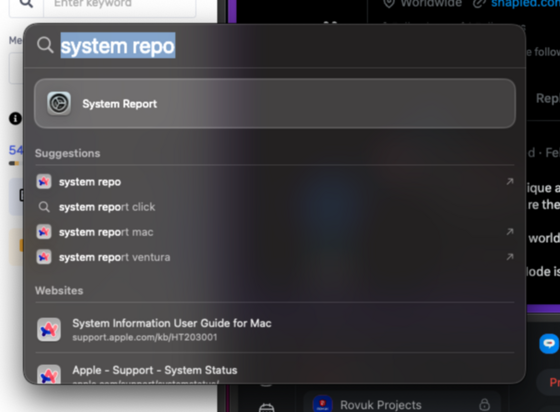
 Jaddie Dodd