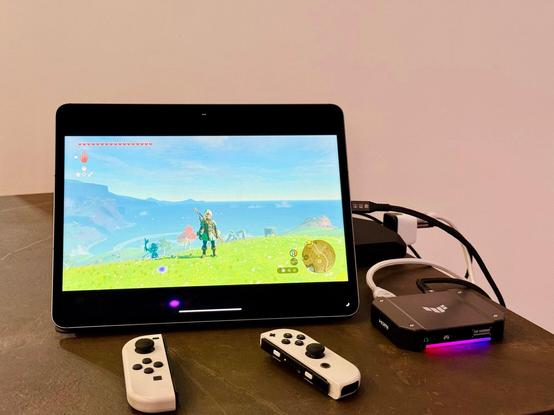
I wrote about how I turned the iPad Pro into a portable display for a *docked* Nintendo Switch in a setup that's 100% portable.

Featuring Orion by the @halide team, a new HDMI capture card, and a new battery pack I have.

It's a ridiculous setup, but I love it, and it's perfect for me: https://www.macstories.net/ipad/using-the-ipad-pro-as-a-portable-monitor-for-my-nintendo-switch-with-orion-a-capture-card-and-a-battery-pack/
Using the iPad Pro as a Portable Monitor for My Nintendo Switch with Orion, a Capture Card, and a Battery Pack

Those who have been reading MacStories for a while know that I have a peculiar obsession for portable setups free of the constraints typically involved with working at a desk or playing games in front of a TV. It’s not that I don’t want to have a desk or dislike my 65” OLED TV: it’s

@viticci @halide Does the battery power the Nintendo Switch AND the iPad at the same time? 😮
@threkk nope
@viticci oh, I guess that is a limitation : / How long does the setup "last"?
@viticci @halide it is impressive, but saying that this is “portable” is a bit much for me. In this sense my whole apartment is portable because I can move the furniture if I want.
@gklka well I can throw all this in a bag and play in a car, which I did, so I'm good. It's portable.
@viticci @halide is that a Genki dock I see 👀
@viticci @halide Makes sense to me, for when you don't want to play on such a big screen as a TV but you also want to enjoy your bigger iPad screen with your Switch.
@viticci ahhhh i need to try this

@viticci @halide

In 2002, I connected my Gamecube to the video-in of my camcorder so I could play Smash on a 2.5" screen when sitting on the toilet.

@michika what other purpose would the video-in port have…?

@viticci @halide What about using something like a Switch Dock Mini and an external battery pack with multiple USB ports. You would be able to fully run the Switch without the need of a dedicated power outlet, instead use usb-c.More compact overall.

Amazon link is the mini dock. The other link is my story on using iPad as an external display. I think I'm going to try the TUF capture card with my setup and see how it goes. Plus my setup allows the iPad and switch to get power from a battery pack at the same time.

https://www.amazon.com/dp/B0B76QTCVQ/

https://appleinsider.com/inside/ipados-17/tips/how-to-use-ipad-as-a-portable-monitor-for-your-nintendo-switch

Amazon.com

@HilliTech Thanks! I've always been skeptical of Switch mini docks I don't know, but if you've been using this I'll get it.
@viticci it definitely feels like "this is so cheap how will this actually work" but it works. I ordered the TUF capture card so I'm going to see how the two pair up. Excited to try Orion with the setup since it didn't work with my current cheap capture card.

@viticci

Would it be too crazy to use the capture card you recommended to connect my 4090 gaming pc to my Mac Studio? 😅

@cwaeland nope, that will work
@viticci Cool, might end up being a solution for sharing my studio display then.

@viticci @halide thank you for this write up! Just bought Orion Pro, Genki Covert Mini, and the Guermok HDMI capture card, and going to give it a try this weekend! 👾

(Also, hoping the Guermok is enough to handle the Switch gaming input as the TUF Gaming Box is a bit out of my price range.)

@viticci @halide great article! Do you have a suggestion for a less expensive capture card or should I not bother to go with something inferior to save money?
@viticci @halide I wonder if this capture card would allow a no lag usage of an iMac as external monitor for a MacBook.
@viticci @halide not to hate, but it's so funny when iOS gets features other systems had for years/decades and and then it's unironically praised as the next thing since sliced bread