I wrote about how I turned the iPad Pro into a portable display for a *docked* Nintendo Switch in a setup that's 100% portable.

Featuring Orion by the @halide team, a new HDMI capture card, and a new battery pack I have.

It's a ridiculous setup, but I love it, and it's perfect for me: https://www.macstories.net/ipad/using-the-ipad-pro-as-a-portable-monitor-for-my-nintendo-switch-with-orion-a-capture-card-and-a-battery-pack/
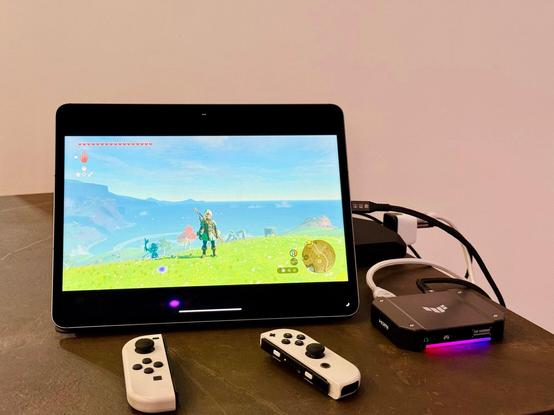
Using the iPad Pro as a Portable Monitor for My Nintendo Switch with Orion, a Capture Card, and a Battery Pack

Those who have been reading MacStories for a while know that I have a peculiar obsession for portable setups free of the constraints typically involved with working at a desk or playing games in front of a TV. It’s not that I don’t want to have a desk or dislike my 65” OLED TV: it’s

@viticci @halide What about using something like a Switch Dock Mini and an external battery pack with multiple USB ports. You would be able to fully run the Switch without the need of a dedicated power outlet, instead use usb-c.More compact overall.

Amazon link is the mini dock. The other link is my story on using iPad as an external display. I think I'm going to try the TUF capture card with my setup and see how it goes. Plus my setup allows the iPad and switch to get power from a battery pack at the same time.

https://www.amazon.com/dp/B0B76QTCVQ/

https://appleinsider.com/inside/ipados-17/tips/how-to-use-ipad-as-a-portable-monitor-for-your-nintendo-switch

Amazon.com

@HilliTech Thanks! I've always been skeptical of Switch mini docks I don't know, but if you've been using this I'll get it.
@viticci it definitely feels like "this is so cheap how will this actually work" but it works. I ordered the TUF capture card so I'm going to see how the two pair up. Excited to try Orion with the setup since it didn't work with my current cheap capture card.