Thwip is now available on iOS 🎺
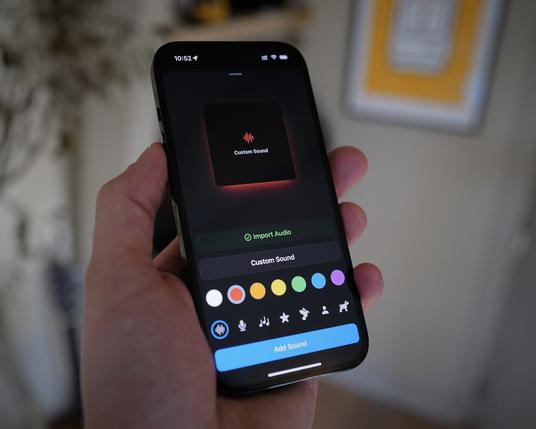
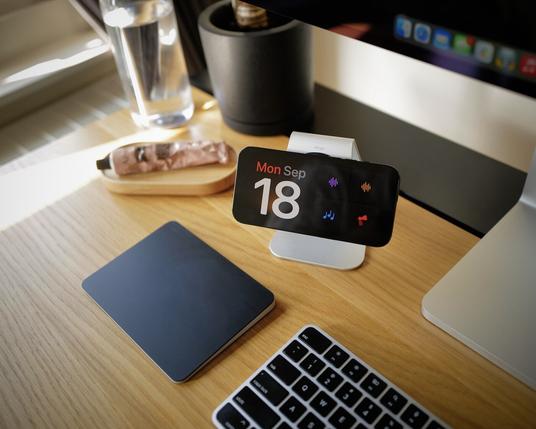
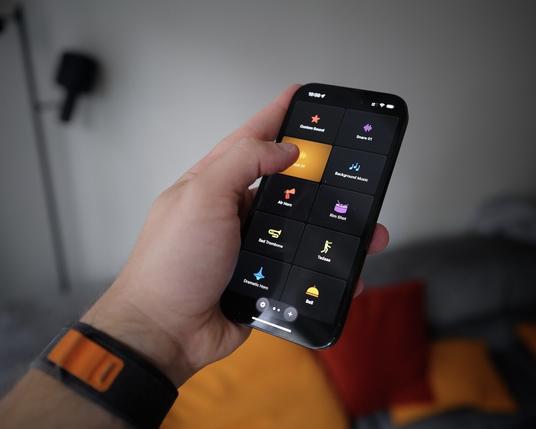
It's a fun soundboard app that let's you import your own custom sounds, interactive widgets, and StandBy support.

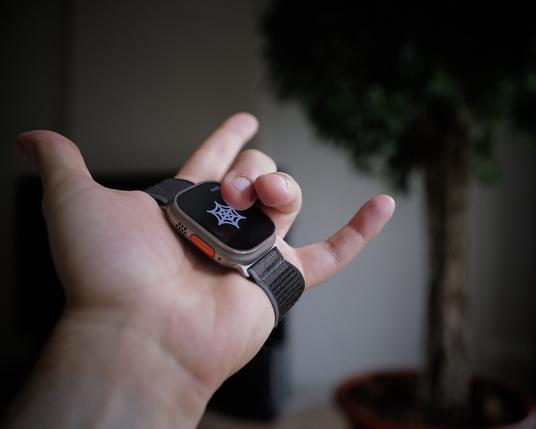
There's also a custom "Web Shooter" mode on watchOS (hence the name).
https://apps.apple.com/us/app/thwip-soundboard/id6466668240

‎Thwip: Soundboard

‎Your favorite sound effects, always one tap away. Thwip is fun and polished soundboard app for iOS and watchOS *airhorn noise* — I know "Thwip" is hard to pronounce *womp womb*, but it supports iOS 17's interactive Widgets and StandBy, the ability to import any audio file using the native File Picke…

App Store
And here's a "trailer”, captured and performed with the actual app ✨
@rafa That's pretty great. 😁
@mark Mark! Thank you 😵🫠🥹
@rafa I had the old version of Thwip and enjoyed it a lot with my kids, but performance wasn't always great. This new version has been great and lots of fun. Though I have definitely been annoying my wife with them. 😅

@mark haha, 'Thwip Inc.’ does not endorse annoying spouses — my lawyer told me to say that.

Yeah it was a complete rewrite, performance is much better 🙏
Now I need to get those custom sounds to sync to the watch 👀

@rafa my favorite app demo ever
@coard @rafa I support this message 👏
@rafa going to be air horning from my bedside table constantly
@mknepprath I support whatever you're into, Michael 😅
@rafa congratulations! Love the trailer. That transition! ❤️

@twatson thanks Tom ♥️

I had to get creative since it was hard to capture the screen of a locked phone on StandBy. Maybe I could do it with QuickTime?

@rafa we need to get lunch so you can tell me your video ways!
@twatson yes to launch! My video ways are “come up with something that won’t take more than 40 minutes to do, GO” 😂
@rafa this sounds like the amount of time I could give to this. 😆
@rafa such a perfectly clever idea for the trailer, bravo 👏🏻 and the app itself is, of course, delightful
@rafa love the name! Congrats 🥳

@JustMeDevin thank you Devin 🥰

It totally doesn't work if you try to say it out loud, which I only realized when I had to say it for the demo video.

@rafa This is very good. Congrats!
@thillsman thank you Tyler 🥰
@rafa Finally I can access the Glass Onion Hourly Dong on demand
@JasonNickel haha
Now I need to build Shortcuts support so it can play automatically every hour.
@rafa make sure to update the About screen for 2.0
@rafa Oh this is awesome! I'll take it for a spin when I record my podcast later today!
@rafa Congrats on the launch Rafa!
@rafa Just what I’m looking for! Just one feature request. Please add an option to set a sound for looping. 🙏
@rafa man this is so good, I’ve been trolling the fam 😂🎛️
@nicolas thank you Nico ❤️
@rafa Pretty cool idea with the webshooter! Gonna try it once my phone is on ios17
@rafa It’s beautiful! Would it be possible to add a complication? Just a button to instanty access the sounds for timely responses.
@Ancro thank you, definitely in the plans ✨
@rafa Super fun app! Suggestions on next revision: remove any sound, emoji picker or SF symbols or both for representation of custom sounds, top two sounds widget option, and tip jar link.

@rafa just had my moment of glory in my daily meeting today thanks to the app

Loving it so hard

@txemaleon haha, thanks for sharing! ✨
What was the winner sound?

@rafa Awesome 🤩

How about some kind of a shuffle setting that lets you play a random sound (from a pre-defined selection)?

@schlauschlau interesting idea, a random button 👀
@rafa Love this app! It has brought an unreasonable amount of whimsy and joy to otherwise boring meetings and social interactions. However, in the spirit of continuous improvement it would be great to have more glyph options for custom sounds. Apple’s SF Symbols library would be a perfect choice.
@rafa Just love the app! Great work, great design, would be great to have more icons to choose from when importing an audio sound
@greatgamer I agree! I’ll add some more soon ✨
@rafa Nice little thing, thanks for that!
A short bug report if I may? There is no way to import a sound from a remote resource (sFTP), it needs to be copied locally. Even if Files.app can access and play the remote files.
@konsonantenboy thanks for this! I didn’t really look into this use case, gonna investigate 🔬
@rafa this is awesome! How do I configure the action in Shortcuts? I see I can specify a "path", but I am not sure what I should write there to play a custom sound I imported.
@muffo of you update to the latest version, you should see a simpler Action, where you can just type in the name of the sound https://mastodon.design/@rafa/111114760442240704
Rafa (@[email protected])

Attached: 1 video Thwip 1.0.1 is now out with a simpler Shortcut action ✨

mastodon.design
@rafa wow! This worked great! Thanks a lot!!
@rafa awesome app! Is there a way to reorder sounds on Apple Watch? Can’t seem to figure it out 🤔
Also imported sounds doesn’t show up in the Watch 
@Gerego not yet, and not yet 😅 working on it!
@rafa awesome, thanks! 👍
@rafa issue report: if I long press a manually imported sound, and tap edit, it brings up the “new audio import” dialogue and I cannot edit existing ones.
@Gerego this is an annoying bug! There’s a workaround: long press a second one and hit edit. Now go back to the previous one and it should work from then on.