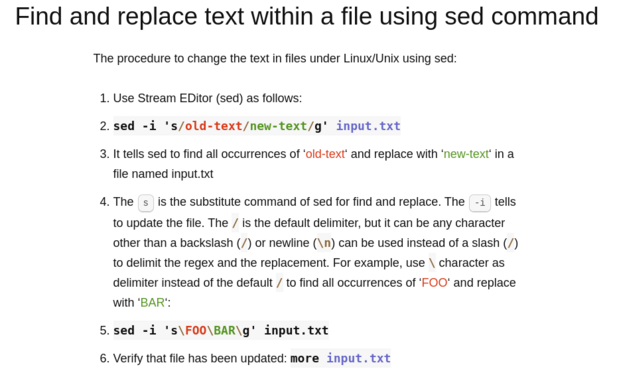
Did you know? The / is the default delimiter in sed, but it can be any character other than a backslash (/) or newline (\n) can be used instead of a slash (/) to delimit the regex and the replacement. See https://www.cyberciti.biz/faq/how-to-use-sed-to-find-and-replace-text-in-files-in-linux-unix-shell/ for more info. #linux #unix #macos #freebsd #opensource
@nixCraft this is breaking my brain. i have yet to find anybody who can explain sed succinctly and with clarity.
@blogdiva yes, sed can be hard but very handy tool.

@nixCraft

And use double-quotes if you need to allow variable expansion.

Example:

sed -i "s|old str ${FOO}|new str ${BAR}|g" input.txt

@nixCraft
Never understood why it doesn't work with sed - I "s/sometext/d"

@nixCraft

Did you forget to escape your backslash? \\

@nixCraft @ is my go to expression delimiter when dealing with path substitutes in sed or vim
@nixCraft
Uhm... to my understanding, backslash is not "/". And I can't test it right now, but I don't think that the backslash-example in the picture would work.
@nixCraft
Tricky little character... If I type a message with a backslash in my Mastodon client (#Fedilab), it doesn't show up in the post. It reappears when I edit the post. Don't know what other clients make of it, so I deleted it from my message.
@nixCraft I usually use the @ character instead of /. It's pretty handy for dealing with file path substitution.
Used sed in production environment to find and replace bounding boxes within EPS-files (Postscript) .. as there were sometimes double and needed to only one, removed the outermost "layer".
@nixCraft "echo cat | sed statement" is always interesting :)
@nixCraft
My favorite delimiter is %