If you ship an app for macOS, please do this! I hardly see this at all with Mac apps.

In your info.plist, add `MDItemKeywords` and the value is a list of keywords for your app separated by commas. This will show up in your More Info window for your app under “Keywords”.

Why is this useful? Let’s say you make a Mastodon client app called anything BUT Mastodon, if you throw “Mastodon” in this list in `MDItemKeywords`, searching “Mastodon” in Spotlight would surface it as a search result!
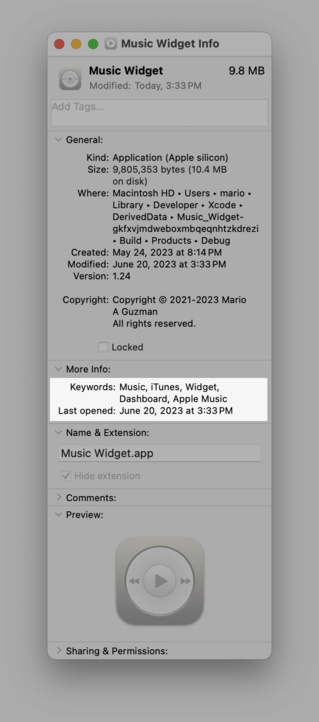
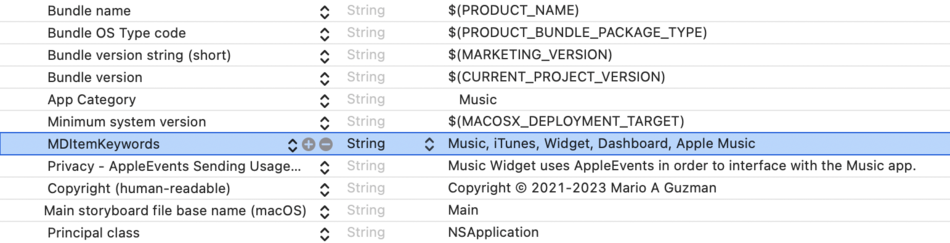
2/2 - I was just reminded of this because I was just trying to add a new calendar even in Outlook so I tried to use Spotlight to open Outlook -- except I typed in “Calendar" because I was thinking “Calendar event” and yet nothing came up. Would have been if Microsoft had added keywords like Email, Calendar, Notes, Invite, etc to surface Outlook in Spotlight better. :D
@marioguzman Was not aware of this. Nice! Is there any documentation of this or similar keys somewhere? I searched and the most relevant result was a StackOverflow question from 10 years ago…
@nighthawk none that I can find but I just did my investigation with Music.app when “iTunes” was bringing up Music as a search result. Found it in the info.plist for Music.

@nighthawk @marioguzman barely. MD* (Metadata) means it relates to Spotlight. You can use mdfind from Terminal to search for files that have the attribute.

It’s mentioned at https://developer.apple.com/documentation/coreservices/kmditemkeywords?changes=__11&language=objc

kMDItemKeywords | Apple Developer Documentation

Keywords associated with this file. For example, “Birthday”, “Important”, etc. An CFArray of CFStrings.

Apple Developer Documentation
@marioguzman had no idea 😅 thanks 🙏
@marioguzman We also have this feature on Linux. It's part of the [Desktop Entry Spec.](https://specifications.freedesktop.org/desktop-entry-spec/desktop-entry-spec-latest.html) as a `Keywords` field, and I **really** love how it works. It makes my life a lot easier. I don't know if iOS also supports `MDItemKeywords` but It's something that I miss a lot while using my Android phone's app search bar.
Desktop Entry Specification

@marioguzman @stroughtonsmith Is there such feature available for iOS as well?
@marioguzman if there was list of macOS table stakes, this would be on it. This feels like the absolute basics.
@marioguzman Nice tip! Thanks! I’m shipping a macOS app soon…
@marioguzman does this work on iOS, too? Or do you know if there is a similar way to appear in iOS Spotlight search?
@meaningful_jan this is macOS only — iOS doesn’t have this.
I want to add keywords to the syst… | Apple Developer Forums

@marioguzman

But if you add keywords that are irrelevant or deceptive, I'll, I'll, I'll give you such a pinch.

@marioguzman I tried to make this happen in one of my favourite MacOS apps. I wonder if it'll take?: https://github.com/keepassium/KeePassium/issues/511