
If you ship an app for macOS, please do this! I hardly see this at all with Mac apps.

In your info.plist, add `MDItemKeywords` and the value is a list of keywords for your app separated by commas. This will show up in your More Info window for your app under “Keywords”.

Why is this useful? Let’s say you make a Mastodon client app called anything BUT Mastodon, if you throw “Mastodon” in this list in `MDItemKeywords`, searching “Mastodon” in Spotlight would surface it as a search result!
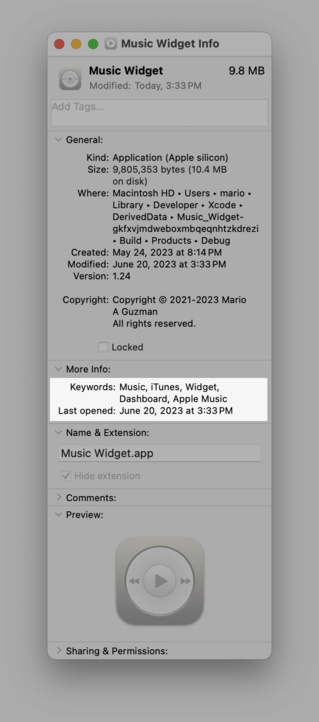
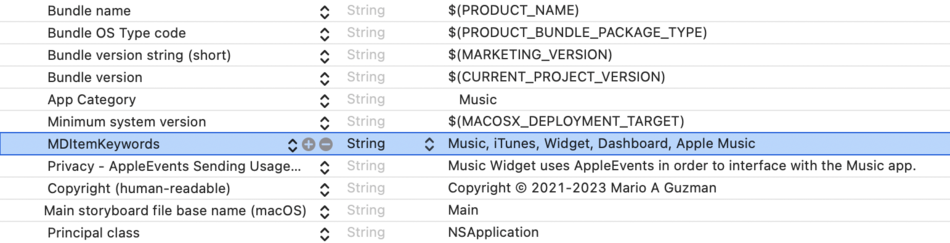
@marioguzman Was not aware of this. Nice! Is there any documentation of this or similar keys somewhere? I searched and the most relevant result was a StackOverflow question from 10 years ago…

@nighthawk @marioguzman barely. MD* (Metadata) means it relates to Spotlight. You can use mdfind from Terminal to search for files that have the attribute.

It’s mentioned at https://developer.apple.com/documentation/coreservices/kmditemkeywords?changes=__11&language=objc

kMDItemKeywords | Apple Developer Documentation

Keywords associated with this file. For example, “Birthday”, “Important”, etc. An CFArray of CFStrings.

Apple Developer Documentation