Hey lovely Mastodon folk. I've just released an HP-35, HP-45, HP-80 simulator called HP-1973 to celebrate the 50th anniversary of the HP-45 calculator. (Free) standalone versions for Mac and WIndows (no need for any Python installation or knowledge) & Python source for Linux. It's been a coding marathon, so it'd mean a lot to me if you could boost this post, so it gets in front of the right people. Download here: https://sarahkmarr.com/retrohp1973.html Enjoy. #retrocomputing #calculators #python #coding #rpn
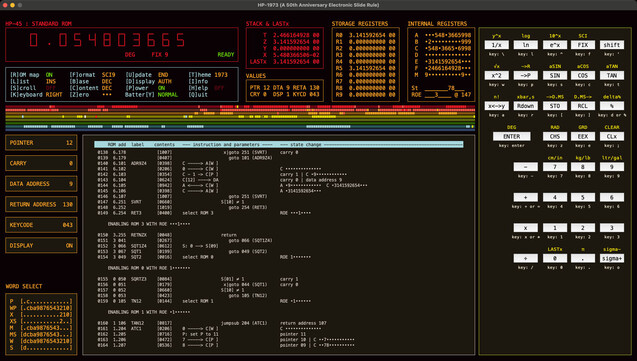
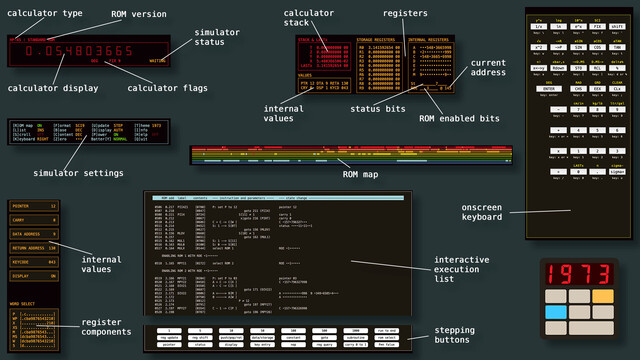
Here are the various parts of the HP-1973 window. The ROM map, keyboard and list pane can all be independently hidden or shown. Download: https://sarahkmarr.com/retrohp1973.html #retrocomputing #calculators #python #coding #rpn
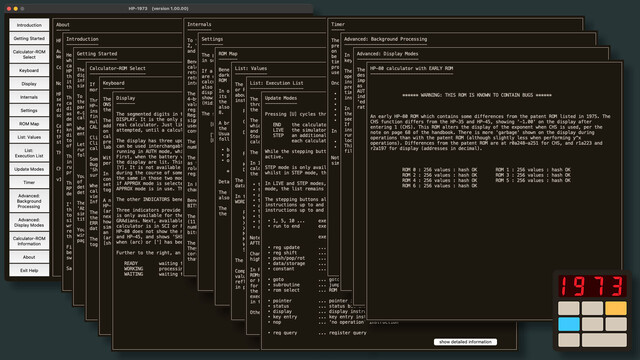
HP-1973 comes with an awful, awful lot of help. Like a _lot_. Really. Loads. Download: https://sarahkmarr.com/retrohp1973.html #retrocomputing #calculators #python #coding #rpn
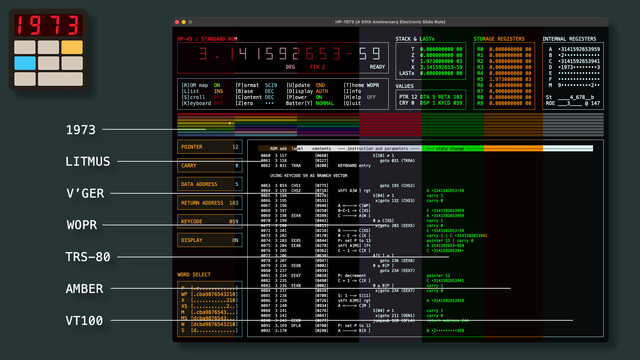
Plus, if you don't like the default colours, HP-1973 has seven included themes. Mastodon types might like "Litmus"... Download: https://sarahkmarr.com/retrohp1973.html #retrocomputing #calculators #python #coding #rpn
@SarahKL This is fascinating. I was reading up about the Cordic algorithm recently - is it possible to see the Cordic algorithm in action with this?
@dm319 It's running the original ROM code, and that uses Cordic, so by using stepping mode and following the code/memory contents, yes, that should be possible, if a little tricky.
@SarahKL Wow, very cool. I suspect I need more understanding to figure it out, but maybe one day I will and demonstrate it with your emulator! I just put in a bid for a HP-67 - the people who made these machines are geniuses.
@dm319 They are! You can see their brilliance and their clear love for what they were doing in the hardware and software. There's a page on the web specifically about the HPs and Cordic: googling should turn it up. Good luck with the '67 bid!
@SarahKL I also find it fascinating that these processors were using decimal down to the CPU level. Sadly didn't get the HP-67 (it was for parts but still went for a lot).
@dm319 Yeah, 4-bit binary coded decimal in the registers. It's get harder and harder to get old HPs for anything affordable. (Although the Facebook group seems full of US folk finding them for 99¢ in estate sales.)
@SarahKL Ha ha, that hurts!! I really don't know at what point in my life I suddenly developed a very strong affection for those trapezoid keys. They are quite rare in the UK - have never seen an HP in the wild in use around here. Maybe HP never marketed to the UK as we were too poor!
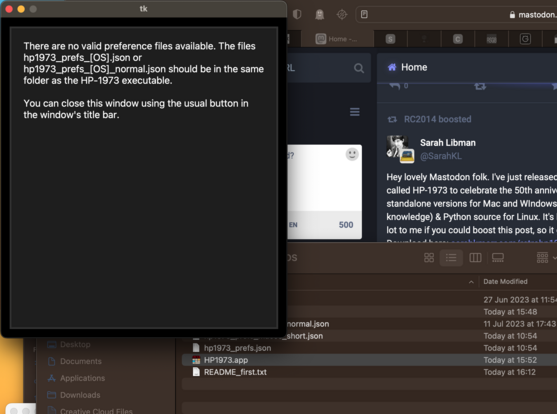
@SarahKL Hi, my Apple silicon Mac comes up with this error, have I done something wrong?
@andyh2o Oh, that's interesting. Hmmm. What happens if you rename hp1973_prefs_normal.json to hp1973_prefs.json?
@SarahKL I tried that and it gave exactly the same error message.
@SarahKL *I copied the file and renamed it, I also renamed the 'normal' and 'short' files (prefixed with xx and the same again.)
@andyh2o I'm having the same problem (for the first time). I'll try to get to the bottom of it. Thanks for letting me know.
@SarahKL You're welcome, I just duplicated it on my 2018 Intel MB Air too. Hope you sort it soon. Cheers
@andyh2o Very odd. I've removed the Mac download whilst I sort it. I'll message you when it's fixed!
@stooovie @andyh2o Working on it. Was bound to happen after launching it, and not the multiple times I tried before launching, right?
@SarahKL @andyh2o especially with the apple silicon transition, yeah :) it's all good
@SarahKL @stooovie It's always the way 🙂
@andyh2o @stooovie OK. I think it's fixed. Could you download and try? (If you're still getting a version with the json files visible, then you're downloading from a cache somewhere: should just be the app and a txt file.)
@SarahKL @andyh2o working! For posterity: I'm on M1 MBP, Ventura 13.4.1
@stooovie @andyh2o Hooray! That was a tense few minutes!
@SarahKL @stooovie Brilliant, working, thanks!
@andyh2o @stooovie Thank you both for taking the time to message me so quickly about the problem.
@SarahKL That program is gorgeous and so are your preview shots. Thank you!
@elb Thanks so much for taking the time to let me know: it's been a solitary (if mostly enjoyable) task coding, so knowing that people are enjoying the result is fantastic.
@SarahKL I can confirm that your target audience is me. ;-)
@SarahKL Just visually that already looks amazing!
@jaseg Thanks: I was going for retro-chic. (Also, I couldn't be bothered to teach myself a more modern windowing environment, for now. Shh: don't tell anyone.)
@SarahKL I'm glad HP calculators are getting some love - bought my first HP-21 when I was a kid. I love Free-42 for my phones and will check out your sim as well - doing what you love and sharing it makes everyone feel good!
@SarahKL this looks complicated and hell I LOVE it!
@SarahKL oh wow! I bought an hp 35 back in the 70s. I just loved that machine and it helped me understand reverse polish. I went on to use the concept in several IT projects/products. I'll def give this a try.
@rogerparkinson Awesome. The emulator includes the original HP-35 ROM code (which has bugs) and the later, fixed ROM, too.
@SarahKL
More power to the calculators!
@SarahKL Very cool. Thanks for sharing.
@SarahKL so cool! Thanks for making this!
@SarahKL Cool! I've got an HP-01 emulator iOS and WatchOS app (Calc-01), free on the app store, Swift code here: https://github.com/lrucker1/Calc01
GitHub - lrucker1/Calc01: iOS/WatchOS calculator based on HP-01 calculator watch

iOS/WatchOS calculator based on HP-01 calculator watch - GitHub - lrucker1/Calc01: iOS/WatchOS calculator based on HP-01 calculator watch

GitHub
@jamoche That looks like it must be so cool on the Apple watch.
@SarahKL Wow, looks amazing! I guess it simulates things at the ROM level and doesn’t reimplement things in a modern language. Does simulation at this level include the (not very accurate) timer function accessible on the HP-45 by holding down CHS-7-8 keys simultaneously?
@stuartmarks It absolutely simulates things at the ROM level: everything the calculator does is done using its ROM code, including any bugs in the original. And yes, the timer function's all there. It just uses '?' to generate the necessary keycode, rather than a combination of keys: then the ROM code does its thing.
@SarahKL Nicely done. I’ll have to give it a try.
@SarahKL unfortunately it is too big to fit my MacBook Air screen
@pandora Ah. If it's just too wide, have you tried shift+k to turn off the onscreen keyboard? You don't need it: all the calculator keys are mapped onto the computer keyboard.
@SarahKL oh yes that kinda works. Thx
@SarahKL
Woa woa woa why do I have an appointment now I must try this...