Okay I think for first attempt getting Linux running I'm just going to sigh and install Ubuntu 23.04. If it works ok and I establish a /home on the other drive I'll consider pop!_os later as an experiment in learning (or living without) kernel signing.

My goals:

- Fit on 37 GB spare partition
- Get Vulkan running and execute one webgpu program in Rust
- (win condition) Successfully support a sound card with 16 channels of IO
- (stretch goal) Get Wayland running

I guess I'm going with GNOME rather than KDE based on looking at the current state of both on Google Image Search (possibly not an accurate source) and feeling less repulsion when I look at GNOME. I don't understand why the titlebar and the "dock" with the launcher icons are 2 different things in GNOME now. Couldnt u just put the launcher icons in the titlebar I only ever run 3 apps anyway

Last time I ran desktop linux was 2016, I tried to use a late beta of KDE Plasma and it never worked right

Current status: Lobster

Ok so installation of Ubuntu was smooth and it seems fine now I'm inside. I'm experiencing one problem, and it is totally baffling: Both in the installer and in the OS itself, a giant banner pops up about once every three minutes saying there is no Internet. This despite the installer downloading from the Internet fine, me running Firefox without problems, etc.

EDIT: This is really irritating actually lol
EDIT 2: It's resolved. Apparently Ubuntu HATES intranets

The fonts do look kinda... well, okay, really bad, especially in Firefox. The lowercase "i" looks strangely like an uppercase "I" much of the time. "Private WIndows".
Within half an hour of installing Linux the lack of visual differentiation between tabs in firefox is already annoying me and I'm already trying to figure out how to install Chrome

UPDATE: I seem to have solved two problems at once as the fonts look a lot nicer in Chrome than in Firefox. Somewhere, RMS just felt a deep pain in his heart and does not know why.

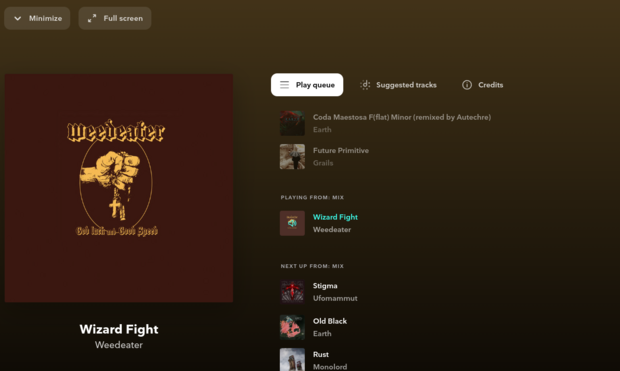
This said, the Chrome fonts also have a problem with i looking like I. lIsten.tIdal.com

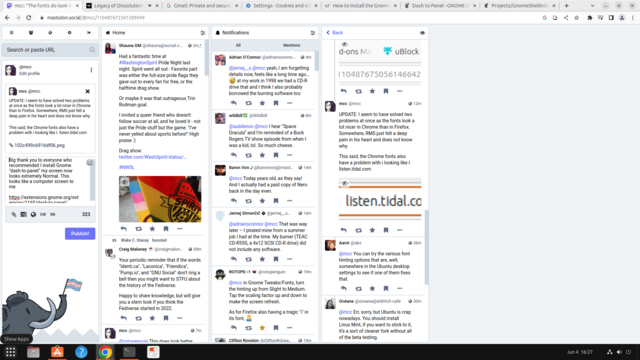
Big thank you to everyone who recommended I install Gnome "dash-to-panel" my screen now looks extremely Normal. This looks like a computer screen to me

https://extensions.gnome.org/extension/1160/dash-to-panel/

Now if I can just I'll be good to go*

* Ready to start the horrible misery of figuring out if nvidia/wayland are working and if not why not

Dash to Panel - GNOME Shell Extensions

Do not break X Windows. Gnome-tweaks is on, she has water and she is listening to her favorite music

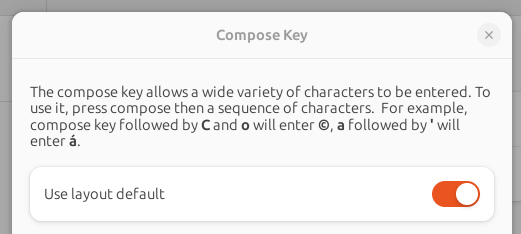
Minor complaints: I want to use the Compose key. In GNOME, if you go to the settings and look up the compose key, you will find a pane helpfully explaining that the compose key is set to the "layout default".

Thanks??! GNOME could you?! Could you possibly tell me what the default *is*!?

Anyway uhhh y'all have been very helpful so: Does anyone know, until I explicitly mapped the Compose key to the Left Super key, GNOME was doing a thing where tapping the Windows key would bring up a kind of Mac OS X Expose screen showing all the Windows. Now Compose is using that key. Anybody know what that shortcut is named. I bet I could map it to something else if I knew what it was named

ALTERNATELY can I just map left super to right alt entire, or something

EDIT: It's "Show the Overview"

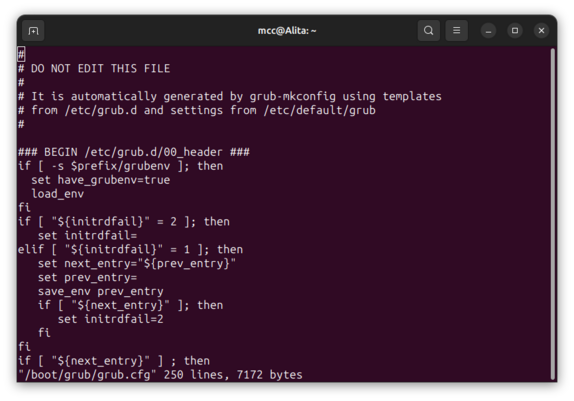
OPINION: It is total garbage that (according to every tutorial?) the way to get grub to default to launching Windows automatically involves manually editing a file (grub.cfg) that begins with "DO NOT EDIT THIS FILE"

Just total unearned confidence that just because I installed Linux on my desktop it *must* be because I prefer to use Linux on my desktop

UPDATE: It doesn't matter that grub is confusing to change the defaults on, because the moment I boot into Windows, it disables grub completely and I have to go into the BIOS boot select menu to get back into Linux.

Which…
was…
…exactly the behavior I wanted to start with.

…the two user-unfriendly OSes on my computers are fighting, and they're canceling each other out.

Extremely surprising outcome: Not only did GNOME mount my Windows/NTFS partition without me even asking it to, it mounted it *readwrite*, and I just opened up /Users and started mucking around with my files and it's just… letting me change things?? Bypassing any and all security?? Did I just fucking accidentally fucking rootkit my own machine by installing Linux?! "lol"
Do you ever post something about computer usability on Internet and immediately worry you have created a major opsec mistake by admitting that last thing out loud
Okay seriously everybody seems to think this is very funny but this is… bad? This is bad practice? Linux distros should not be mounting the entire drive readwrite including files that otherwise would require administrator permissions without at any point, such as during install, asking me if I wanted to do this? I wouldn't have even realized it had done it if I hadn't gone looking? Literally any piece of software on the Linux machine gets owned and it can virusify any part of Windows freely.
Like I want to be able to but ideally it should make me like… enter a password first. Also ideally this should be the default behavior it defaults to until I tell it "no it's okay give every linux app root access to the Windows drive"

OK so unrelated note, a question. I got the compose key working. Now I want to install my custom compose key mappings. I copied over the file from my copy of WinCompose and put it at ~/.XCompose. I logged out and back in.

It did nothing. Not one single app supports my custom compose mappings.

Does… anyone know how to make custom compose work on Ubuntu+Gnome? I'm having surprising troubles finding an answer on Google.

Day one Linux seems to be going okay with my two major issues being:

- Getting apps to respect ~/.XCompose appears to be horrifically difficult, and for "snap" applications, may be impossible
- Getting "click mouse button down to scroll" behavior like on Windows turns out to be horrifically difficult and may be impossible

I *think* I have the NVidia propreitary drivers working. Wayland works, but it causes Chrome menus to glitch out, so I guess I'm going back to Xorg for now

On an unrelated note, I was *very* annoyed to discover that on Linux mousewheel-clicking a tab in Chrome closes it, but now I'm back in Windows, and testing, mousewheel-clicking a tab in Chrome closes it.

…what?

Why would this be the default behavior? That's so weird

@mcc same in Firefox. and mousewheel-clicking the empty space next to the tabs opens a new one
@mcc You need to use gnome-tweak-tool for that, iirc.
@mhoye Is that a different program from "gnome-tweaks"?
@mcc yes, sorry - it was renamed to gnome-tweaks a while back
@mhoye I have gnome-tweaks installed but I can't find anything related to xcompose. Do you know what I could be missing?
@mcc The problem might be the input method isn't compatible? If running an app with GTK_IM_MODULE=xim (or QT_etc) set works then that would seem to be the case (and point directly to a fix).

Also if the app not respecting your .XCompose config file is a Snap, that might be a known-ish problem thanks to containerization: https://bugs.launchpad.net/ubuntu/+source/snapd/+bug/1989475

There are a few things in that bugreport that point to other things to generally test too. Fingers crossed it turns out to be simple!
Bug #1989475 “Snaps don't respect .XCompose” : Bugs : snapd package : Ubuntu

Reproduction recipe: ---> snap install gedit apt install gedit #Set compose key as AltGr under Xorg. setxkbmap -option 'compose:ralt' printf '%s\n' '<Multi_key> <x> <f> : "∫"' >> ~/.XCompose snap run gedit #Type [AltGr] [x] [f] #Expected: ∫ is written #Actual: f is written /bin/gedit #Type [AltGr] [x] [f] #Expected: ∫ is written #Actual: ∫ is written <--- The same final results are observed if the Xim input method is used, by setting "GTK_IM_MODULE=xim". Though you can see that, as ...

Launchpad
@mcc fwiw this sounds like an Ubuntu thing to be "user friendly," I've never seen this on other distros
@mcc yep: https://git.launchpad.net/ubuntu/+source/policykit-desktop-privileges/tree/com.ubuntu.desktop.pkla#n1
I'm not aware of any other distros that change this from the default of requiring a password
com.ubuntu.desktop.pkla - ubuntu/+source/policykit-desktop-privileges - [no description]

@leo I wonder if there is a guide somewhere for making Ubuntu act like other distros.
How to require mount with password of other internal hdd partitions for all mount-style applications (with udev)

I am trying to block access to other partitions with different file systems on the same physical hdd (layout: gpt) by preventing any partition mounting without requiring a password. FSTAB takes c...

Ask Ubuntu
@mcc now we know why the whole secure boot fiasco is a thing.
@mcc "evil maid with a bootable USB drive?"
@jmeowmeow That's just my wife. She's wearing a maid outfit for normal reasons
@mcc oh carry on then, I want to know how to get the Compose key working on my new Debian workstation.
@jmeowmeow are u using gnome and do u actually want help with this
@mcc yes actually though I could probably Google it, the accented character keyboard support in MacOS is one of the things I miss on my DebThinkIanPad laptop.
@jmeowmeow Settings -> Keyboard -> Special Character Entry -> Compose Key -> disable "layout default", pick some other key you like instead
@jmeowmeow Still baffled trying to figure out where to install .XCompose

@mcc on it, thanks!

I have been using the
left side Windows key for "show all active windows" which I discovered by accident in case you were wondering whether I knew what I was doing.

and your font comments are appreciated. ilI1| etc.

@jmeowmeow You can map this (the show all windows verb) to something else (I picked alt-`, as it's conceptually similar to alt-tab) by going to keyboard shortcuts and remapping "overview" to (thing you want)
@mcc and I am p sure the default X for my Debian as installed is Gnome/Wayland
@mcc this is what secure boot tried to save you from 😔
@aeva @mcc wait, how does secure boot help in this case?
@mcc there are tools to edit this file without touching the file itself, but it changes from distro to distro and there are a lot of tutorials saying a lot of different things.
@NafiTheBear IMO u should be able to change it from within Grub itself. This was the opinion I had in 2015 and I'm surprised it hasn't "improved" since then
@mcc the grub editor is very limited. I don't think anyone wants to touch grub as long as it is running ^^''
@mcc The failure of the tutorial is that, as the file says, grub-mkconfig should be used instead of editing the file.
@mcc alt gr, on most European keyboard layouts, at least
@HauntedOwlbear Thanks. I am on en-US and I don't know if there's a standard for this.
@mcc FWIW, I had a similar gripe with firefox on windows, and found the "Arc Darker" theme helped: https://addons.mozilla.org/en-CA/firefox/addon/arc-darker-theme-we/
Arc Darker Theme – Get this Theme for 🦊 Firefox (en-CA)

Download Arc Darker Theme for Firefox. Arc Darker theme for Firefox

@mcc You can try the various font hinting options that are, well, somewhere in the Ubuntu desktop settings to see if one of them fixes that.

@mcc Err, sorry, but Ubuntu is crap nowadays. You should install Linux Mint, if you want to stick to it, it's a sort of cleaner fork without all of the beta testing.

(I'm not telling you to run my favorite distribution or to mansplain you while guessing your use case, nobody should, but that's really the sort of canonical Ubuntu fork.)

@mcc It's probably trying to activate a second connection of some type. Does your machine have both wired and wireless connections?
@mcc It is supremely annoying that this message does not tell you *which* connection it was trying to activate...
@kevin I tried going into network settings and disabling connection 2 but the error just popped up again a moment later like I'd done nothing
@mcc Ugh.
@kevin Wait, it does appear to be fixed now. Maybe it just wanted to print one more popup for the road
@kevin It has two ethernet connections. The second one is a USB ethernet dongle for a private network which I absolutely do not want it trying to talk to.