The perfect confirmation dialog does not existโ€ฆ
@irvingpop tar xvf

@tryst @irvingpop I never understood that comic. It's been straightforward o.o

`tar czf someapp.tgz -C /opt/someapp /opt/someapp/*`

Aaa

@ceralor @tryst @irvingpop It's only straightforward if you have the knowledge.

@maxissakitsune @tryst @irvingpop I mean yeah but the relevance and context for the joke is here: https://xkcd.com/1168/

Where like, someone who uses UNIX or Linux a heavily almost assuredly knows one. They're just that commonly used, even just extracting.

As my ex remembers it: xzf stands for "xtract ze files"

tar

xkcd

@ceralor @maxissakitsune @tryst @irvingpop as someone who's switched to solely using linux for the past 2 years, i'm not defusing that bomb either

i could use the manual page for it, but graphical archive managers have existed for eons so i use that instead

@EeveeEuphoria @ceralor @maxissakitsune @tryst @irvingpop I live by using bsdtar because you don't have to specify the archive type and even after using nix likes for 5+ years I don't remember how to properly use tar because it's designed like shit

ark is just better if you have gui tho
@Mia @ceralor @irvingpop @maxissakitsune @EeveeEuphoria I don't think you need to tell tar what the archive your is these days, either. tar xf works just as well as tar xzf. I could be wrong, tho.
@tryst @ceralor @irvingpop @maxissakitsune @EeveeEuphoria I don't use gnu systems so I could be wrong but most forms of tar can't detect what the archive is

z is for gzip and only gzip
J is for xz and only xz
j is for bzip2 and only bzip2

lzip, lzma, and lzop only have long options
@Mia @ceralor @irvingpop @maxissakitsune @EeveeEuphoria If you set a, tar will attempt to automatically identify the compression type. This is now the default behaviour, so if you feed it a compressed tarball without specifying the compression type, it will attempt to detect the compression type automatically.
@tryst @ceralor @irvingpop @maxissakitsune @EeveeEuphoria the fact that I didn't know a was an option proves my point about tar being a fucking bitch to use
@ceralor @maxissakitsune @EeveeEuphoria @irvingpop @tryst As an actual Linux admin by trade, the switches are the easy part, but heck if I can ever remember which behavior is which for including the trailing slash or not on a directory nameโ€ฆ

@TonyYarusso @ceralor @maxissakitsune @irvingpop @tryst the only time i've ever used it is to make backups of my website, which i've only had to do like, a few times

and the next time i'm doing it it'll be automated in a bash script, meaning i'll probably type a tar command 1 more time

@ceralor @maxissakitsune @tryst @irvingpop I just go tar xf and let GNU tar work out the compression. Then I don't have to worry about what flag to use for .tar.bz2 or .tar.xz
@ceralor @maxissakitsune @tryst @irvingpop you donโ€™t even need the z, tar autodetects gzipped archives
@maxissakitsune @ceralor @tryst @irvingpop problem is, tar is easy. I had to deal with cpio.
@M0KHR @maxissakitsune @ceralor @irvingpop Just cat bytes at a file system device and hope for the best
@tryst @maxissakitsune @ceralor @irvingpop
Real programmers used to use magnets against a disk to flip the bits but since they are all SSDs now, all we have left is to pray to gods of Static. Shamans are grabbing all the top jobs.

@ceralor @tryst @irvingpop I never realized people found tar confusing. It's not obscure, it's just old. Sometimes thinking unix is more of an archeological pursuit than a technical one. vi is descended from ed, which also spawned sed. After ed came ex (oddly, there is no sed equivalent for ex.) So if you understand the conventions of ed, the rest logically follows.

Likewise, if you consider that "tar" is "tape archive" and descended from "ar" and uses similar syntax, it all makes sense.

@ceralor @tryst @irvingpop In other words, if you understand the various conventions, the rest logically follows. While conventions do change and adapt, it doesn't mean they're any more intuitive than the older ones. (though some are, of course) Gesture-based conventions are just as unintuitive to people unfamiliar with them as clicking and dragging, or 1970s unix syntax, or vi, or emacs, or DOS.

Ultimately, it's due to the strength of the convention that it's still useful, albeit to a subset.

@ceralor @tryst @irvingpop But ultimately, to understand unix, you need to "think" unix, and some of that is understanding the local or historical conventions. (Just like learning a spoken language well typically means also learning a culture.)
@irvingpop @spottyfox - If I remember right, it's :wq!, but I prefer Pico/Nano for being WAY less arcane. I don't think I've used Vim since my university days in the 90s.
@dolari @irvingpop @spottyfox Controversial opinion: quitting vi/vim is more intuitive than quitting nano. People just think it's easier as two whole lines are wasted showing the options at the bottom of the screen.
@dolari @irvingpop @spottyfox I actually get angry every time I type "vipw" and find myself in nano or pico or some awful "easy" editor. If they aren't going to call vi it shouldn't be called vipw.
@irvingpop it's :x! not wq you two keyboard stroke fools....

@unixsh_it @irvingpop

Nah, it's <Esc>ZZ ... or maybe :wqa

Vim is gnarly (but not as gnarly as Microsoft Word, which is just baroque)

@irvingpop My voice is my password verify me

๐Ÿ˜‡
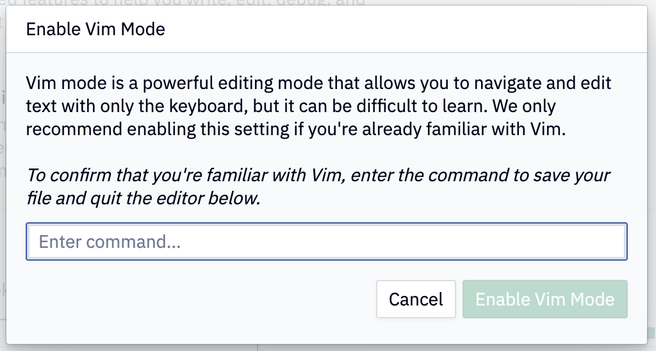
@irvingpop Extended image description:
Enable Vim Mode:
Vim mode is a powerful editing mode that allows you to navigate and edit text with only the keyboard, but it can be difficult to learn. We only recommend enabling this setting if you're already familiar with Vim.
To confirm that you're familiar with Vim, enter the command to save your file and quit the editor below.
Enter command. (Text field.)
Cancel.
Enable Vim Mode.

@irvingpop obsidian?

I had to do that for vim commands

@irvingpop EX$$ ๐Ÿคทโ€โ™‚๏ธ
@irvingpop It's a trick! You can't exit vim!
@irvingpop "The" command? There are at least 2...
@irvingpop @arclight I feel seen. But also kind of offended at the same time.
@irvingpop Are :wq , :wq! and :x all acceptable answers?

@irvingpop

Looks like Obsidian

@irvingpop Ah Obsidian, how I love you. Their Vim mode is pretty good, too. No dot, but there are Ex commands, even.
@fishidwardrobe @irvingpop No dot? Most of the power I get from vim is in writing repeatable commands and using dot a lot. No dot is a severe limitation.

@zygous @irvingpop It is. But Vim is damn complex and I don't think it's reasonable to expect all of it inside something else that's also quite complex.

I'm amazed that it's as complete as it is, TBH.

@irvingpop what a noob! He doesn't know how to use the shells
@irvingpop I usually hate this kind of gatekeep-y stuff, but in this case, itโ€™s absolutely justified. If you donโ€™t know the vim keybindings, you really donโ€™t want to activate that mode (the same way I wouldnโ€™t want to accidentally set my keyboard to Dvorak).
@irvingpop do they accept both :wq and ZZ?
Irving Popovetsky (@[email protected])

Attached: 1 image @[email protected] I had to go back and look to see if it accepted other options, and:

Hachyderm.io