 Hal Pomeranz
Write a Linux command line to traverse a directory of files and summarize the number of instances of each file extension found (e.g., .docx, .jpg, .pdf, etc). Fold all file extensions to lower case-- ".JPG" and ".jpg" should be reported together. Files that have no extension should be reported as "other". List the extensions found in descending numeric order by the number of occurrences of each extension.
I took yesterday's Linux DFIR command line trivia from one of our old Command Line Kung Fu blog postings (Episode 99). It's an interesting challenge and useful for quickly summarizing types of files in a directory by simply collecting and counting the file extensions.
I also liked it because we get to use the "${var##pattern}" expansion, similar to my solution from a couple of days ago using "${var%%pattern}". So there's some nice symmetry.
If you read the original blog posting, my first solution used a funky "sed" substitution to whittle down to the file extensions. It was actually loyal reader and friend of the blog Jeff Haemer who suggested this much cleaner version (and to @barubary who reminded me to quote my variables) :
find Documents -type f |
while read f; do
echo "${f##*.}";
done |
sed 's/.*\/.*/other/' | tr A-Z a-z |
sort | uniq -c | sort -n
"find" gets us a list of files in the directory and then we feed that into a loop that uses "${f##*.}" to remove everything up until the final "." in the file path.
Some file names are not going to have a "." and so the original file path will be unchanged. The "sed" expression after the loop marks these files as being in category "other". Finally we shift everything to lowercase so "GIF" and "gif" are recognized as the same type. Then our usual command line histogram idiom rounds things out.
We could add some other fix-ups to make things nicer:
find Documents -type f |
while read f; do
echo "${f##*.}";
done |
sed 's/.*\/.*/other/' | tr A-Z a-z |
sed -r 's/^jpg$/jpeg/; s/(~|,v)$//' |
sort | uniq -c | sort -n
I've dropped in another "sed" expression before we start counting things. We make "jpg" and "jpeg" count the same and remove some trailing file extensions for backup files to reduce clutter in the output. This just shows that you can arbitrarily tweak the output to suit your needs.
Props to @apgarcia for getting very close to the final solution on this one!
 Oriel Jutty
@hal_pomeranz OK, this one is broken again. Most obviously, it lists the result in ascending numeric order, not descending. 😉
Names without extension are indistinguishable from files named foo.other in the output.
However, it also mishandles
- names that end with spaces (spaces are removed implicitly at two places in the pipeline)
- names that end with backspace (those get silently skipped)
- extensions that contain shell wildcards (e.g. a file like
foo.*will produce funny output)
At minimum you should change the read loop to:
while read -r; do
    echo "${REPLY##*.}"
done
That fixes the issues with spaces, backslashes, and wildcard characters.
However, since all you're doing is removing characters up to the last ., you could replace the whole loop by just sed 's/.*\.//' (or sed 's/.*\././' if you want to distinguish between .other and other).
@barubary Sigh. It's like you've become my shell programming conscience. "Forgive me, Father, for I have committed the following bash sins..."
My original solution in the blog was using sed, but I liked the loop version for readability.
But I am going to sneak back and edit my answer to quote the variable in the loop. Thank you.
 apgarcia
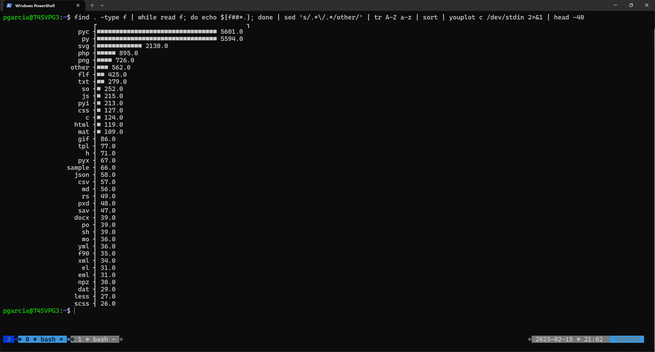
@hal_pomeranz i came across a really cool alternative to the 'sort | uniq -c | sort -rn' histogram pattern:
https://github.com/red-data-tools/YouPlot
see screenshot...