
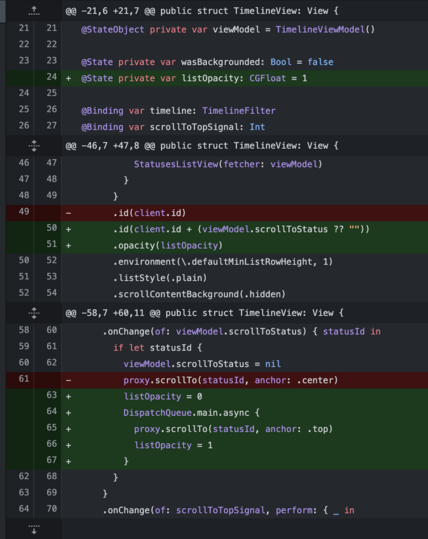
So I had to choose between a random crash on ScrollViewProxy scrollTo and a flash when adding a new posts on the top of the timeline... I choose the flash. This is a sad day for #SwiftUI
@dimillian I had absolutely no idea that programming for scrolling is so difficult. Makes me appreciate your work even more.
@rajat it should not be and it’s not with iOS older framework UIKit. It’s only the case because SwiftUI is still young a bit incomplete but also full of hidden bugs and quirks. But it still worth it because of how fast it is to build stuff with it.

@dimillian But I thought “It Just Works… (tm)”

:D

@dimillian I don't know how you can deal with all that, I would have given up a long time ago 😢
@mttvll I would not even attempt this app as a hobby project without it. So this is my consolation prize haha.
@dimillian I'm not sure why this fixes the crash? Any explanation to share? Thanks!
@alpennec the list view ld force the list to completely re render, and then once it’s rendered I’m scrolling to the original status. The crash seems like it was related to scrolling when the list was not ready. The opacity is just to hide the fact that in between it’s scrolled to the top.
@dimillian thanks for answering! Nice workaround.
@dimillian @alpennec wouldn’t it be better to ID the whole List (or, preferably, ForEach inside?)
@lvalenta @alpennec the id is on the whole list.
@dimillian @alpennec aha! And what about just ForEach?
@lvalenta @alpennec i wonder. It’s so hard to test that every change to test the crash is very time consuming :/
@dimillian @alpennec totally get it. Whenever you have time, try looking at it :-) I think the difference would be that scrolling position per se would not be destroyed in IDing ForEach
@alpennec for now I can’t reproduce but also it’s hard to reproduce, seems like it’s related to the amount of time the app is in background too.
@dimillian @alpennec Had been happening to me each morning for the past couple of days. Had to switch back to Mammoth for my first session of the day because of that. Flashing is not pretty, but it’s still better than a crash.
@slothdude @alpennec it’ll ship today so let me know how it goes. Same for me and it’s been ruining the fun of the app completely. So much that I thought about reverting everything and going back to the old behavior of manual tapping + scroll to top with new posts.
@dimillian I do find it somewhat amusing, though, that in the end your workaround does involve the async main call. I don’t remember how many issues I have had to fix with that piece of chewing gum.
@slothdude Fun fact is that with that alone it would change nothing. The real fix is in the id. Well I mean I guess it's both.
@dimillian can you wrap the opacity changes in withAnimation and pretend it’s a design flourish?
@xurble I’ve tried but it won’t animate properly in this short timeframe :/
@dimillian Yeah I had something similar with a crash on the scrollTo crashing because of index out of bounds. just let me check for it first then ????
@dimillian hah, I had a feeling it wasn’t going to just work 😁. I have a workaround for a somewhat similar issue in Pulse where I temporarily hide the view during updates and show an identically looking placeholder.
@a_grebenyuk and it still crashing with that… much less but I got one… at this point I really don’t know what to do.
@dimillian @a_grebenyuk What to do? Drop down to UICollectionView + UIHostingConfiguration 😛 this seems to be the current state of the art.
@dimillian showing SwiftUI views as UICollectionView (or UITableView) cells is pretty easy.
@a_grebenyuk It’ll take half of the fun out of the app :/ + all the quirks of having UIKit playing nicely with SwiftUI for basically everything a status row does.
@dimillian if there aren’t many crashes, maybe you could simply ignore them.
@dimillian or, alternatively, try using introspect to access the underlying UIScrollView?
@a_grebenyuk I was thinking about that, but does it help me to scroll it at the correct place? I still need something, I can't calculate a scroll offset nor an index path with any guarantee.
@a_grebenyuk That what I'll see with the next hotfix. I don't know how widespread it is. And then I'll bug Apple for a fix hopefully in 16.4....

@dimillian @a_grebenyuk what about dropping in some external libs that bring back the fun?

https://github.com/SwiftUIX/SwiftUIX has a collection view wrapper

GitHub - SwiftUIX/SwiftUIX: Extensions and additions to the standard SwiftUI library.

Extensions and additions to the standard SwiftUI library. - GitHub - SwiftUIX/SwiftUIX: Extensions and additions to the standard SwiftUI library.

GitHub
@teomatteo89 @a_grebenyuk I'm taking a look, at this point.... why not.
I keep trying folks about going all in with SwiftUI. 🚮
@dimillian do you have a public bug tracker? I had some weird ux in the search bar with crashes following.
GitHub - Dimillian/IceCubesApp: A SwiftUI Mastodon client

A SwiftUI Mastodon client. Contribute to Dimillian/IceCubesApp development by creating an account on GitHub.

GitHub
@dimillian are you still beta testing via testflight? my build is stuck on v1.0 there.
@drunknbass just use the App Store version TestFlight is not updated anymore, it’s 1.3.7 now :p
@dimillian I didn’t want to file bugs based off the wrong build so I am on that build, but I might be running the beta on my macbook 😇
@dimillian Looks like the same problem @kharrison was hitting. In his blog post he says “There’s some hope in that Apple did respond to my feedback report (FB11826112), identifying a potential fix for a future OS update.” https://twit.social/@kharrison/109625434512618695
Keith Harrison :clubtwit: (@[email protected])

I’ve hit a frustrating bug in SwiftUI scroll views since the release of iOS 16. https://useyourloaf.com/blog/swiftui-scrollviewproxy-crash/ #swiftui #iOSdev

TWiT.social
@stevengharris @kharrison I do hope they provide a fix. But even then there is something broken in the flow. There is no clear way to know when a List will be ready to scrollTo after a state update.