
#Zotero & Mastodon tricks:
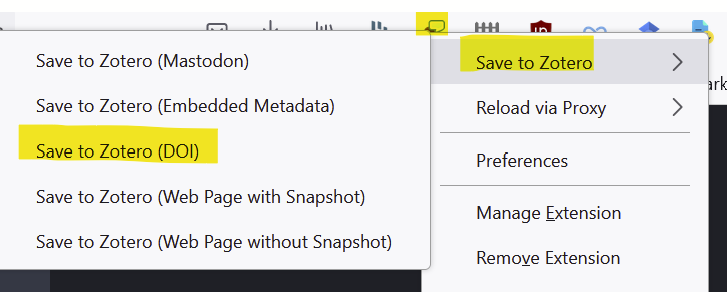
1. Bc Mastodon is using standard HTML, Zotero is able to recognize any DOIs in your current timeline & import the related works into your Zotero library:
Right-click on the Save to Zotero icon in your browser and select "Save to Zotero (DOI)"
2. Did you know you can add individual Mastodon posts with metadata to Zotero when you're looking at a single post view, e.g. by clicking on the timestamp (the URL will look sth like https://fediscience.org/@adam42smith/109639860471806025 )
Sebastian Karcher (@[email protected])

Content warning: #USPol #Speaker

FediScience.org

@adam42smith

Wow, this is sooo cool. It works like a charm and I just added your #Mastodon post to my #Zotero library

#DigitalHumanities @dh #histodons

@adam42smith as someone who always reads Mastodon on phone, I also love how easy it is to save a post to the Zotero iPhone app via the regular share function
@adam42smith Have you already testet the second point for other #Fediverse services besides Mastodon? That should work just as well.
(unfortunately Mastodon does not show which software a post comes from; this one comes from
#Misskey, for example).
@datendetektivin It uses the Mastodon site structure to get the metadata, so it works when viewing any Fediverse post on Mastodon (e.g. your post in my case: https://fediscience.org/@datendetektiv[email protected]/109647966729451322 ) but it won't work when looking at the original post on Misskey (i.e. https://mk.absturztau.be/notes/99phzqigz7 )
@datendetektivin

@[email protected] Have you already testet the second point for other #Fediverse services besides Mastodon? That should work just as well. (unfortunately Mastodon does not show which software a post comes from; this one comes from #Misskey, for example). RE: #Zotero & Mastodon tricks: 1. Bc Mastodon is using standard HTML, Zotero is able to recognize any DOIs in your current timeline & import the related works into your Zotero library: Right-click on the Save to Zotero icon in your browser and select "Save to Zotero (DOI)" 2. Did you know you can add individual Mastodon posts with metadata to Zotero when you're looking at a single post view, e.g. by clicking on the timestamp (the URL will look sth like https://fediscience.org/@adam42smith/109639860471806025 ) (📎1)

ぷにすきー
@adam42smith thank you for sharing this!! @jonny check this out. may also be of interest to those who want to add their #PaperThread #PaperThreadNeuro to Zotero
@manisha @adam42smith hmm wonder if I can just borrow zotero's method of resolving doi from journal URL. should be all JavaScript anyway?
@jonny @manisha The Zotero code is JS, but uses a fair amount of internal functions, so it's not trivial to port.
DOI import itself is pretty straightforward, though. Zotero uses Content negotiation directly at doi.org, so it works with CrossRef & Datacite DOIs: https://citation.crosscite.org/docs.html
DOI Content Negotiation