 Casey Newton
Embarrassed by how much I miss Twitter's quote-tweet feature on here. It was mostly used for evil but I tried to use it for good!!
 Carl Heath
@caseynewton I agree Casey. I miss it for writing, but enjoy the lack of it for reading and experiencing. It also is a reminder of how important design is for experience of social media. The experience of a linear feed with no adds is amazing I think. Along with the possibility of exploring servers. Having a local feed for ones server can mean a lot if engaging in a server of a specific population.
 mintmich
@carl @caseynewton yes, exactly what I thought.... But how do I visit another server) community?
 Sierra Madre
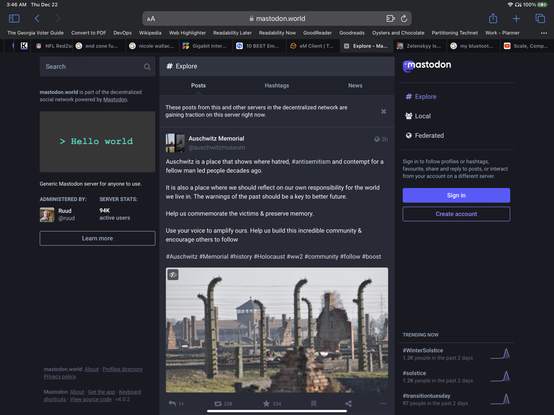
@mintmich @carl @caseynewton the easiest way I’ve found to visit another server is to open a web browser and type the server name in the address bar no additional acct required:
Ex.
Mas.to
Mastodon.world
Default view is explore. You can see posts, trending hashtags, and news.
From the side bar, you can tap to view the local and federated TLs
Also some 3rd party apps let you sign into multiple servers, but you have to create separate accounts.
 Jacob Michelsen
@smadre75 @mintmich @carl @caseynewton Browsing other servers’ local timelines is one of my favorite aspects of Mastodon! Sadly quite a few seem to hide those unless you have an account.
I just wanted to add that there are apps such as Toot! and Metatext that will indeed let you add and browse those servers without having an account, if their local timeline is public. At least Toot! lets you interact with them using your other signed in accounts.
@smadre75 @mintmich @carl @caseynewton as @anchel suggested, it would be great with a Tweetdeck-like interface that let you add local timelines of other servers as columns. Has anyone here run into such an app yet?
@Jickelsen @smadre75 @mintmich @caseynewton @anchel the people at tweetdeck are working on it, called @ivory
 Anchel
@carl @Jickelsen @smadre75 @mintmich @caseynewton @ivory Ah, got excited for a moment, but I see it's only for Mac OS?