Finally figured out how to add GIFs on here. Something I definitely think adds that extra "playfulness" to the #fediverse

For IPhone:

1.Download G-board from app store
2. Settings-General-Keyboards
3. Add G-board keyboard

And we’re back baby! 🔥

#feditips #introduction #newhere #twittermigration #twitter #mastodon #MastodonTips #twittermigration #blackwomendiscover #BlackMastodon #BlackFedi #BlackTwitter #howto #gifs
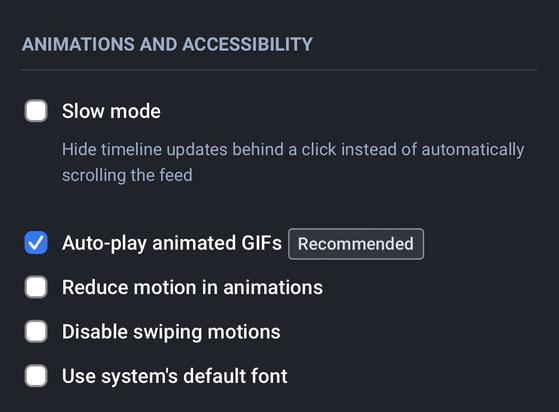
Also remember enable your Mastodon account settings in “Preferences” to “auto play animated gifs” for a better scrolling experience. (See next toot screenshot)

#feditips #introduction #newhere #twittermigration #twitter #mastodon #MastodonTips #twittermigration #blackwomendiscover #BlackMastodon #BlackFedi #BlackTwitter #howto #gifs

@rue that depends a lot on your connection and device. Auto play can significantly slow down loading if everything isn't ideal.
@William_Robison thanks for heads up. Definitely something to look out for. All tips and better adjustments are welcome
@rue
Good, isn't it? I also discovered that SwiftKey has gifs, but I prefer Gboard.
@rue Interesting. I could do that on my phone (I think). What I would like to do is be able to do that on my chromebook. Any thoughts?

@LeeGP I’m not sure about that one ☝🏾 but if I figure it out I’ll update the thread or hopefully someone will find this thread who could help.

Also look under the hashtag #feditips to find more ppl with fediverse experience. Only been here a couple days and still figuring out the ins and outs

@rue

Another plus for the browser-based experience: never had any problems with uploading GIFs - just treat them like any other image. My 2nd pinned toot has two.

Interestingly there appears to be no way to download these GIFs from mastodon. Even if you click to get the url of the mpg it gets converted to, the pretty versatile downloader I use:
https://videodownloaderbot.com/
...cannot download it.

Downloader Bot — Free Online Video Downloader

Download videos from