People with multiple Apple Watches for testing or sleep or whatever:

How do you reliably prevent the “other” one (at a given time) from sounding your daily wake-up alarm from your iPhone?

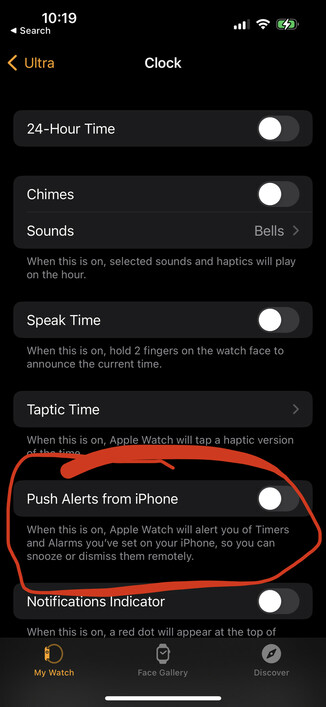
This “Push Alerts from iPhone” setting in Watch -> Clock is off for both watches, but sometimes, the “other” watch sounds the alarm anyway.
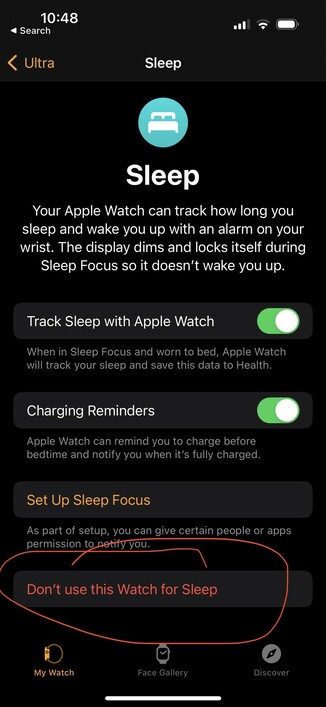
This looks like the answer!

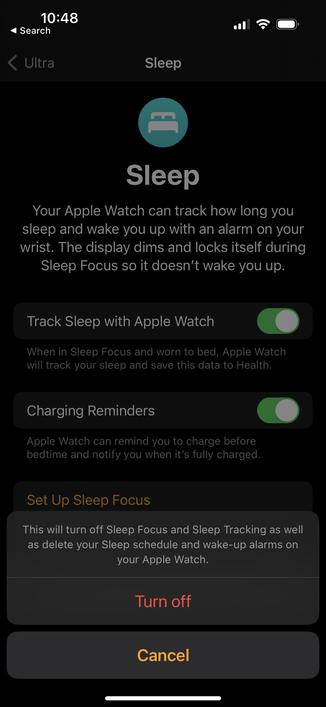
Watch -> Sleep -> Don’t use this Watch for Sleep

Thanks, @captainslim !

https://infosec.exchange/@captainslim/109512751562435199

Chris Johnson (@[email protected])

Attached: 1 image @[email protected] I have two watches, one of which I wear to sleep. I select Don’t use this Watch for Sleep in Sleep settings in the Watch app on the non-sleep one.

Infosec Exchange
@marcoarment @captainslim I tried that but it still went off. Would love an answer to this as I’ve resorted to just completely turning off the watch I’m not wearing, which precludes charging as far as I can tell?

@drgrowmac @marcoarment Is this an alarm you have set in the Clock app or an alarm set in the Sleep section of the Health app? That setting applies to the Sleep settings alarms; I don’t know if it has an effect on the Clock app alarms.

An alarm you set up in the Sleep section of Health is much nicer. It starts out with just a gentle haptic tapping, and the alarm sound starts out softly and gets louder until you dismiss it.

@captainslim @marcoarment yes, the alarm set in the sleep app. The phone stays silent, the watch being worn taps you on the wrist and allows cancellation or snooze, the other watch sounds an audible alarm that keeps going until cancelled on that watch.
@marcoarment @drgrowmac That’s odd, since this is the exact setup I’ve been using for a couple of years, with several different combinations of watches. When I’m in bed, one is on my wrist with sleep tracking turned on, and the other is in the other room on a charger. The alarm on the one I’m not wearing never makes a peep, though it did before I figured out this setting.
@captainslim My iWatch 6 is busy restoring to 9.2 and I'll give it another go tonight. Ultra told not to use sleep and we'll see. 👍
@drgrowmac To be clear, it’s not the Track Sleep with Apple Watch setting that has to be turned off. You have to click the red Don’t use this Watch for Sleep button at the bottom of the page, which will disable everything else on that page.
@captainslim Understood, thank you. I am 99% certain that's what I tried last time, but I'm hoping to be back tomorrow as the idiot that was mistaken. :)