 mauve
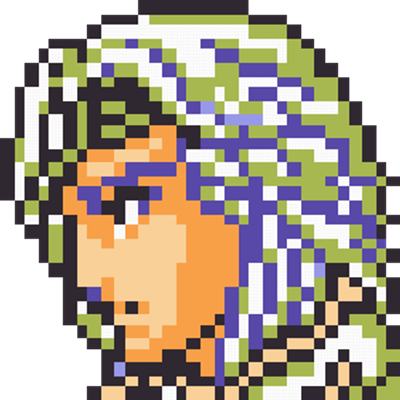
mauvebeen working on some character designs for the story part of puzzle game thing
tbh i'm pretty happy with how this design came out #gamedev

been working on some character designs for the story part of puzzle game thing
tbh i'm pretty happy with how this design came out #gamedev
@codeacula you can see the palette method I used in the image there
the real trick is you don't want to have completely individual color islands, when you do that it makes it look like those are separate, distinct objects that may not exist in the same scene. It's better to have palettes that crisscross on common colors a lot, so that it looks like the entire scene is 'connected' together
@codeacula the 'bad' palette in that one really looks lifeless compared to the 'good' one, y'know? a bunch of individual ramps with something connecting them.
this is mostly because black and white can be considered to be all-consuming voids; they are not so much colors as they are the limits of contrast, so your brain thinks the colors converge far beyond black and white, which increases the contrast between them.
@mauve Yeah, I noticed the branching and how that may have been formed. I think I might try doing something like that and seeing if I can create a color scheme I like and then go from there.
Then again, I should probably start with "draw something" but this piques my interest most right now :D
@jsnlxndrlv I'm using https://www.aseprite.org/
It is really really good, highly recommended for pixel art. Binaries are not free but it's one of those open source apps that you can build yourself if you like.
 Codeacula
 jsn lxndr lv