๐—ช๐—ฎ๐˜ ๐˜‡๐—ถ๐—ท๐—ป ๐—ฑ๐—ฒ ๐—ด๐—ฒ๐˜ƒ๐—ผ๐—น๐—ด๐—ฒ๐—ป ๐˜ƒ๐—ฎ๐—ป ๐—ฑ๐—ฒ ๐—ช๐—ฒ๐˜ ๐—ฒ๐—น๐—ฒ๐—ธ๐˜๐—ฟ๐—ผ๐—ป๐—ถ๐˜€๐—ฐ๐—ต๐—ฒ ๐—ฝ๐˜‚๐—ฏ๐—น๐—ถ๐—ฐ๐—ฎ๐˜๐—ถ๐—ฒ๐˜€? ๐—ช๐—ฒ๐—น๐—ธ๐—ฒ ๐˜๐—ผ๐—ผ๐—น๐˜€ ๐—ธ๐˜‚๐—ป ๐—ท๐—ฒ ๐—ด๐—ฒ๐—ฏ๐—ฟ๐˜‚๐—ถ๐—ธ๐—ฒ๐—ป ๐—ผ๐—บ ๐—ฑ๐—ฒ ๐—ธ๐˜„๐—ฎ๐—น๐—ถ๐˜๐—ฒ๐—ถ๐˜ ๐˜ƒ๐—ฎ๐—ป ๐—ฝ๐˜‚๐—ฏ๐—น๐—ถ๐—ฐ๐—ฎ๐˜๐—ถ๐—ฒ๐˜€ ๐˜๐—ฒ ๐˜ƒ๐—ฒ๐—ฟ๐—ฏ๐—ฒ๐˜๐—ฒ๐—ฟ๐—ฒ๐—ป? ๐—˜๐—ป ๐—ต๐—ผ๐—ฒ ๐—ธ๐—ผ๐—บ ๐—ท๐—ฒ ๐—ถ๐—ป ๐—ฐ๐—ผ๐—ป๐˜๐—ฎ๐—ฐ๐˜ ๐—บ๐—ฒ๐˜ ๐—ต๐—ฒ๐˜ ๐—ถ๐—บ๐—ฝ๐—น๐—ฒ๐—บ๐—ฒ๐—ป๐˜๐—ฎ๐˜๐—ถ๐—ฒ๐˜๐—ฒ๐—ฎ๐—บ ๐—ข๐—ฃ ๐˜ƒ๐—ผ๐—ผ๐—ฟ ๐—ฒ๐˜…๐˜๐—ฟ๐—ฎ ๐—ถ๐—ป๐—ณ๐—ผ๐—ฟ๐—บ๐—ฎ๐˜๐—ถ๐—ฒ?
Benieuwd? @zouwen van der Zouwen vertelde dit allemaal tijdens de webinar 'Kwaliteit publicaties' (Roadshow overheidspublicaties mei 2025). Kijk deze nu terug op ons youtubekanaal: https://www.youtube.com/@Logius-KOOP

#WetElektronischePublicaties, #Wep, #OfficiรซlePublicaties, @Logius

#WEP kรผndigt schlappe 28% Preiserhรถhung bei der Fernwรคrme an (#Hรผckelhoven)โ€ฆ

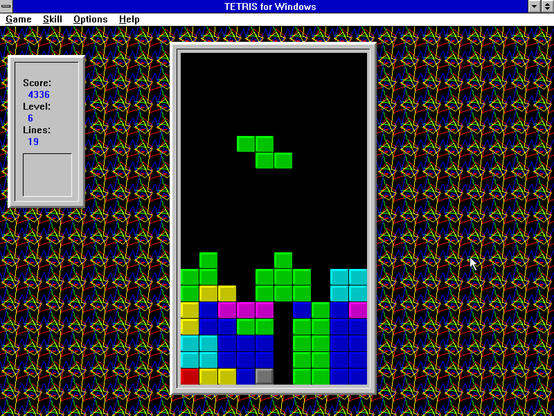
It's 1:30am here. I just wanted to make a nice screenshot of TETRIS for Windows for the Internet Archive. Now, I've been playing for an hour and a half! Holy cow... this game is still addictive as hell! ๐Ÿ˜œ

#TETRIS #RetroGaming #Windows #Microsoft #WEP #90s #PCGaming #InternetArchive

Nostalgia: Today I can play with #WEP again :D

Wireless Security Protocols Explained: WEP, WPA, WPA2 & WPA3 ๐Ÿ“ก๐Ÿ”

Understanding wireless security protocols is essential for protecting your network from unauthorized access and ensuring data confidentiality.

๐Ÿ“˜ Key Protocols & Their Characteristics:

1. WEP (Wired Equivalent Privacy)
โ€ข Introduced in 1997
โ€ข Weak encryption (RC4), easily cracked
โ€ข Deprecated and insecure

2. WPA (Wi-Fi Protected Access)
โ€ข Interim solution after WEP
โ€ข Improved encryption with TKIP
โ€ข Still vulnerable to certain attacks

3. WPA2
โ€ข Widely used today
โ€ข Uses AES-based CCMP encryption
โ€ข Supports enterprise (RADIUS) and personal (PSK) modes

4. WPA3
โ€ข Latest standard with stronger security
โ€ข Resistant to brute-force attacks
โ€ข Supports SAE (Simultaneous Authentication of Equals)
โ€ข Enhanced encryption and forward secrecy

Why it matters:
Choosing the right wireless protocol significantly affects your networkโ€™s resilience against common attack vectors such as packet sniffing, replay attacks, and credential theft.

Disclaimer: This post is for educational and awareness purposes only. Always secure your wireless networks using the latest standards.

#WirelessSecurity #WPA3 #WEP #WPA2 #CyberSecurity #InfoSec #EducationOnly #WiFiProtocols #NetworkSecurity #WiFiEncryption

Daily old piece 12 (Easter edition part B)!

Tbfh this anime had one of the most disappointing endings in the history of anime and in retrospective it wasn't even that great, but I still like how this came out.

From 2021.


#eli's-art #art #digital-art #procreate #illustration #fanart #wonder-egg-priority #wep #ai-ohto #easter #old-piece

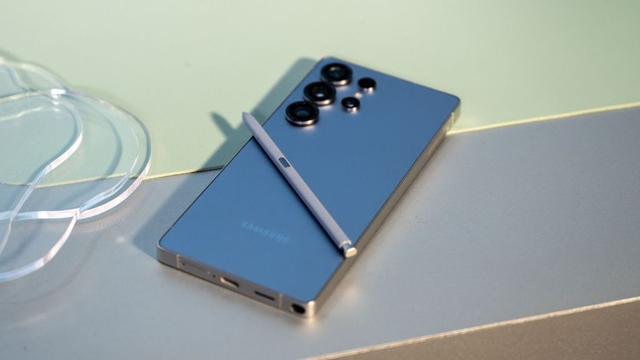
Turn off WEP on your Galaxy S25 to increase security

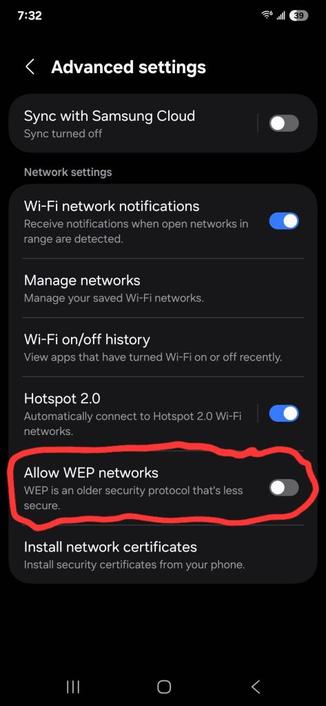
One of the new features introduced in the brand new Samsung flagship, the Galaxy S25, allows you to determine whether your phone is allowed to connect to Wired Equivalent Privacy (WEP) Wi-Fi networks. Unfortunately, itโ€™s turned on by default, despite the option that says that WEP is โ€œan older security protocol thatโ€™s less secure.โ€

Over the years, people and security experts have constantly discouraged using WEP as a security protocol for Wi-Fi access points as it can be hijacked very easily due to weaknesses related to RC4 that were disclosed back in 2001. This document explained how such cipher, along with the initialization vector (IV), were exploited that resulted in a passive attack that could recover the RC4 key.

In general, WEP is insecure. Luckily, on your Galaxy S25, you can configure your smartphone to forbid connections to WEP-protected access points using this new configuration switch in the below menu:

Follow the steps to disallow connections to WEP networks:

  • Open the Settings app
  • Navigate to Connections > Wi-Fi > three dotted menu button > Advanced settings
  • Toggle the Allow WEP networks entry off
  • Upon turning it off, your phone will no longer be able to connect to such networks. Youโ€™ll then be only able to connect to WPA-protected networks, especially those protected with WPA3. We recommend doing this after either obtaining the Galaxy S25 or updating your eligible device to One UI 7.

    The best solution to those relying on those networks is to either switch to WPA3 protection if youโ€™re managing them yourself, or contact your network administrator for more info. You can consult your router manual for more info about changing the network protection method.

    #Android #Network #Networking #news #oneUi #OneUI7 #Samsung #smartphone #Tech #Technology #update #WEP #WPA #WPA2 #WPA3

    Wired Equivalent Privacy - Wikipedia

    Well, turns out it's a bit picky, but I did find a few cool games I could actually play on Windows 3.0.

    #RetroGaming #Windows #Oldschool #90s #SimCity #WEP #Mamba

    Morgen, vrijdag, Drink & Draw numero 17 met Anne Stalinski bij 'Werk, Expositie, Plaats' oftewel #WEP aan de Van Leeuwenhoekstraat #Groningen

    https://stichtingwep.nl/drink-draw-17/

    Drink & Draw #17 โ€“ WEP

    Aanstaande vrijdag Drink & Draw numero 17 met Anne Stalinski bij #WEP
    https://stichtingwep.nl/drink-draw-17/
    Drink & Draw #17 โ€“ WEP