I would like to invite #visidata users, who also work with NASA's Planetary Data System data archive, to try out my employer's shiny new visidata plugin that lets you read anything with a PDS label that the "Planetary Data Reader" package (also by my employer ;-) understands, into visidata. 🧵

Built a little script to download a JSON dump of all my followers, and now I can use #VisiData to ask questions like "On which instances do most of my followers live?"

If you're curious: It's 600 instances in total, which I think is pretty good.

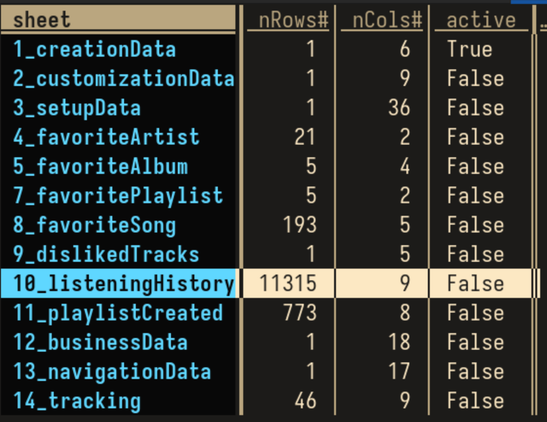
When you request a dump of your personal data from #Deezer, they provide you with a single XLSX file with multiple sheets, and frankly, I don't hate it.

It's easy enough to work with using open source tools, has built-in compression, and is more strict than just getting a garbage truck full of JSON objects dumped in your homedir.

Some screenshots of the sheet in #Visidata.

Przyszło Wam kiedyś do głowy, aby przeglądać pliki CSV w terminalu? Niektórym przyszło i prezentują do tego narzędzie #Visidata.

https://python.plainenglish.io/error-analysis-from-your-terminal-using-visidata-68cb92fc9043

Error Analysis From Your Terminal Using Visidata

Viva La Command Line

Medium

@saulpw
@visidata

I just started using #visidata three days ago, and it's already become indispensable to me. It's now my main way to view #MicrosoftExcel files / #csv

The shift+F frequency tables are simply genius. Also, the easy joins and the columns statistics and well... Everything.

Thanks for all of your hard work!

命令列漫談 10: 終端機的 Dataframe 檢視器 visidata
https://www.youtube.com/watch?v=9Fq7ObFcRlE #visidata
命令列漫談 10: 終端機的 Dataframe 檢視器 visidata

YouTube
@cbjr77 Thanks I did not know about that #GUI tool. Will see how it compares with #visidata (https://www.visidata.org) which is my go-to tool for #CSV #CLI exploration.
Open-source data multitool | VisiData

Command-line interactive multitool for tabular data.

VisiData

I love #VisiData.

So I have this TSV (tab-separated) file of my YouTube history, including two columns that I wanted to make more readable.

Import Python's datetime module:
g Ctrl-X datetime

Move to the "duration" column, mark it as integer ("#" key) and create a derived, formatted column:
=datetime.timedelta(seconds=curcol)

Mark view_count as int (# again), open columns sheet (Shift-C), move to "fmtstr", hit e to edit, enter "{:,.0f}", hit q to close column sheet.

https://jsvine.github.io/intro-to-visidata/

An Introduction to VisiData — An Introduction to VisiData

#TIL about #Visidata: https://jsvine.github.io/intro-to-visidata/

If you ever need to wrangle, filter, sort, edit, navigate, subset or get basic statistics out of #data in #CSV format (comma-separated values), this is a super useful piece of software. It takes raw data and implements a very handy subset of functionality from spreadsheets directly on top, with both a keyboard (modal Vi-style operation) and menu/mouse driven operation.

Nice one to have in the toolchest.

An Introduction to VisiData — An Introduction to VisiData

@ricci it's amazing how much quick and simple and correct analysis you can already do with tools like #visidata