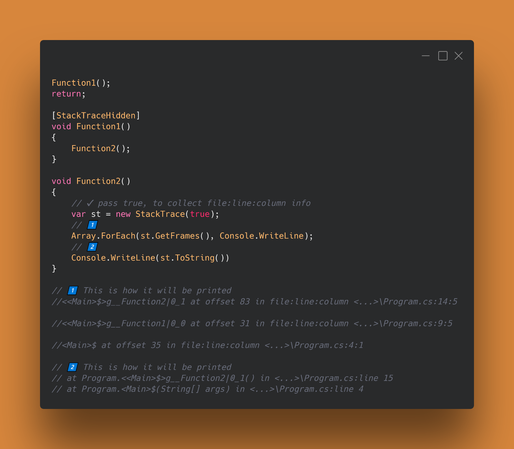
System.Diagnostics is a vast source of interesting classes. One such gem is the StackTrace class. It allows us to collect the frames of the current execution call if we need to know how we ended up at a particular location. This information might be useful for diagnostic purposes.
A stack trace will provide the most information in Debug mode since it includes debug symbols.
Connected with the stack trace is the StackTraceHidden attribute. This attribute allows us to decorate methods that should be hidden from being included when the stack trace is printed. These methods will show up if we iterate through all the frames in the stack trace, but they will not appear if we use .ToString().
Docs 📑: https://learn.microsoft.com/en-us/dotnet/api/system.diagnostics.stacktrace?view=net-8.0
#dotnet #stacktrace #systemdiagnostics #stacktracehidden
---
If you find this useful, consider giving a like & share ♻
 Brandon H


 Sascha Stumpler

 💾 Paweł Łukasik