
@counterVariable
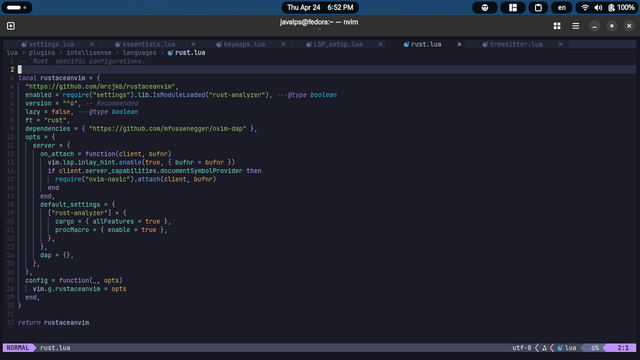
5. Notice line no(s). 14, 15, 16. If you use `nvim-navic` or `barbecue` for winbar then don't need to tinker it. Otherwise you can remove it.
6. `codelldb` for rust, is recommended if you use debugger and have a setup.

#neovim #rust #rustaceanvim #rustanalyzer #dap #codelldb #lazy #mason
@counterVariable
3. Do not setup LSP with rust-analyzer beforehand, rustaceanvim will do it for you.
4. Look at line no. 5, since, you probably didn't/haven't setup any `settings.lua` file to manage macro Neovim settings. Replace the line with `enabled = package.loaded["rust-analyzer"] ~= nil`. This way rustaceanvim will only work when rust-analyzer is available. If you don't care about it remove line no. 5 completely.

...

#neovim #rust #rustaceanvim #rustanalyzer #dap #codelldb #lazy #mason

@counterVariable Yea, I have something that works.

NOTE : I've made few assumptions :
1. You use Lazy as package manager.
2. You use Mason.

There are few things that you need to keep in mind :
1. My path for this file in my config is -> `lua/plugins/intellisense/languages/rust.lua`. But you can put this file anywhere within the `plugins` directory.
2. You need rust-analyzer for rustaceanvim to work.

...

#neovim #rust #rustaceanvim #dap #rustanalyzer #codelldb #lazy #mason

@stevenaleach Hey 👋. Do you have any guide on how to start with #rust ?

#neovim #rustanalyzer #rustaceanvim