WE AND THE COLOR
This Business Proposal Presentation Template Gives Agencies a Real Competitive Edge
Clients often decide before you finish your first slide. That’s not cynicism — that’s how visual communication actually works. A well-designed business proposal presentation template signals competence, taste, and preparedness before a single talking point lands. The E-Type template for Adobe InDesign does exactly that. Designed by Adobe Stock contributor E-Type, this 16-page InDesign presentation template runs at a crisp 1920 × 1080 px widescreen format and packages editorial authority into a fully customizable, pitch-ready structure. It’s one of the more considered business proposal presentation templates on Adobe Stock right now — and the design choices behind it are worth examining closely.
Download the template from Adobe StockPlease note that this template requires Adobe InDesign installed on your computer. Whether you use Mac or PC, the latest version is available on the Adobe Creative Cloud website—take a look here.
Download a business proposal presentation template by E-Type for use in Adobe InDesign. Download the template from Adobe StockWhat Does a Business Proposal Presentation Template Actually Need to Accomplish?
Before we talk about what this template does, it’s worth asking that foundational question. Most agencies and freelancers treat presentation design as a formatting task. They pick a template, drop in text, and call it done. But the strongest proposal decks function as persuasion systems. They sequence information deliberately, manage visual energy across slides, and create the emotional arc that leads a client from skepticism to conviction.
This business proposal presentation template builds that arc into the file itself. The slide order moves from identity through diagnosis, strategy, evidence, logistics, and closing. You don’t need to restructure anything. The narrative logic is already there — a framework I call Structural Pitch Sequencing.
Structural Pitch Sequencing is the deliberate editorial ordering of proposal sections to mirror a client’s psychological decision journey. You start with who you are, move to what the problem actually is, offer your solution, prove it with data and credentials, handle the practical concerns (budget, timeline), and close with social proof. This template follows that exact path across 16 slides.
The Visual Logic Behind the Design
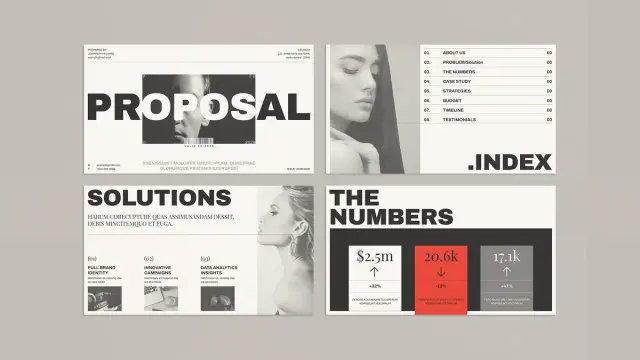
The design language here runs on what I’d call the Editorial Tension Model — a visual principle borrowed from print magazine design. Massive condensed sans-serif headlines sit against open negative space and quiet body text columns. That contrast creates graphic tension without visual chaos. The typography dominates without suffocating the content underneath it.
The palette operates through a three-value system I call the Chromatic Authority Stack: black for structure and confidence, white for breathing room and clarity, and red deployed with precision at the single most critical narrative moment — the Problem slide. That’s not an accidental color assignment. Red creates urgency. Placing it specifically on the “Problem” slide means the visual signal and the content signal reinforce each other. That kind of intentional design decision separates a professional proposal template from a generic one.
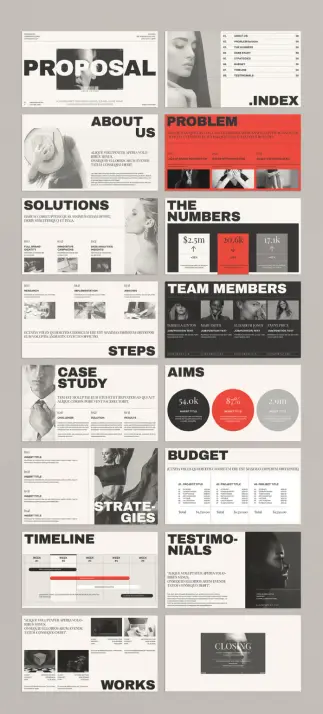
The 16 Slides Inside This Business Proposal Presentation Template
Each of the 16 predesigned pages covers a specific stage of the pitch narrative. Together they form a complete, self-contained presentation system. Here’s what the full deck includes:
- Cover / Proposal — Oversized typographic headline with space for studio name, client, and project reference
- Index — Numbered table of contents with right-aligned section codes and clean grid alignment
- About Us — Split layout with a full-height image placeholder and a structured intro text block
- Problem — Full red background slide with a bold headline and three-column issue breakdown with supporting images
- Solutions — Numbered three-column solution grid with supporting portrait image
- The Numbers — Data-heavy stats slide featuring three key metrics with directional performance indicators
- Steps — Research, Implementation, and Analysis workflow grid with image placeholders
- Team Members — Dark background team grid with headshots, names, titles, and contact lines
- Case Study — Three-column Challenge / Solution / Results breakdown
- Aims — Circular data visualization layout with three overlapping metric rings
- Strategies — Four-point vertical strategy list with full-bleed editorial image
- Budget — Three-column project budget table with line-item detail and totals
- Timeline — Five-week Gantt-style bar chart with phase labels and milestone markers
- Testimonials — Pull-quote layout with client portrait and attribution
- Works / Portfolio — Multi-image case study grid with captions and client references
- Closing — Minimal dark-background closing slide with contact and studio information
Every section maps to a real client concern. The budget and timeline slides are particularly well-structured — they’re the slides where most presentations lose momentum because the layout can’t handle the information density. This InDesign proposal template handles that density cleanly.
Slide Density Calibration: The Design Principle Most Templates Ignore
One of the strongest qualities of this deck is what I call Slide Density Calibration — the intentional variation of information load across slides to control the viewer’s cognitive energy. Data-heavy slides like “The Numbers” and “Budget” pack meaningful content into organized grids. Narrative slides like “Testimonials” and “Closing” strip back to a single strong visual element and a statement.
That rhythm prevents cognitive fatigue. It gives the audience space to absorb dense information by following it with a visual rest. Most template designers don’t think at this level. They either make every slide busy or every slide sparse. This template paces itself like a well-edited piece of writing.
Why Adobe InDesign Is the Right Platform for This Business Proposal Presentation Template
InDesign is not the obvious choice for presentation design — most people reach for PowerPoint or Keynote first. But for a business proposal presentation template at this visual quality level, InDesign is the correct tool. It offers typographic precision that slide software simply doesn’t match. Kerning, leading, optical margin alignment, and advanced paragraph styles all give you control over how your text sits on the page.
Practically, editing this editable presentation template is fast. Every text frame is fully unlocked. Image placeholders accept your own photography, product renders, or illustration work with a simple place command. The global color swatches mean you can shift the entire deck to your brand palette — swap the red accent for your primary brand color and update the full template in seconds.
InDesign also supports interactive PDF output. You can add hyperlinks, animated buttons, video embeds, and slide transitions directly in the file. An agency producing a pitch deck template in InDesign can deliver a fully interactive proposal as a PDF without touching any other application. The 1920 × 1080 px widescreen format exports perfectly for screen presentations, whether on a laptop, conference room display, or external monitor.
Everything in the Preview Is a Placeholder — Here’s What That Means for You
The images and text throughout the preview are placeholder content. They show the layout in action, not the finished product. Think of them as visual scaffolding — they help you read the proportions and spatial logic of each slide before your own content populates the frame. Replacing them inside InDesign is genuinely fast. This professional proposal template is built for quick turnaround without compromising quality.
Who Actually Needs a Business Proposal Presentation Template Like This?
The honest answer is broader than you might expect. Creative agencies use this kind of business proposal presentation template to frame campaign strategies and brand recommendations. Consultants use it to present research findings and structured recommendations. Startups use it to walk potential partners or investors through their roadmap and early traction. In-house marketing and brand teams use it to pitch internal initiatives to leadership boards.
The editorial aesthetic carries a specific signal regardless of who is presenting. It communicates taste, attention to detail, and investment in how information gets delivered. That signal lands before a single word of spoken content, and in competitive pitches, it shapes how the rest of the presentation gets received.
A Direct Opinion on What Makes This Template Worth Your Attention
Most corporate presentation templates fall into one of two failure modes. They either drown in decorative excess — gradients, stock icons, drop shadows — or they’re so generic that no visual identity survives the format. This template occupies a third category: editorial restraint with structural intelligence.
Download the template from Adobe StockThe design language comes from print culture, not slide culture. That distinction is visible immediately and it matters. Clients sitting across the table from this proposal slide design feel the difference, even if they can’t name it. Visual authority is a form of credibility. Credibility influences decisions. For any agency or freelancer serious about winning work, a well-designed InDesign presentation template like this one is not a cosmetic choice — it’s a strategic one.
Frequently Asked Questions About This Business Proposal Presentation Template
What software do I need to use this business proposal presentation template?
You need Adobe InDesign to open, edit, and customize this template. InDesign is available as a standalone subscription or as part of Adobe Creative Cloud.
Can I change the fonts and colors in this InDesign presentation template?
Yes. The template uses globally defined color swatches and fully unlocked text frames. You can update the color scheme to match your brand identity in minutes, and you can replace or adjust any typeface directly inside InDesign.
What is the resolution and aspect ratio of this professional proposal template?
The template runs at 1920 × 1080 px in the standard widescreen 16:9 format. It outputs perfectly for screen presentations, exported PDFs, and interactive InDesign presentations.
Are the images in the preview included in the downloaded file?
No. All images in the preview are placeholder graphics that demonstrate the layout system. You replace them with your own photography, illustrations, or product renders inside InDesign.
Can I add interactive features to this business proposal presentation template?
Yes. InDesign supports interactive PDF features, including hyperlinks, animated buttons, video embeds, and slide transitions. You can build a fully interactive pitch deck from this template without additional software.
How many slides does this template include?
This business proposal presentation template includes 16 fully predesigned, customizable pages covering all core pitch sections — from cover, index, and about us through problem, solutions, data, team, case study, aims, strategies, budget, timeline, testimonials, portfolio, and closing.
Who designed this InDesign presentation template?
E-Type, an Adobe Stock contributor, designed this template. It’s available as a licensed digital download through Adobe Stock.
Is this template suitable for freelancers as well as agencies?
Absolutely. The structure works for any professional presenting a business proposal — creative agencies, brand consultants, freelancers, startups, and in-house strategy teams preparing client or leadership presentations.
What file format does this business proposal presentation template come in?
The template arrives as an Adobe InDesign file (.indd). You open it directly in InDesign, make your edits, and export to your preferred delivery format — interactive PDF, standard PDF, or individual image files per slide.
Check out other professional templates for marketing experts and graphic designers here at WE AND THE COLOR.
#AdobeInDesign #AdobeStock #design #graphicDesign #presentation #proposalTemplate