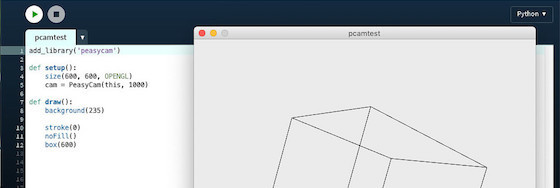
@villares this includes the wonderful new #py5 tools helper to install #Processing community libraries!

https://py5coding.org/how_tos/use_processing_libraries.html

Now getting #PeasyCam or #QueasyCam is a breeze!

How to Use Processing Libraries β€” py5 documentation

@rich talking about #Processing + 3D, have you ever played with #PeasyCam?

I should also try to make a #QueasyCam example (Quake like movement with WASD keys + mouse to point viewing direction)

sketch-a-day/2025/sketch_2025_05_20 at main Β· villares/sketch-a-day

One visual idea a day. Contribute to villares/sketch-a-day development by creating an account on GitHub.

GitHub
sketch-a-day/2025/sketch_2025_05_19 at main Β· villares/sketch-a-day

One visual idea a day. Contribute to villares/sketch-a-day development by creating an account on GitHub.

GitHub
sketch-a-day/2025/sketch_2025_05_18 at main Β· villares/sketch-a-day

One visual idea a day. Contribute to villares/sketch-a-day development by creating an account on GitHub.

GitHub
sketch-a-day/2025/sketch_2025_05_17 at main Β· villares/sketch-a-day

One visual idea a day. Contribute to villares/sketch-a-day development by creating an account on GitHub.

GitHub

Worknote: Peasycam und Processing.py

Eigentlich hÀtte ich nie geglaubt, daß die #Processing-Bibliothek #Peasycam, mit der man 3D-Objekte in Processing-Sketchen mit der Maus kontrollieren kann, auch mit Processing.py, dem #Pyton-Mode von Processing, zusammenspielt. Bis ich realisierte, daß die Bibliothek von Jonathan Feinberg programmiert wurde. Und Jonathan Feinberg ist der Mann, der uns auch Processing.py spendiert hatte. http://blog.schockwellenreiter.de/2019/04/2019042301.html #ProcessingPy #CreativeCoding

Peasycam und Processing.py – Schockwellenreiter