@wentasah My solution after same and / or similar problems:
use the following in my #configurationdotnix #nixconfiguration
configuration.nix
file:
 
services.printing.enable = true;
services.printing.drivers = [pkgs.brlaser];

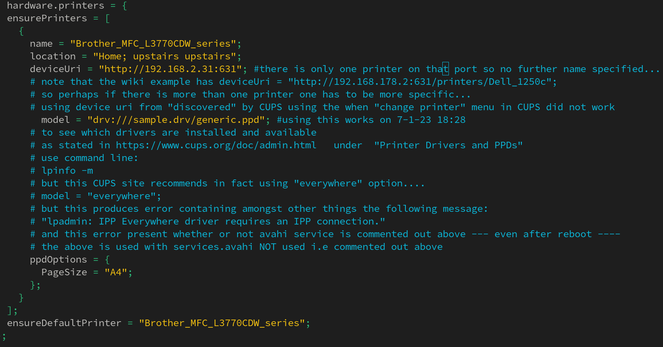
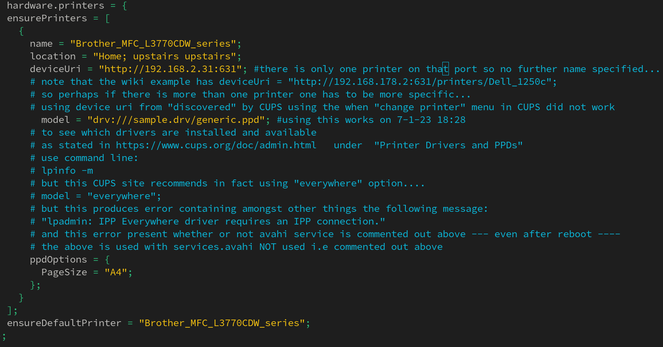
with additionally the lines in the image below:

Complete configuration.nix is listed here
https://pastebin.com/SCNv2c3h
see lines 78-158
feedback welcome !!

20240107_configuration.nix - Pastebin.com

Pastebin.com is the number one paste tool since 2002. Pastebin is a website where you can store text online for a set period of time.

Pastebin

After about 4 months running #nixos I had to fix the #printing problems. After many hours fiddling & trying various fixes, the only way I got my #Brother #LAN local #network #printer to work was to use the following in my #configurationdotnix #nixconfiguration
configuration.nix
file:

services.printing.enable = true;
services.printing.drivers = [pkgs.brlaser];

with additionally the lines in the image below:

Complete configuration.nix is listed here
https://pastebin.com/SCNv2c3h
see lines 78-158

20240107_configuration.nix - Pastebin.com

Pastebin.com is the number one paste tool since 2002. Pastebin is a website where you can store text online for a set period of time.

Pastebin
NixOS rollback questions

Ok thanks. So let me make sure I have this clear. System configurations don’t keep a snapshot of the configuration.nix file that created them....

reddit