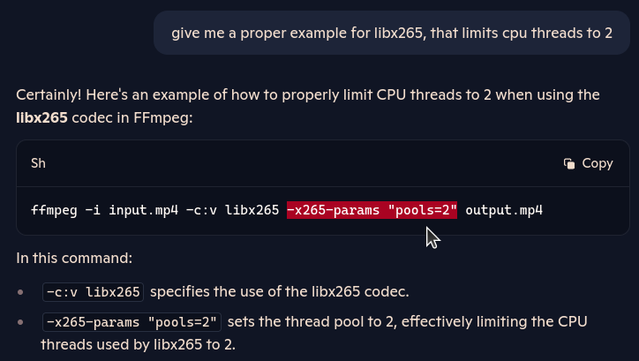
I've figured out how to limit #libx265 software/CPU encoding to only 2 threads:

👉 -c:v libx265 -x265-params "pools=2"

#ffmpeg ignores the -threads parameter with the libx265 encoder

#Copilot needed the qualifying term "proper" in its prompt, i guess (it took a lengthy discussion about the proper placement of -threads, and a few test runs - turns out, you just don't use -threads) 😅

I give up, for now - i'm not in the mood of compiling #ffmpeg with non-free QSV|AMF deps.

I'll let the NAS (Skylake i5-6500T quad core) crunch away the #libx265 load at 14 fps / 0.6x speed.

It's gonna take 5 days, but what do i care - it runs at ~85°C and is MUCH quieter at full all-core load than my Zen4 octa-core mini PC.

edit: added screenshot - 75 minutes per transcode. Remember how i put a "time" command in front of my ffmpeg command lines - yikes 😅

😕 👉 [hevc_vaapi @ 0x5876a485e500] Cropping information on input frames ignored due to lack of API support.

Well, let's try cropping with h264_vaapi…

🤬 👉 [h264_vaapi @ 0x5fe9e3d3b8c0] Cropping information on input frames ignored due to lack of API support.

edit: the #libx265 software encoder seems to crop the footage just fine, -threads 2 does nothing, though

🤞 Let's try cropping with Quick Sync on the NAS, AVC/264 1st

edit2: no QSV support in the ubuntu deb 🥴

#ffmpeg #vaapi #Ubuntu #Linux

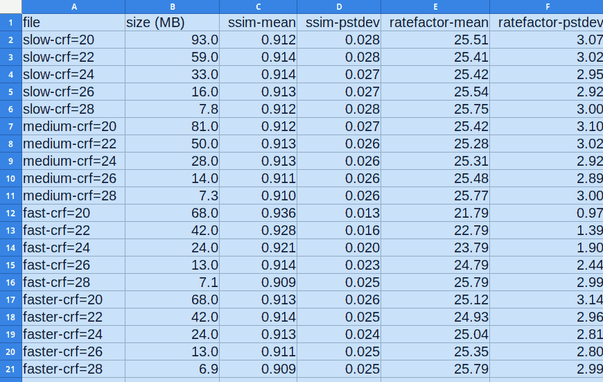
A question for any #digital #video experts out there... I'm confused as heck about the results from #libx265 (used via #ffmpeg, not the #x265 tool) regarding quality vs. preset and ratefactor.

I'm far from the first person to be confused by this, but I haven't found any real answers.

First I'll just show some analysis from some test encodes of a file; ssim and ratefactor numbers are coming from the CSV stats output of libx265.

1/x
#quality #preset #ratefactor #CRF #encode #encoding