
@LikeItOrLumpIt if you have an IR blaster on your phone, you could probably program #irplus to send the needed signals to input your password ;)
@fesshole get a phone with an IR blaster, and the #irplus app. Finding the right presets might take a bit of effort, but now you can use your phone to control your infrared-remote-controlled devices. Even create macros and custom layouts so you just have your most-used keys on one screen.

@kelbot yeah, Xiaomi kept that in quite some of their models.

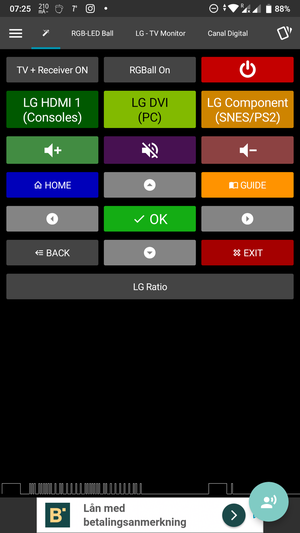
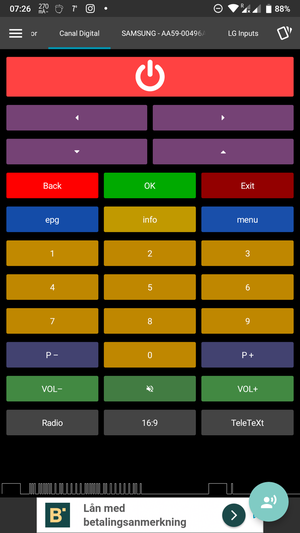
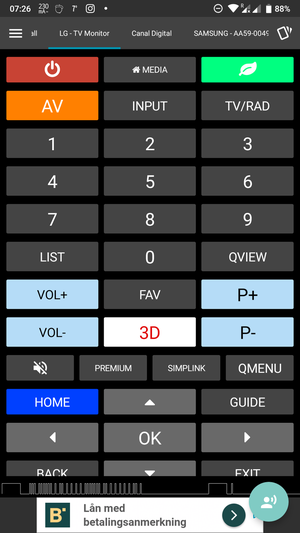
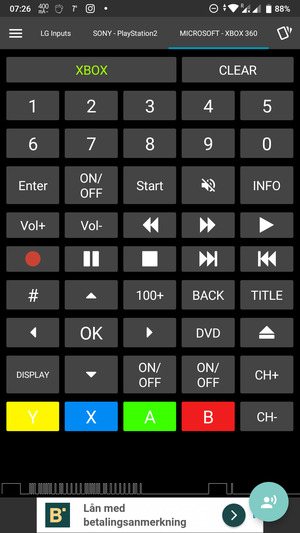
Attached are screenshots of the #irplus app with some of the layouts I use / have used.

@technomancy my #Xiaomi #MiA1 still has one, and the #Samsung #Note3 I had before that, also did afaik. While I never explicitly looked for a device which had one, I don't think I'd like my next phone to be without it.
Combined with #irplus I regularly use it to control my monitor screen, RGB LED ball lamp and on the rare occasions I watch TV, I use it to control the decoder box (for which we misplaced the remote years ago).
Could even control my #PS2 😅
@solarbear
@emacsomancer I was going to suggest #irplus myself as well! Excellent app which has replaced quite some remote controls already. Editing layouts can be a bit cumbersome at times, but it comes with a built-in updatable database of devices. If yours isn't listed, chances are you find a definition in an external database, or enter codes manually.
@technomancy @mhoye
irplus - Infrared remote

Glad my #Xiaomi #MiA1 phone has an #IRBlaster...
Means I still can turn off the lights and such with #irplus (https://irplus-remote.github.io) even when we've misplaced the remotes again...
irplus - Infrared remote