 Color Palette Bot
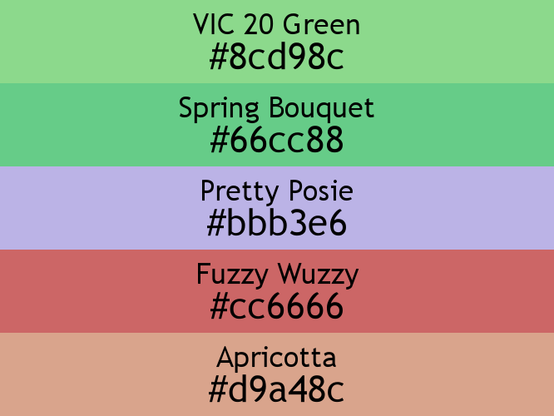
a wizard new palette for you to enjoy:
VIC 20 Green (#8cd98c),
Spring Bouquet (#66cc88),
Pretty Posie (#bbb3e6),
Fuzzy Wuzzy (#cc6666), and
Apricotta (#d9a48c)
a wizard new palette for you to enjoy:
VIC 20 Green (#8cd98c),
Spring Bouquet (#66cc88),
Pretty Posie (#bbb3e6),
Fuzzy Wuzzy (#cc6666), and
Apricotta (#d9a48c)
Interactive Python IDLE
When using Python from a shell, the REPL is fairly awful and doesn't let you copy-paste or save, except through the shell itself. I especially find that copy-pasting functions in is error-prone. There's a nice interactive environment for Python called IDLE (after Eric ): It's probably an application in your /Applications/Python 3.7 folder, or whatever other OS's do, or can be run with IDLE3 from the shell. Other than using ^N/^P for next/previous history line, it works pretty much exactly as you'd expect a GUI REPL to work, and lets you save your session as a text file, easy to extract some functions from later or use as a doctest.
Trouble is, IDLE doesn't automatically pick up the ~/.pystartup script; I had to remember to call it with IDLE3 -s, and there's no easy way to do that from the desktop, where I'm often lazily clicking. This has been frustrating me very slightly for years.
So: open Automator, new Document, add Utilities/Run Shell Script, and paste in:
IDLE3 -s
Save as an Application, name it IdleStart. The icon's ugly and generic, so I made a half-assed icon, copy it from an image editor or Preview, and paste into the icon in Get Info on the application.
Now I have a nice stupid foot to click on, and get a proper REPL. The running program has a hideous 16x16 or 32x32 icon scaled up, which I don't think I can easily solve; I looked at the idlelib source and while I could patch it, it's not easily configured. Maybe later. There's also no way to specify the window location, which I'd like to have mid-left of my screen, but again, maybe later.
While I'm at it, the themes are garish, and the customizer is unpleasant. So I just edited this in ~/.idlerc/config-highlight.cfg, then picked Mark's Dark theme:
[Mark's Dark]
normal-foreground = #eeeeee
normal-background = #111111
keyword-foreground = #ff8000
keyword-background = #111111
builtin-foreground = #0099ff
builtin-background = #111111
comment-foreground = #dd0000
comment-background = #111111
string-foreground = #80ffdd
string-background = #111111
definition-foreground = #80ff80
definition-background = #111111
hilite-foreground = #ffffff
hilite-background = #808080
break-foreground = #ffffff
break-background = #808000
hit-foreground = #002040
hit-background = #ffffff
error-foreground = #ffffff
error-background = #cc6666
cursor-foreground = #ffffff
stdout-foreground = #ccddff
stdout-background = #111111
stderr-foreground = #ffbbbb
stderr-background = #111111
console-foreground = #ff4444
console-background = #111111
context-foreground = #ffffff
context-background = #444444
My current ~/.pystartup is short (in python2 it was much longer, since nothing worked right), just some common imports and functions I use enough to miss:
import os, sys
import math
import random as R
import re
import time
import turtle as T

def dice(n, s):
    t = 0
    for i in range(n):
        t += R.randint(1, s)
    return t

def roundup(n):
    return math.floor(n+0.5)

def sign(i):
    if i > 0: return 1
    elif i == 0: return 0
    return -1

print("READY")
Now if I click the foot and see "READY" above >>>, it's all working.
#002040 #0099ff #111111 #444444 #808000 #808080 #80ff80 #80ffdd #cc6666 #ccddff #dd0000 #devtools #eeeeee #ff4444 #ff8000 #ffbbbb #ffffff #nerd #Python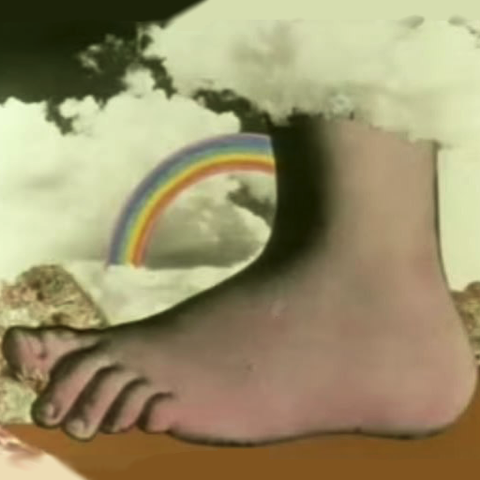
 mdhughes