 Samuel
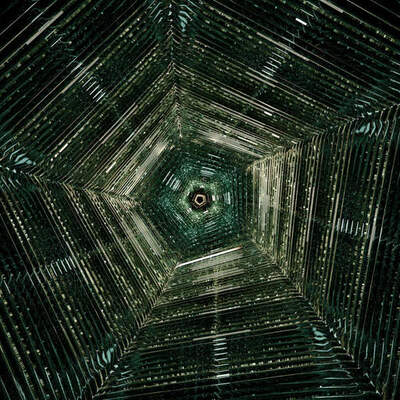
Had this doodle lying around on my hard drive and thought I'd share it: a simple playdoh-style material in #Blender, made by flattening the normals with a voronoi texture. Displace the voronoi texture a little and you got a paint-stroke effect.
 PUPUWEB Blog
Stuck with Blender glitches? Transform frustrating errors into flawless renders—master expert tips for smooth 3D workflows and stunning results! #BlenderTips
 Calver School
How to loop animation in #blender3d
#Blender Quick Tip:
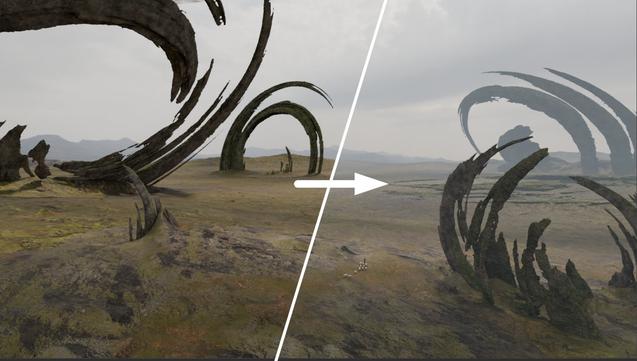
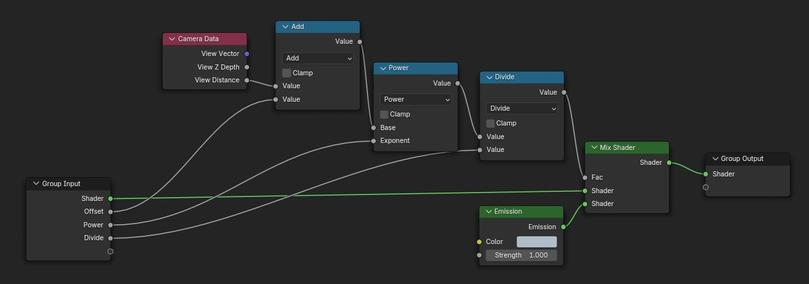
How to simulate atmospheric haze without volumetrics (fast)
1. Create a node group and append it as the last step to every material that you want to influence.
2. Add the following mix shader inside the group. The haze strength and falloff can be tweaked with the division and power nodes.
3. You could extend this setup by mixing in procedural noise or another falloff towards the Z axis.
 LPS
LPSThis is such an AMAZING #blender tip by #ArchitectureTopics
This Changes Everything - Blender Lights' Modifiers

This Changes Everything - Blender Lights' Modifiers
How to Use Modifiers on Light objects in Blender! 👍 Get Over 300 Add-ons & more ► https://www.youtube.com/playlist?list=PL4-Q7MyUxdZEvTkrEyhzQIBCWrwtZoSmG 👍 Interior Playlist ► https://www.youtube.com/playlist?list=PL4-Q7MyUxdZFl_1YpXrDGoScl1kKua9RH 👍 Visit the Channel ► @architecturetopics ☕ Support & Visit The Shop for Free Assets ► https://buymeacoffee.com/architecturetopics Follow Me on Social Media! ►Instagram: https://www.instagram.com/architecturetopics101/ ►ArtStation: https://www.artstation.com/architecturetopics101 ➤ Download Blender 3D https://www.blender.org/ _________________________________________________________________ ⠀⠀⠀⠀⠀⠀⠀⠀⠀⠀⠀⠀⠀⠀⠀⠀⠀⠀⠀⠀⠀⠀⠀ ⠀⠀⠀⠀⣠⣶⡾⠏⠉⠙⠳⢦⡀⠀⠀⠀⢠⠞⠉⠙⠲⡀⠀ ⠀⠀⠀⣴⠿⠏⠀⠀⠀⠀⠀⠀⢳⡀⠀⡏⠀⠀⠀⠀⠀⢷ ⠀⠀⢠⣟⣋⡀⢀⣀⣀⡀⠀⣀⡀⣧⠀⢸⠀⠀⠀⠀⠀ ⡇ ⠀⠀⢸⣯⡭⠁⠸⣛⣟⠆⡴⣻⡲⣿⠀⣸⠀Sub⠀ ⡇ ⠀⠀⣟⣿⡭⠀⠀⠀⠀⠀⢱⠀⠀⣿⠀⢹⠀⠀⠀⠀⠀ ⡇ ⠀⠀⠙⢿⣯⠄⠀⠀⠀⢀⡀⠀⠀⡿⠀⠀⡇⠀⠀⠀⠀⡼ ⠀⠀⠀⠀⠹⣶⠆⠀⠀⠀⠀⠀⡴⠃⠀⠀⠘⠤⣄⣠⠞⠀ ⠀⠀⠀⠀⠀⢸⣷⡦⢤⡤⢤⣞⣁⠀⠀⠀⠀⠀⠀⠀⠀⠀⠀ ⠀⠀⢀⣤⣴⣿⣏⠁⠀⠀⠸⣏⢯⣷⣖⣦⡀⠀⠀⠀⠀⠀⠀ ⢀⣾⣽⣿⣿⣿⣿⠛⢲⣶⣾⢉⡷⣿⣿⠵⣿⠀⠀⠀⠀⠀⠀ ⣼⣿⠍⠉⣿⡭⠉⠙⢺⣇⣼⡏⠀⠀⠀⣄⢸⠀⠀⠀⠀⠀⠀ ⣿⣿⣧⣀⣿.........⣀⣰⣏⣘⣆⣀⠀⠀ Visit the Channel for more dope jiggly wiggly stuff @architecturetopics ---------------------------------------------------------------------------------------------------------------- #3d #blender #lighting
 MARCO HAYEK
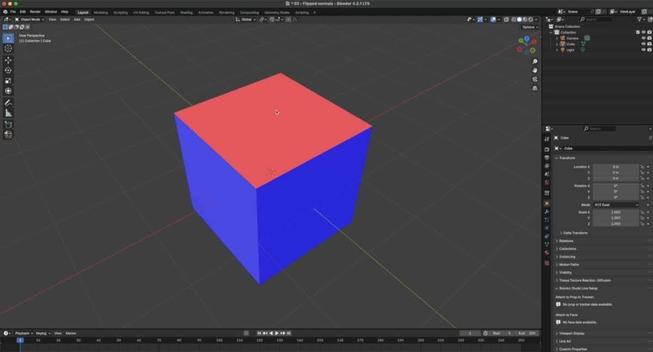
Backface Culling in Blender

Using the Target-Function in Blender

 Cecelia
Okay. Figured it out. Pressing W changes the selection mode. Pressing it again cycles through different modes (default click and drag (“Tweak”), select by brush (or that’s how it works), select by lasso—select box is so far indistinguishable from the first one).
So, if you suddenly wonder why your cursor has a circle around it…
(Also, quitting doesn’t reset the selection mode for saved files.)
 Pixlways
Learn how to properly pack external texture files into your Blender file.
https://youtu.be/lummtauxc00
#blender #b3d #blendercommunity #blendernation #blendertutorial #blendertips

Pack Textures in Blender
 Delta Wye
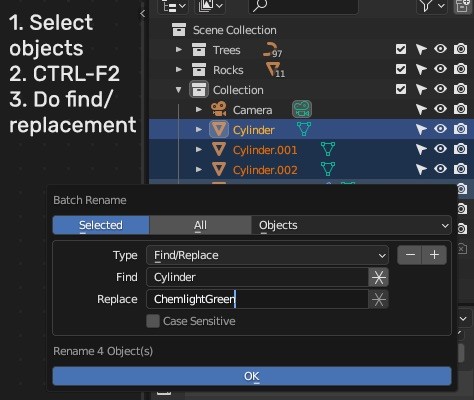
Little #Blender tip - CTRL-F2 allows for easy replacement and renaming of objects. No more hundreds of “Cube” objects!
Probably as useful as the “M” key to add objects into a new or existing collection (the containers you see with “Trees” and “Rocks”).
#Blender3d #blendertips