 Миша
МишаLooking for suggestions for a multi-monitor home office setup. Currently I have two 34" ultra-wide curved monitors sitting side by side, but they're both connected to different boxes, one work, one personal. I'd like to augment my work setup with either another monitor, or maybe even two, but I'm not sure what size(s) to go with or how to mount them with my current desk setup so that they're actually usable without having to crank my head.
I was thinking a 24" on the side, positioned vertically for coding, but wasn't sure if I should add another 34" with some kind of adjustable arm mount and maybe "stack" it on top of the current 34"? Does it make more sense to go smaller if "stacking"? My 34"s are pretty old at this point, too (3440x1440), so I'm open to potentially replacing and going all new to get better displays and the right size to work for my desk.
Or maybe it's time to downsize for my personal system? I'm open to any and all ideas and suggestions, especially if you've got pics to help me visualize.
Thanks!! #homeoffice #battlestation #battlestations #battlestationpics #wfh #wfhsetup
 Bobby Byrne HAS MOVED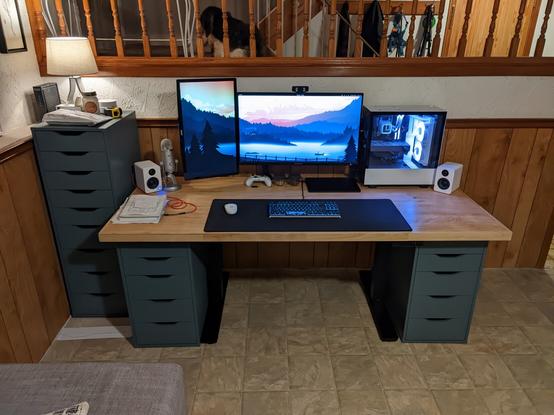
 FiXato
 LΛMBDANAUT