What's your favorite Python SEO crawler?

According to The Google, there seems to be one dominant option.

python3 -m pip install advertools

If you dig deeper, you'll find two other crawlers:
- One for status codes and all response headers
- One for downloading images from a list of URLs

#advertools
#SEO
#DataScience
#Python

Using Python for doing SEO, versus using Python to develop software/tools for SEO.

The first activity is called SEO.

The second one is called software development.

Important difference.

You can use Python for crawling (try one of the #advertools crawlers), analyzing log files (also advertools), XML sitemaps (yes, yes, advertools), running bulk robots.txt tests, weighted n-grams, and much more. These are SEO tasks. Running them in bulk, using a programming language and its powerful

1/4

Using a proxy while crawling

This is another feature of using the meta parameter while crawling with #advertools.

It's as simple as providing a proxy URL.

There is also a link to using rotating proxies if you're interested

https://bit.ly/3SXh8b8

#crawling #scraping #scrapy #proxy

Using the crawl meta parameter while crawling โ€“ advertools Blog

An overview of how to use the new meta parameter while crawling with advertools. Set arbitrary metadata, set custom request headers per URL, and limited support for crawling JavaScript websites.

adver.tools

Happy to share a new release of #advertools v0.16

This release adds a new parameter "meta" to the crawl function.

Options to use it:

๐Ÿ”ต Set arbitrary metadata about the crawl
๐Ÿ”ต Set custom request headers per URL
๐Ÿ”ต Limited support for crawling some JavaScript websites

Details and example code:

https://bit.ly/3SXh8b8

#SEO #crawling #scraping #python #DataScience #advertools #scrapy

Using the crawl meta parameter while crawling โ€“ advertools Blog

An overview of how to use the new meta parameter while crawling with advertools. Set arbitrary metadata, set custom request headers per URL, and limited support for crawling JavaScript websites.

adver.tools

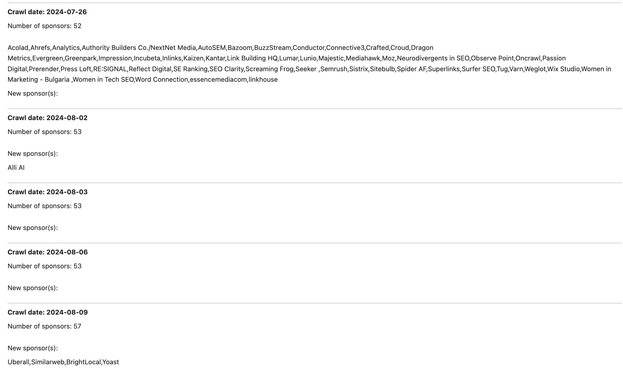
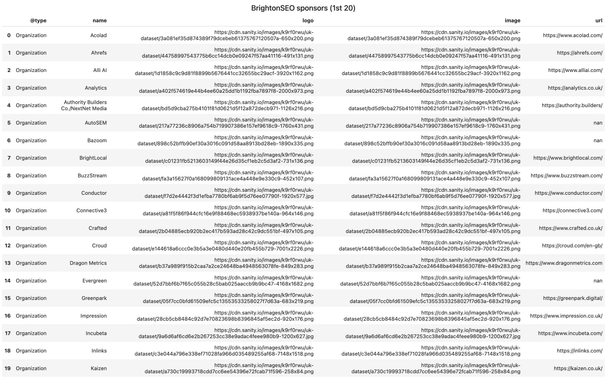
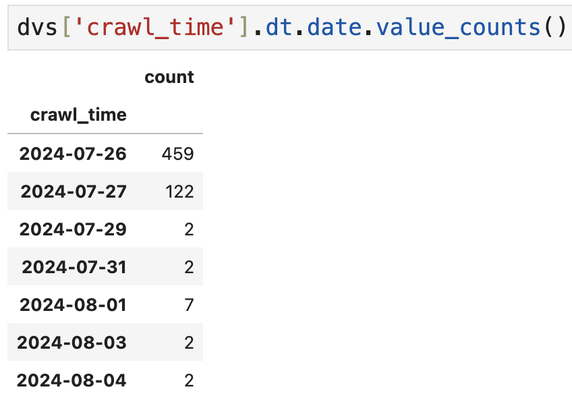
Evergreen crawling: tracking updated content

One of the things you can do is focus on a certain set of pages, and check key changes.

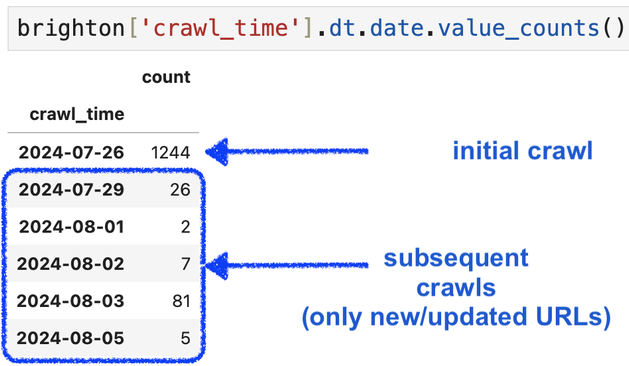
In this example, you'll see when and which sponsors were added to the sponsors page on BrightonSEO's website. This is based on parsed data from the page's JSON-LD.

#advertools #crawling #scraping #SEO

Evergreen crawling with XML sitemaps (status check)

This is how things will look.
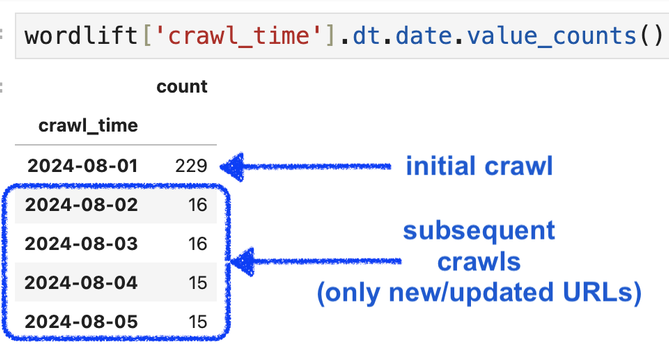
All URLs in the sitemap get crawled the first time.

Then a relatively tiny number of URLs is crawled (new URLs in the sitemap, & the URLs with a changed lastmod).

URLs are saved to the same crawl file to immediately compare what changed, which URLs are frequently updated, which ones were recently introduced, & when.

https://bit.ly/4fnhiSO

#advertools #DataScience #Python #crawling #scraping #SEO

Evergreen Crawling Using XML Sitemaps โ€“ advertools Blog

An approach to updating a crawl file by crawling only new and/or updated URLs.

adver.tools

Evergreen crawling with XML sitemaps (updated to run in bulk)

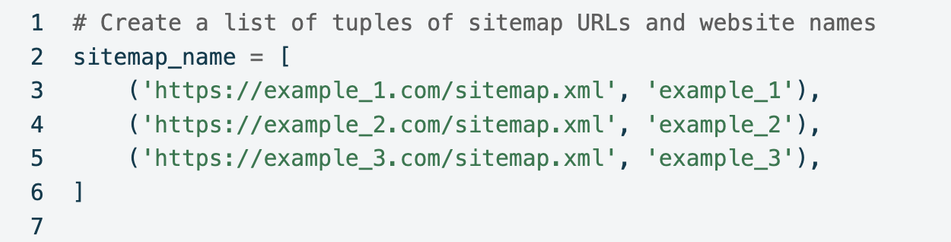
The script now takes a list of tuples of XML sitemap URL, and website name, and runs the through them all, creating dynamic file names, for example

{name}_sitemap.csv
{name}_crawl.jl
{name}_errors.txt

Now you just need to add a URL and a name to add a new website to the process, instead of creating new specific files from scratch.

https://bit.ly/4fnhiSO

#advertools #crawling #sitemaps #scraping #SEO #DataScience #Python

Evergreen Crawling Using XML Sitemaps โ€“ advertools Blog

An approach to updating a crawl file by crawling only new and/or updated URLs.

adver.tools

Evergreen crawling using XML sitemaps

Crawl once then only crawl new &/or modified URLs

1. Download a sitemap
2. Crawl its URLs
3. Save it to a CSV file
4. After a month/week/day download the same sitemap again
5. Find URLs to crawl
A. New URLs not found in the last_sitemap
B. URLs that exist in both, but with a different lastmod
6. Crawl the new URLs
7. Save the current_sitemap and overwrite the last_sitemap
8. repeat

https://bit.ly/4fnhiSO

#advertools #SEO #crawling #scraping #Python

Evergreen Crawling Using XML Sitemaps โ€“ advertools Blog

An approach to updating a crawl file by crawling only new and/or updated URLs.

adver.tools

I'm liking the new default body text selector in #advertools

Many xpath/css selectors would be needed to extract the content on these pages, from many other templates on the same website?
It automatically excludes header, footer, and nav elements.

This is key in extracting the main text of (sub)category pages which might not have the same template across the website.

I'd love to know if you try it and/or have suggestions or issues.

#crawling #scraping #SEO #DataScience #Python

XML sitemaps: How to set custom request headers while fetching

Three examples are demonstrated:

๐Ÿ”ต Setting a custom User-agent
๐Ÿ”ต Fetching only if the sitemap's ETag was changed
๐Ÿ”ต Fetching only if the sitemap was modified since the Last-Modified response header

Let me know if you have other headers that might be interesting to use.

https://bit.ly/3WbCAd6

#advertools #SEO #DataScience #Python

XML Sitemap Request Headers โ€“ advertools Blog

Setting custom request headers while fetching and parsing XML sitemaps.

adver.tools