 JdeBP
JdeBP Hacker News
Eschewing Zshell for Emacs Shell (2014)
https://www.howardism.org/Technical/Emacs/eshell-fun.html
#HackerNews #Eschewing #Zshell #for #Emacs #Shell #Emacs #Zshell #TechNews #Programming
Eschewing Zshell for Emacs Shell (2014)
https://www.howardism.org/Technical/Emacs/eshell-fun.html
#HackerNews #Eschewing #Zshell #for #Emacs #Shell #Emacs #Zshell #TechNews #Programming
Configurando o prompt de zshell para amosar a versión de python no venv activo

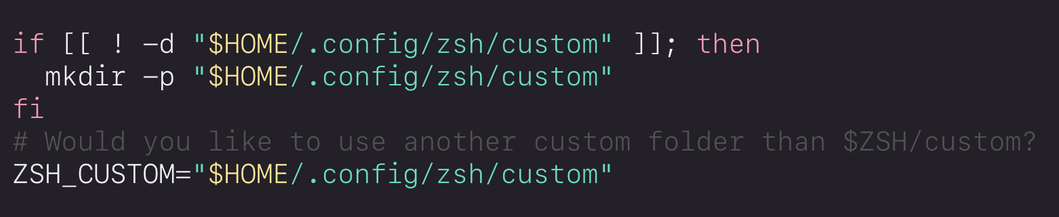
I add a zsh `custom` folder inside my versioned .config repo for aliases, functions, and themes:
`mkdir -p "$HOME/.config/zsh/custom"`
Copy folder structure and examples, `cd "$HOME/.config/zsh" && cp -r ~/.oh-my-zsh/custom/ ./custom`
Edit `zshrc` to set `ZSH_CUSTOM`.
To customise the prompt with a timestamp and git info, I create a theme in: `~/.oh-my-zsh/custom/themes/di.zsh-theme`
#zsh #zshell #DiSetsUpAMacBook 18/n
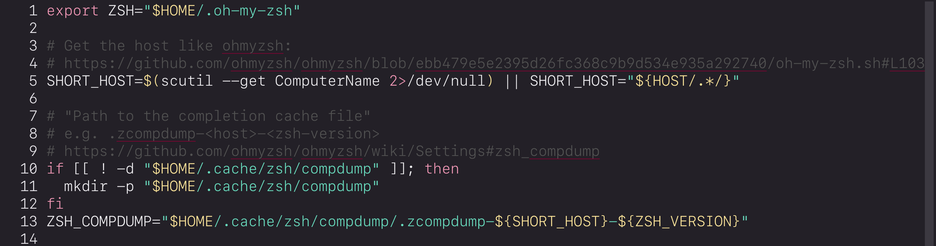
For zsh, I group completion cache files into a subdirectory to minimise the loose collection of stray files in my home directory. I edit `~/.config/zsh/zshrc` and add comp dump file details before `source $ZSH/oh-my-zsh.sh`.
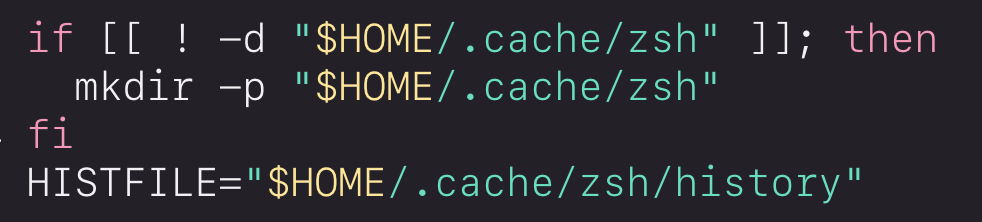
I also move `zsh_history` (which is not really config) out of the config directory. Edit `~/.config/zsh/zshrc` and add details before `source $ZSH/oh-my-zsh.sh`.
If I decide to delete `~/.cache` on a whim to free up space on my hard drive, I'll lose my whole zsh history. That's ok! If I miss it, that's what backups are for.
Close all existing tabs and start a new shell so I don't accidentally make more files in old locations. Delete any stray `.zcompdump-*` or `.zsh_history` files already created.
#zsh #zshell #DiSetsUpAMacBook 17/n
I set up zsh with Oh My Zsh.
First, I make a directory for zsh config files in the git tracked .config dir:
`mkdir -p ~/.config/zsh`
I create a `~/.config/zsh/.zshenv` file and in it I set `ZDOTDIR` to the new config dir:
`ZDOTDIR="$HOME/.config/zsh"`
I create symlinks for the `.zshenv` file (which will be processed before other zsh files) and zshrc:
`ln -s ~/.config/zsh/zshenv ~/.zshenv`
`cd ~/.config/zsh/ && ln -s zshrc .zshrc`
#zsh #zshell #DiSetsUpAMacBook 16/n
Such a nerdy thing to get warm-fuzzy-satisfaction feels from. But remembering pushd/popd exist so I can pop open my editor _in the correct working directory_ and come right back to my previous context feels like putting on fresh-from-the-dryer socks
`alias zrc='pushd ~/.dotfiles/zsh/ > /dev/null; nvim .; popd > /dev/null'`
Mmm mmm good
_edit: syntax_
 Space Hobo
 salvari
 𝔱.𝔥.
𝔱.𝔥. ax6761
 Di
Di Luke Bergen